
Instagram Auto-DM: DM automation for comments and DMs
SuperProfile Auto-DM automatically sends a personalised direct message when someone comments on your Reels or posts, replies to your Story, comments on your Live or messages you — on Instagram and Facebook Messenger, within Meta's messaging rules. It is free to start; see the SuperProfile pricing page for plans.
Key facts
- Works on
- Instagram and Facebook Messenger
- Triggers
- Comments on Reels and Posts, Story replies, Live comments and direct messages
- Message types
- Text with buttons, voice, image and video messages
- Free plan
- Auto-DM on Instagram posts and Reels, one keyword per automation, text-and-button DMs that end with a short "Sent via" line naming SuperProfile's Instagram account
- Paid plans add
- Stories, Lives and incoming-DM triggers, unlimited keywords, any-comment and all-posts triggers, ask-to-follow, email collection, follow-ups, more DM types, Facebook Messenger and more than one Instagram account
- Connects with
- Your SuperProfile store, so a DM can link straight to your course, product, webinar, booking or Telegram community
What are auto DMs?
Auto DMs, sometimes called instant DMs, are direct messages Instagram or Messenger sends for you as soon as something triggers them: a comment with your keyword, a reply to your Story, a comment on your Live or a new message. You write the message once, and each person who triggers it gets their own copy in their inbox, without you opening the app.
- Comment to DM: someone comments LINK on a Reel and gets the link in their DMs.
- Story reply: someone replies to a Story and gets the freebie or offer you mentioned.
- Welcome or FAQ reply: someone messages you first and gets an answer with the right link.
- Sales follow-up: someone tapped your link but didn't buy, and a follow-up reminds them inside Meta's messaging window.
Auto DMs are sent through Meta's official Instagram Graph API and Facebook Graph API (Messenger), with the account connected by Meta login; no password sharing or browser automation. Meta's messaging windows and rules apply to all messages, so they reach people who interacted with you, not cold lists.
How does Instagram Auto-DM work?
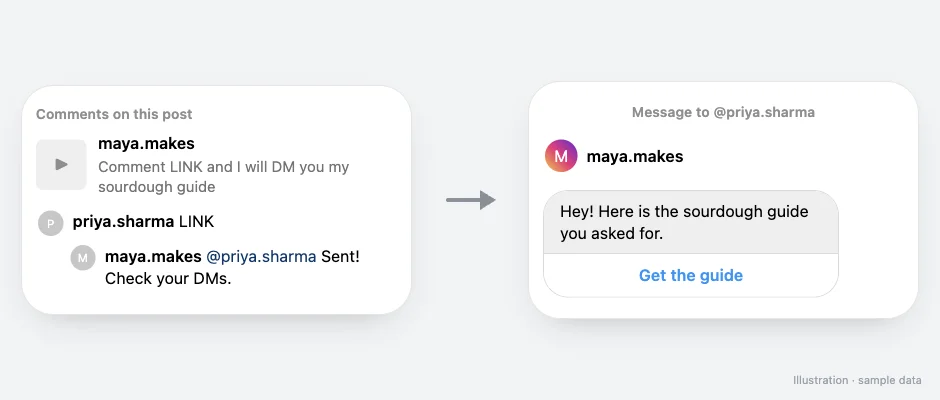
- Connect your Instagram professional account (and, if you want, your Facebook Page for Messenger). You sign in with Meta; SuperProfile never sees your password.
- Choose what starts the automation: comments on a specific post or reel, your next post, any post, Story replies, Live comments or incoming DMs.
- Pick the keywords to match (for example LINK or GUIDE), or match any comment.
- Write the DM: text, buttons, images, video, audio, PDFs or cards. Buttons can open one of your SuperProfile products, your store or your referral link.
- Optionally reply publicly to the comment, ask people to follow you before they get the link, collect their email address, and send follow-ups.
- Publish. When Meta delivers a matching comment or message, the automation replies, and you can see runs and link clicks for each automation. Meta's messaging windows and rules apply to all messages.
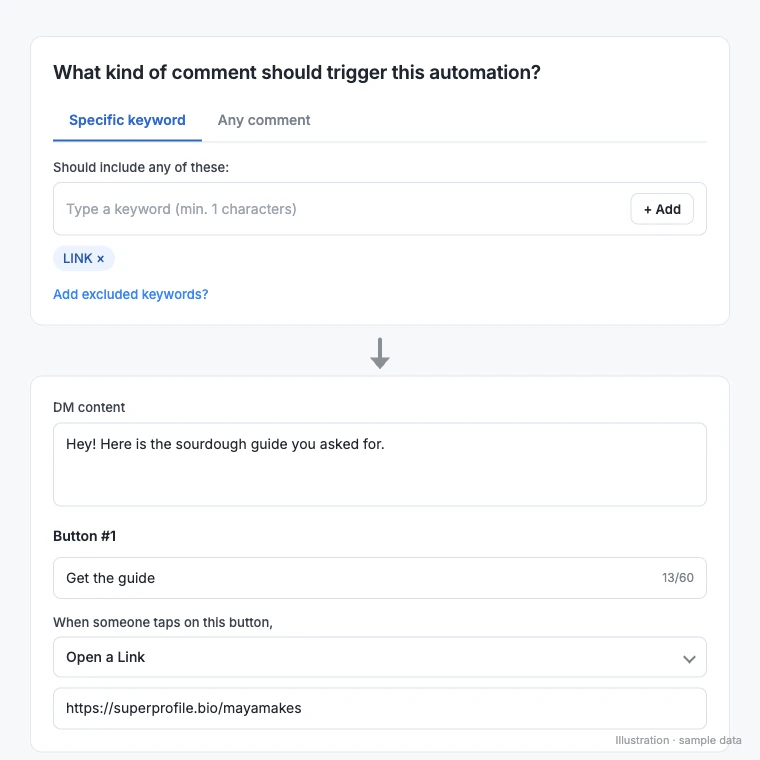
What can an Auto-DM do beyond sending a link?
The most common use is sending a link when someone comments a keyword, but the same automation can grow your list and your sales:
- Ask for a follow first: send the freebie or discount only after the person follows you.
- Collect email addresses inside the DM and send them to Kit, Mailchimp or Klaviyo.
- Follow up automatically after a delay, when the link was not clicked, when there is no reply, when the product was or was not bought, or when a lead form was not submitted.
- Reply publicly to the comment with up to three rotating public comment replies.
What can I use Auto-DM for?
- Send a link when someone comments a keyword
- Ask people to follow before the link
- Collect emails into Kit, Mailchimp or Klaviyo
- Sell products with follow-ups
- Automate Facebook Messenger replies
- Reply even when the comment has no exact keyword (AI intent matching)
- Hide or delete spam, links and abusive comments automatically
- Sort brand collaboration DMs and never miss a paid deal
- Add a persistent DM menu, ice breakers and Story mention replies
New to DM automation?
Learn how Instagram DM automation works, what Meta allows and what to automate. For a step-by-step setup with templates, see the Instagram auto DM guide. For ready-to-paste messages, use the Instagram DM templates: comment-to-get-link, price reply, free lead magnet and more.
Instagram Auto-DM guides
Which plan do I need?
Free plan: Auto-DM on Instagram posts and Reels, one keyword per automation, text-and-button DMs that end with a short "Sent via" line naming SuperProfile's Instagram account. Paid plans add Stories, Lives and incoming-DM triggers, unlimited keywords, any-comment and all-posts triggers, ask-to-follow, email collection, follow-ups, more DM types, Facebook Messenger and more than one Instagram account. Prices differ by country: see the SuperProfile pricing page.
Is Instagram Auto-DM allowed by Meta?
SuperProfile uses Meta's official messaging APIs, and you connect through Meta's own login. Using the official API is necessary but not the whole rule: Meta's messaging windows and rules apply to all messages, which decide when and how often a person can be messaged. You can disconnect at any time from SuperProfile or from your Instagram settings.
How is SuperProfile Auto-DM different from a DM-only tool?
A DM-only tool sends the message; what the DM links to lives somewhere else. SuperProfile also runs the store and the checkout, so the DM links to your own product page, and in India the money is paid out to your bank account the next day (T+1), with no payment gateway account needed, only KYC. To see how it compares with other options, read the best Instagram DM automation tools compared.
Frequently asked questions
What is an auto DM on Instagram?
An auto DM is a direct message sent automatically when someone comments your keyword, replies to your Story, comments on your Live or messages you. It is the same as an instant DM: the reply goes out without you typing it each time.
Are auto DMs safe for my Instagram account?
SuperProfile sends them through Meta's official Instagram Graph API and Facebook Graph API, with your account connected by Meta login, so there is no password sharing or browser automation. Meta's messaging windows and rules apply to all messages.
Is SuperProfile Auto-DM free?
Yes, to start. The free plan includes Auto-DM on Instagram posts and Reels, one keyword per automation, text-and-button DMs that end with a short "Sent via" line naming SuperProfile's Instagram account. Paid plans add Stories, Lives and incoming-DM triggers, unlimited keywords, any-comment and all-posts triggers, ask-to-follow, email collection, follow-ups, more DM types, Facebook Messenger and more than one Instagram account; see the SuperProfile pricing page.
Does it work on Stories and Lives?
Yes, on the Creator plan: Story replies and Live comments can start an automation, as well as comments on posts and Reels and incoming DMs.
Does it work on Facebook Messenger?
Yes. Connect your Facebook Page and the same automations can reply to Messenger conversations.
Can I send different DMs for different keywords?
Yes. Each automation matches its own keywords, or any comment, on the posts you choose.
Can my AI assistant set up Auto-DM for me?
Yes. With the SuperProfile connector for Claude you can ask Claude to draft an automation, review it and publish it.
Last updated .