
What is Instagram automation, and how do you use it?
Instagram automation means letting software handle repeat work on a professional Instagram account: replying to comments and DMs, publishing posts at a set time, and hiding spam comments. Some of it is built into Instagram and Meta Business Suite; the rest comes from tools connected through Meta's official APIs. Tools that collect your password or session cookies to like, follow or comment for you are a different thing, and Instagram's Terms forbid them.
What can you automate on Instagram?
| Task | Instagram and Meta's own tools | With a tool connected through Meta's API |
|---|---|---|
| Answer people who message you | Up to four suggested questions, with automated answers, shown when people start a chat with you (Instagram Help); in Meta Business Suite, instant replies and away messages, and on desktop custom keyword replies for up to five keywords or phrases, which can include photos, videos, buttons and links and are sent after 15 minutes unless you answer first (Meta Help) | Keyword replies, replies to Story replies, and DMs with buttons and links |
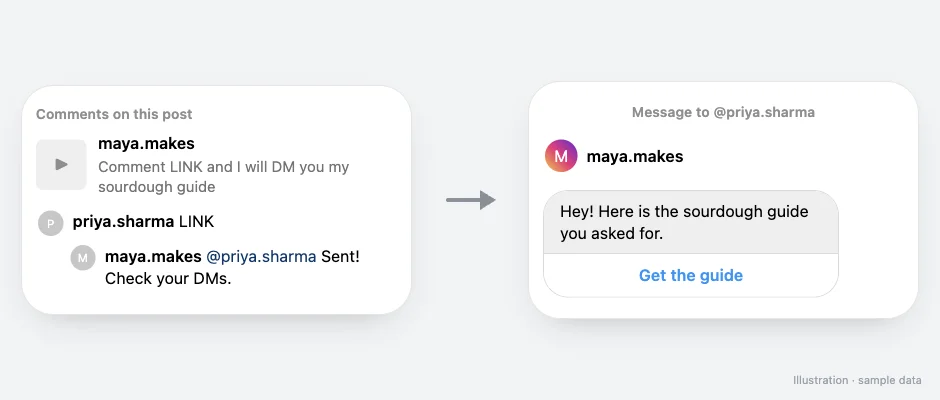
| Send a DM when someone comments | Meta Business Suite on desktop, for comments that contain specific hashtags (Meta Help) | Any keyword you choose on a post or Reel, plus an optional public reply under the comment |
| Reply with AI | Creator AI auto replies answer DMs from an audience you choose. They need a professional account, a creator AI built in Meta AI Studio and the Creator AI Terms, work only in the mobile app and are being introduced gradually (Instagram Help) | Read comments that skip your keyword, such as typos or Hinglish, and send your prewritten DM only when the match is confident |
| Publish at a set time | Instagram's own scheduling in the app | A calendar for posts, Reels, carousels and Stories |
| Deal with spam comments | Hidden Words and comment filters | Rules that hide or delete spam, links and abuse as comments arrive |
Meta notes that depending on which channels you have connected, some automations may not be available to you (Meta Help). On SuperProfile, Auto-DM automations can start from Comments on Reels and Posts, Story replies, Live comments and direct messages. For the full comment-to-DM setup, see Instagram comment automation.
Is Instagram automation allowed?
Instagram supports built-in automation and third-party automation through its official APIs, subject to its Terms, Developer Policies and messaging rules.
- Allowed: Instagram's own tools, and tools connected through Meta's APIs. Instagram's help center describes accounts using "Meta APIs on our Developer Platform to create automated chats", and says these chats must tell people they are automated where the law requires it (Instagram Help). Connecting with Meta login is not a guarantee against restrictions: the rules still apply.
- Not allowed: tools that collect your password or session cookies, or run other unauthorized automation, to like, follow, comment or scrape. Instagram's Terms of Use forbid "creating accounts or accessing or collecting information in an automated way without our express permission" (Instagram Terms of Use).
Allowed tools still follow Meta's messaging rules: Meta allows one private reply to a comment, sent within 7 days of the comment (during the broadcast for Live); more messages only if the person responds, within 24 hours of their response. Sending the first DM alone does not permit follow-ups; the person must respond.
What do you need before you automate?
- A professional account. Auto-DM works with Instagram Creator and Business (professional) accounts; if an account is switched back to personal, Instagram stops letting tools send its DMs and SuperProfile shows the fix: switch back to Creator or Business in Settings and activity, Account type and tools, then reconnect.
- Message access for connected tools. In Instagram, turn on Allow access to messages under Message controls, Connected tools.
- A reason people will reply. Automation answers people who ask: a keyword in your caption, a question in your Story, a freebie in your bio.
How do you set up your first Instagram automation?
We build SuperProfile, so here is the quickest first automation with it, comment-to-DM on a Reel:
- Switch to a Creator or Business account if you have not.
- Connect the account to SuperProfile Auto-DM with Meta login.
- Create an automation, pick the Reel and set a keyword such as LINK.
- Write the DM and add the button or link people asked for.
- Put "Comment LINK" in the caption, turn the automation on, and test from a second account.
The free plan gives you Auto-DM on Instagram posts and Reels, one keyword per automation, text-and-button DMs that end with a short "Sent via SuperProfile" line. Step-by-step detail: how to set auto reply on Instagram.
Built-in tools or a connected tool: which do you need?
Use Instagram's suggested questions and Meta Business Suite's instant replies and custom keywords if you only want to greet people and answer common questions. They are free; keyword replies wait 15 minutes unless you answer first, and comment-to-message works on desktop for hashtags (Meta Help).
For a DM when someone comments any keyword you choose on a Reel, use an API-connected tool if your account's native automations don't support that trigger. A connected tool also helps when you want follow-ups, email capture or spam handling in the same place. Comparing tools? See Instagram automation tools compared.
Instagram automation kya hai? Short mein
Instagram automation ka matlab hai repeat kaam software se karwana: comment par DM bhejna, DM ka reply, post time par publish karna aur spam comments hide karna. Iske liye Creator ya Business account chahiye.
Meta ke official API se connected tools allowed hain, lekin Instagram ke Terms aur messaging rules phir bhi lagte hain. Jo app aapka password ya session cookies le kar aapki taraf se like, follow ya comment kare, wo Instagram ke Terms ke against hai.
Frequently asked questions
What is automation in Instagram?
Using Instagram's own tools, or a tool connected through Meta's official APIs, to handle repeat work on a professional account: replying to comments and DMs, publishing at a set time and hiding spam comments.
Is Instagram automation safe? Can it get my account banned?
Instagram supports automation through its own tools and its official APIs, subject to its Terms and messaging rules, and connecting with Meta login is not a guarantee against restrictions. Tools that collect your password or session cookies to like, follow or comment for you break Instagram's Terms of Use, which forbid accessing Instagram in an automated way without permission.
Does Instagram have built-in automation?
Yes: up to four suggested questions with automated answers in chats, instant replies and away messages in Meta Business Suite, custom keyword replies and hashtag comment-to-message on Meta Business Suite desktop, and creator AI auto replies for DMs where Instagram has rolled them out. Availability varies with the channels you have connected.
Is Instagram automation free?
Instagram's own tools are free. SuperProfile's free plan has Auto-DM on Instagram posts and Reels, one keyword per automation, text-and-button DMs that end with a short "Sent via SuperProfile" line; the free plan sets no cap on contacts or DMs; Meta's messaging limits still apply.
How do I turn on automation in Instagram?
For built-in FAQs: Messages, then Tools, then Frequently asked questions, and turn on Show Questions. For comment-to-DM: switch to a professional account, connect a Meta API tool such as SuperProfile Auto-DM, pick a post and a keyword, write the DM and turn it on.
More guides
Last updated .