
How to set auto reply on Instagram: comments, DMs and Stories
To set auto reply on Instagram, use Instagram's built-in FAQs or Meta Business Suite's instant replies for messages, or connect an Auto-DM tool that answers a keyword comment with a private DM and, if you want, a short public reply. Meta allows one private reply per comment within 7 days, and replies to DMs within 24 hours of the person's message.
What can be auto replied on Instagram?
There are three kinds of auto reply, and most creators use them together:
| Reply type | Where it appears | What it is for |
|---|---|---|
| Private reply (DM) | In the person's DMs | Sending the link, file, product or form they asked for |
| Public comment reply | Under their comment on your post | Telling them, and others reading, to check their DMs |
| DM auto reply | In a DM thread someone started | Answering a keyword message, a Story reply, or a shared post |
On SuperProfile, automations can start from Comments on Reels and Posts, Story replies, Live comments and direct messages. On Facebook, the triggers are comments on any or a specific Facebook Page post, incoming Messenger DMs, and m.me links or QR codes.
How do you set auto reply on Instagram without a tool?
Instagram and Meta have built-in options for messages:
- Suggested questions in chats. Tap Messages, then Tools, then Frequently asked questions, turn on Show Questions and add up to four questions, each with an optional automated response. People see them when they start a chat with you and can tap one (Instagram Help).
- Instant reply, away message and custom keywords in Meta Business Suite. Instant reply greets someone who messages you for the first time; an away message answers when you are not available. On desktop you can add custom keyword replies for up to five keywords or phrases, with photos, videos, buttons or links, sent after 15 minutes unless you answer first; if a template automation also triggers, the template reply is sent instead. Comment-to-message answers comments that contain specific hashtags (Meta Help).
- Creator AI auto replies. They answer DMs, not comments, from an audience you choose. You need a professional account, a creator AI built in Meta AI Studio and the Creator AI Terms; go to Professional dashboard, Your AI, then settings. The feature works only in the mobile app and is being introduced gradually, so it may not be on your account yet (Instagram Help).
Meta notes that depending on which channels you have connected, some automations may not be available to you (Meta Help). For a DM when someone comments any keyword you choose on a Reel, use an API-connected tool if your account's native automations don't support that trigger; setup is below. New to the idea? Read what Instagram automation is and what's allowed.
What are Meta's rules for auto replies?
Auto replies go through Meta's official API, and Meta sets the limits for every tool:
- One private reply per comment, sent within 7 days of the comment; on a Live, only while you are live. A follow-up needs the person to reply, and must go within 24 hours of that reply (Meta private replies docs, read October 2026).
- For messages people send you, a business has 24 hours to respond (Meta messaging API docs).
- The account must be a professional account, with Allow access to messages turned on under Message controls > Connected tools.
For unwanted comments, Instagram's own help center describes these in-app tools:
- Instagram hides comments with common offensive words, phrases or emojis automatically; the setting is on by default
- Hidden Words lets you add your own list of words, phrases, numbers or emojis to hide from comments
- You can hide any single comment yourself by tapping Hide under it; it stays visible only to you and the person who wrote it
How do you auto reply to Instagram comments with a DM?
- Connect your professional Instagram account to SuperProfile Auto-DM.
- Create an automation and pick the post or Reel.
- Set the keyword people will comment, such as LINK, and put "Comment LINK" in your caption.
- Write the DM: text, buttons, images, video, audio, PDFs or cards are supported, depending on your plan.
- Optionally turn on comment replies (next section).
- Turn it on and test from a second account.
Keywords match as a whole word and ignore capital letters, so "link pls" matches LINK but "links" does not. The free plan gives you Auto-DM on Instagram posts and Reels, one keyword per automation, text-and-button DMs that end with a short "Sent via" line naming SuperProfile's Instagram account. Choosing a tool? See Instagram automation tools compared. Full guide: comment-to-DM.
How do public comment replies work?
On an Instagram post or Reel automation, you can turn on comment replies. SuperProfile then posts up to three rotating public comment replies under matching comments, picked in a random order, so your replies do not all read the same. A typical set:
- "Sent! Check your DMs"
- "Just DMed you the link"
- "It's in your inbox now"
The builder itself warns that automating comment replies comes with risk. Identical public replies repeated hundreds of times look like a bot, which is why there are three that rotate. Write them in your own voice, and keep links out of public replies; the link belongs in the DM.
Can AI write the reply variations for you?
Yes, on paid plans: a Rewrite button suggests up to 3 rewordings of your DM text or public comment reply, keeping links, variables, handles and numbers exactly as you wrote them; up to 50 rewrites per day. In the comment reply step, write your first reply and tap Fill variations from reply 1: Rewrite turns it into replies two and three. The same button works on the DM text.
AI assistants can turn on intent matching when they draft an automation, and suggest rewordings with suggest_autodm_text_variations, through the SuperProfile MCP server. See Instagram Auto-DM with Claude or ChatGPT.
Can it reply when the comment does not have your keyword?
Keyword matching misses typos, other languages and people who just write "pls send". Intent matching fixes that on paid plans: per automation, the creator can turn on “Also reply without your keywords” and describe the comment in plain words (for example “asks for the link”); comments that contain no keyword, such as typos, other languages, Hinglish or “pls send”, are read by AI and the DM goes out only when it is confident.
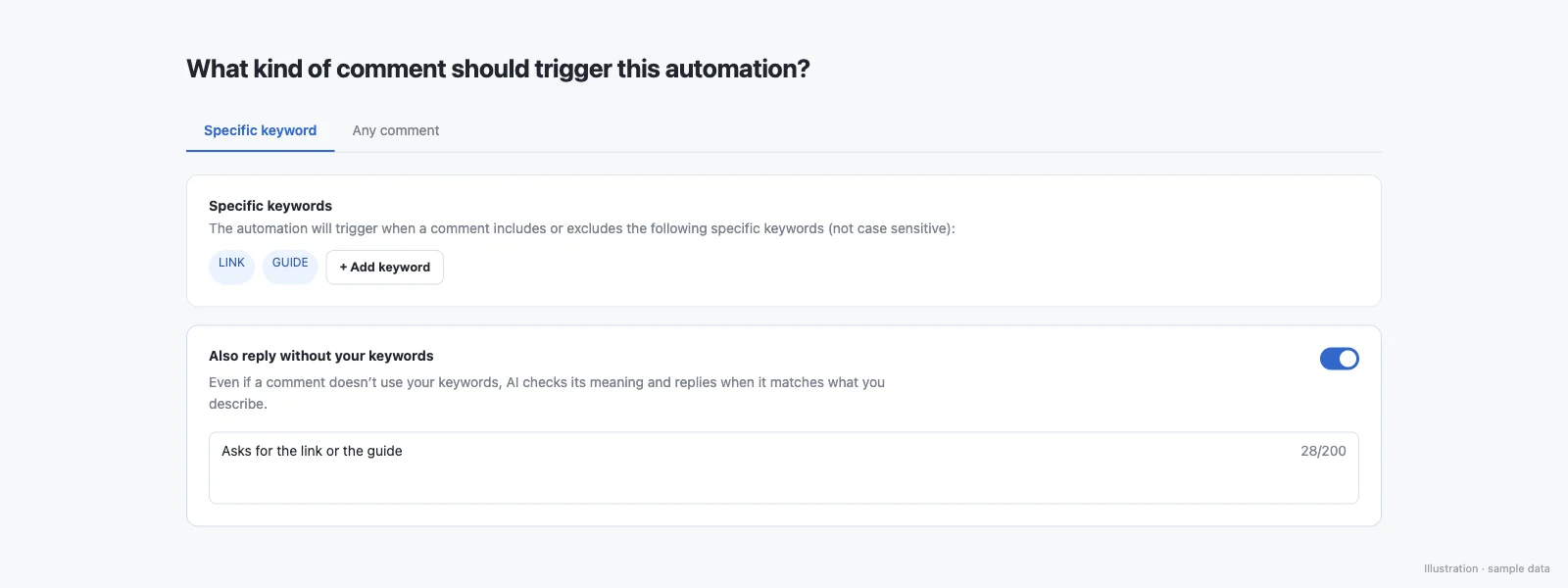
Tested live on production:
| Comment | Result |
|---|---|
| bhai guide ka link bhejo na | DM sent in about 3 seconds |
| gide link plz | DM sent |
| nice video bro | No DM |
The rules it follows:
- Keywords are matched first; AI reads only comments that matched no keyword
- The DM is sent only on a confident match; when the AI is unsure or unavailable, nothing is sent
- At most one AI-matched DM per person per automation per day
- Exclude keywords still block a match
- Works on Instagram post and Reel comments (not Stories, DMs, Lives or Messenger yet)
- Works across languages, including Hinglish, slang and misspellings
- Up to 1,000 AI comment reads per creator per day
More: auto DM without a keyword.
How do you auto reply to Instagram DMs and Story replies?
On paid plans, an automation can start when someone sends you a DM with your keyword, replies to your Story, or comments on your Live. Also, a fan sending you one of your posts or reels in a DM can trigger an automation. When the person messaged first (a DM or a Story reply), Meta's 24-hour window is open, and follow-ups can run after a delay, when the link was not clicked, when there is no reply, when the product was or was not bought, or when a lead form was not submitted.
A Live comment works like any other comment, not like a DM: the reply is a private reply, which Meta only allows while your broadcast is live. In SuperProfile, on comment and Live triggers, follow-ups need the person to respond first, so the automation opens with a message and a button (the default button reads "Send me the link"), and the tap is that response.
For Facebook, the same builder runs Messenger: Facebook Messenger Auto-DM.
What about comments you don't want to reply to?
Auto reply and moderation are two sides of the same comment section. Spam, scam links and abuse should be hidden, not answered. SuperProfile's comment moderation handles those on paid plans:
- Three rules: spam and promotion, links, and abuse or harassment
- For each rule you choose Ignore, Hide or Delete
- Optionally describe what counts on your account in your own words (Hinglish works); otherwise default definitions apply
- A strictness setting, and posts you can skip entirely
- An activity view with Hidden and Deleted tabs showing which post each comment came from, with one-click unhide or delete, kept for 30 days
- Works on new comments on your Instagram posts and Reels
Frequently asked questions
How do I set auto reply on Instagram?
For messages, use Instagram's suggested questions (Messages, Tools, Frequently asked questions) or Meta Business Suite's instant reply, away message and custom keywords. For a DM when someone comments a keyword on a Reel, connect an API-connected Auto-DM tool such as SuperProfile, pick the post, set the keyword and write the DM.
Can I set auto reply for Instagram DMs without an app?
Partly. Instagram's suggested questions, Meta Business Suite's instant replies, away messages and desktop keyword replies, and creator AI auto replies where Instagram has rolled them out all work without a third-party tool. Availability varies with the channels you have connected. Keyword comment-to-DM on a Reel usually needs a connected tool.
Can Instagram auto reply to comments by itself?
Instagram's in-app comment tools hide comments by word list. To send an automatic DM or public reply, connect a tool that uses Meta's official API, such as SuperProfile Auto-DM.
How do I auto reply to Instagram comments with a DM?
Connect a professional Instagram account to an Auto-DM tool, pick a post or Reel, set a keyword, write the DM with your link, and turn it on. When someone comments the keyword, the DM goes out within Meta's rules.
Can I reply publicly and send a DM to the same comment?
Yes. On a SuperProfile Instagram post or Reel automation, turn on comment replies and it posts one of up to three rotating public replies alongside the DM.
Is auto replying to Instagram comments allowed?
Yes, through Meta's official API: one private reply per comment within 7 days, and follow-ups only within 24 hours of the person's reply. Vary your public replies so they do not look like spam.
Can AI auto reply to Instagram comments?
On SuperProfile paid plans, AI intent matching reads comments that have no keyword and sends your DM only when it is confident, and Rewrite suggests variations of your replies.
More guides
Last updated .