
Instagram comment automation: send a DM when someone comments
Ask followers to comment a keyword on your Reel or post, and SuperProfile sends them a DM with your link.
What is Instagram comment automation?
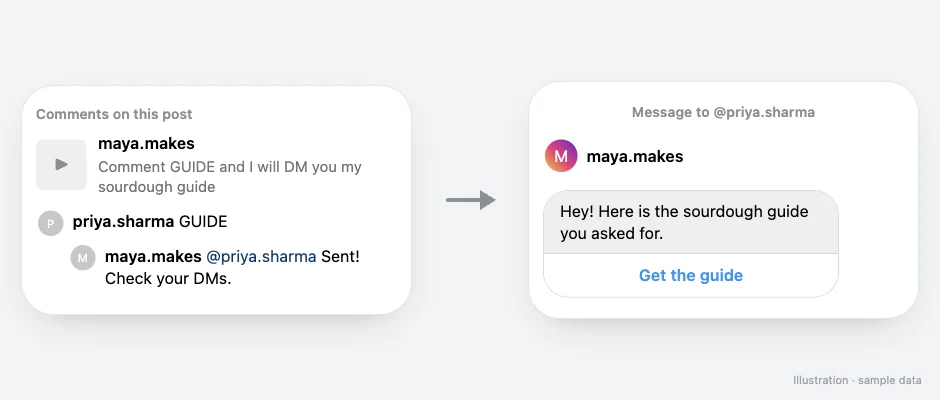
Instagram comment automation, also called comment-to-DM automation, sends a private Instagram DM to anyone who comments a keyword such as LINK or GUIDE on your post or Reel, and can reply to their comment publicly. People get your link, freebie or product in their inbox instead of hunting for your link in bio.
On SuperProfile, Auto-DM sends replies and DMs through Meta's official Instagram Graph API and Facebook Graph API (Messenger), with the account connected by Meta login; no password sharing or browser automation.
How it works
- Trigger
- A comment with your keyword (or any comment) on a specific post, your next post, or any post
- The DM
- A message with text, buttons, images, video, audio, PDFs or cards, and a button to your link
- Then
- Optional public comment reply (up to three rotating public comment replies)
How do I set it up?
- Pick the Reel or post, or choose your next post or any post.
- Set the keyword people should comment, for example GUIDE.
- Write the DM and add a button with your link.
- Optionally add public comment replies so the comment section shows a response.
- Publish, and tell your audience to comment the keyword.
What do I need?
- Auto-DM works with Instagram Creator and Business (professional) accounts; if an account is switched back to personal, Instagram stops letting tools send its DMs and SuperProfile shows the fix: switch back to Creator or Business in Settings and activity, Account type and tools, then reconnect.
- On the free plan: Auto-DM on Instagram posts and Reels, one keyword per automation, text-and-button DMs that end with a short "Sent via" line naming SuperProfile's Instagram account; the free plan sets no cap on contacts or DMs; Meta's messaging limits still apply.
- Auto-DM on Stories and Lives, ask-to-follow, email collection and follow-ups need a paid plan.
What are Meta's limits?
Meta allows one private reply to a comment, sent within 7 days of the comment (during the broadcast for Live); more messages only if the person responds, within 24 hours of their response. SuperProfile sends follow-ups within 23 hours to stay inside Meta's 24-hour window. On comment and Live triggers, follow-ups need the person to respond first, so the automation opens with a message and a button (the default button reads "Send me the link"), and the tap is that response. People who don't follow you may find the DM in their message requests.
How does it compare with ManyChat?
Both use Meta's official Instagram API. SuperProfile Auto-DM keeps the DM, your checkout and your link-in-bio in one place; ManyChat is stronger when the same funnel also runs on WhatsApp, TikTok or Telegram. See SuperProfile vs ManyChat, the ManyChat alternatives compared, and the best Instagram comment automation tools.
Can an AI assistant set this up?
Yes. Connect the SuperProfile MCP server to Claude, ChatGPT or another assistant and ask: “Create a draft automation for my latest Reel that sends my guide when someone comments GUIDE. Show me the draft first.” A new automation starts as a draft you review before it goes live. Auto-DM with an AI assistant.
Things to know
Meta's messaging windows and rules apply to all messages; follow-ups run within 23 hours of the person's message, inside Meta's messaging window. Auto-DM on Stories and Lives, ask-to-follow, email collection and follow-ups need a paid plan; see superprofile.bio for plans.
New to this? Read the Instagram DM automation guide. Comparing tools? See the best comment-to-DM tools.
Frequently asked questions
What is comment-to-DM automation on Instagram?
It sends a DM automatically to anyone who comments a keyword on your post or Reel, so the link or freebie arrives in their inbox instead of your link in bio.
Is Instagram comment automation allowed?
Yes, when it runs through Meta's official API and follows Meta's messaging rules. Meta allows one private reply to a comment, sent within 7 days of the comment (during the broadcast for Live); more messages only if the person responds, within 24 hours of their response.
Will Instagram ban my account for using comment automation?
Automation through Meta's official API, with your account connected by Meta login, is the route Meta provides. The risk comes from tools that ask for your Instagram password or automate the app, and from ignoring Meta's messaging rules.
Do I need a business account?
You need a professional account: Auto-DM works with Instagram Creator and Business (professional) accounts; if an account is switched back to personal, Instagram stops letting tools send its DMs and SuperProfile shows the fix: switch back to Creator or Business in Settings and activity, Account type and tools, then reconnect.
Can it also reply to the comment publicly?
Yes, optionally: up to three rotating public comment replies.
Is there a free plan?
Yes: Auto-DM on Instagram posts and Reels, one keyword per automation, text-and-button DMs that end with a short "Sent via" line naming SuperProfile's Instagram account; the free plan sets no cap on contacts or DMs; Meta's messaging limits still apply.
Does it work on old posts?
Yes. Pick any existing post or Reel, your next post, or all posts.
Can each keyword send a different DM?
Yes. Each automation has its own keywords and message.
More Auto-DM use cases
Last updated .