
Sell your products from Instagram DMs
Send people who comment straight to your SuperProfile product page, and follow up if they have not bought.
How it works
- Trigger
- A keyword comment, Story reply, Live comment or DM
- The DM
- Buttons can open one of your published SuperProfile products (payment pages, courses, webinars, 1:1 sessions, Telegram communities, locked content, lead magnets), your store or your referral link
- Then
- Follow-ups can run when the product was or was not bought, when the link was not clicked, or when there is no reply
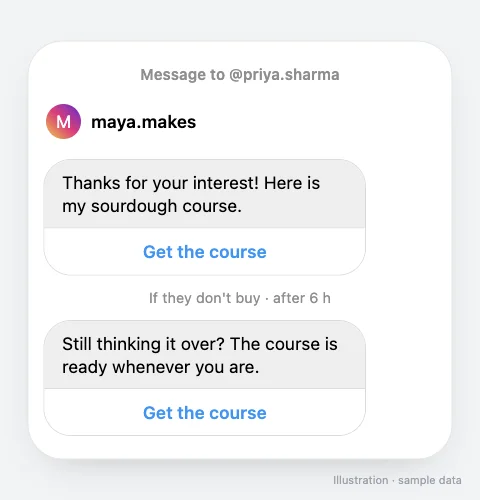
How do I set it up?
- Publish the product on SuperProfile (course, digital product, webinar, 1:1 session, Telegram community...).
- Create an automation and add a button that opens the product.
- Add a follow-up for people who did not buy, for example after a few hours.
- Publish and mention the keyword in your Reel or Story.
Can an AI assistant set this up?
Yes. Connect the SuperProfile MCP server to Claude, ChatGPT or another assistant and ask: “Create an automation for my next Reel: when someone comments COURSE, DM them my course page, and follow up after 6 hours if they have not bought.” A new automation starts as a draft you review before it goes live. Auto-DM with an AI assistant.
Things to know
Meta's messaging windows and rules apply to all messages; follow-ups run within 23 hours of the person's message, inside Meta's messaging window. Auto-DM on Stories and Lives, ask-to-follow, email collection and follow-ups need a paid plan; see superprofile.bio for plans.
Frequently asked questions
Why not just put the link in my bio?
A DM reaches the person at the moment they showed interest, and a follow-up can remind people who did not buy.
Can the DM link to my own checkout?
Yes. Buttons open your SuperProfile product, where the buyer pays.
More Auto-DM use cases
Last updated .