
Instagram DM automation MCP server
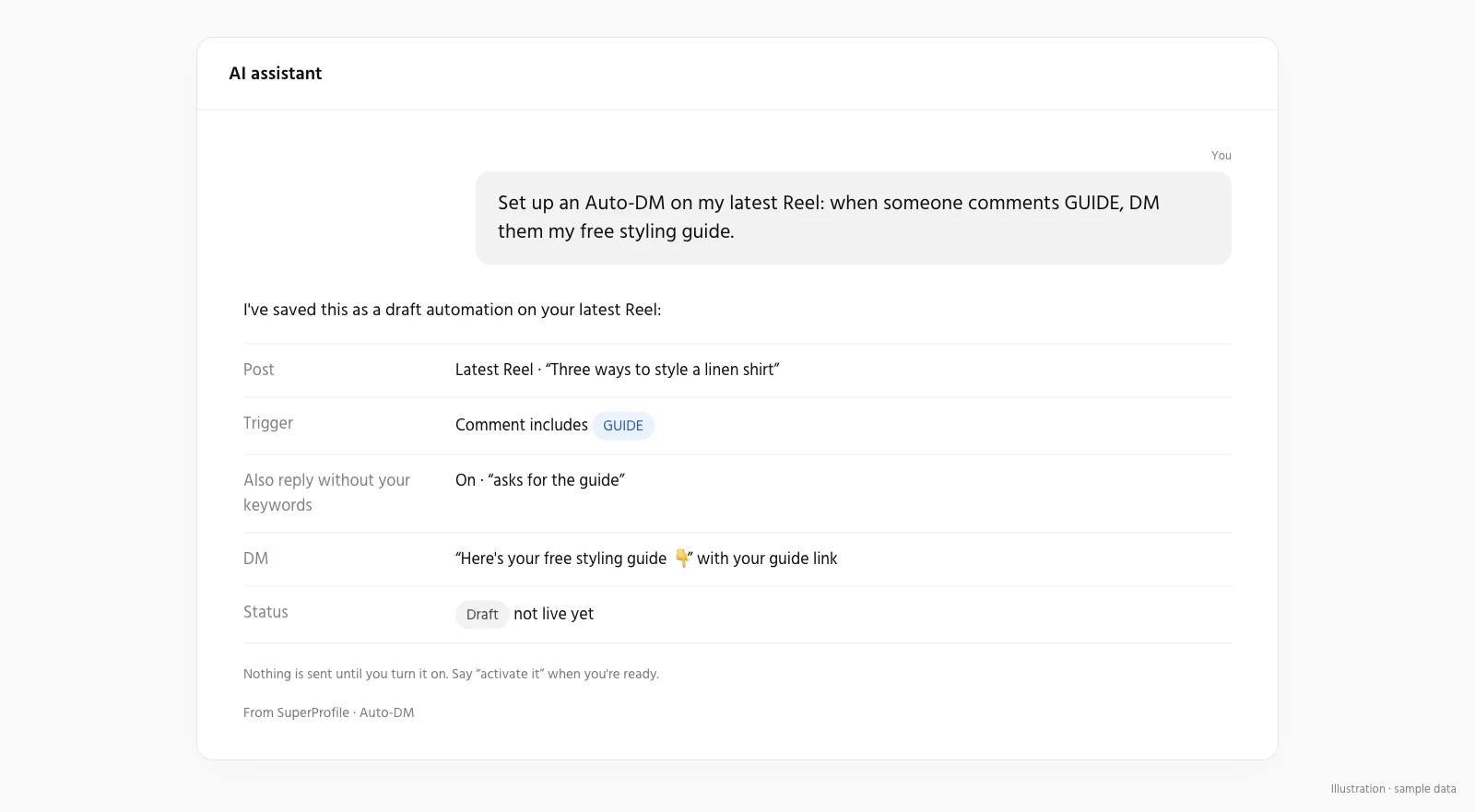
Describe the automation in plain words and your assistant builds it in SuperProfile Auto-DM: the trigger, the DM, buttons to your products and the follow-ups. A new automation is saved as a draft for you to review, and nothing sends until it is turned on. An edit to an automation that is already on applies as soon as it is saved. Meta's messaging windows and rules apply to all messages.
How do I connect it?
Server URL: https:// (remote, OAuth).
- Create a free SuperProfile account and connect your Instagram professional account in Auto-DM with Meta login.
- Add the server to your assistant: Claude, ChatGPT, Cursor, Codex, Gemini or any assistant that supports remote MCP.
- Sign in to SuperProfile when the assistant asks, and choose the permissions it gets.
- Ask for an automation in plain words, review the draft, then publish.
What can I ask my assistant to set up?
| Use case | Ask your assistant, for example |
|---|---|
| Send a link when someone comments | “Create a draft automation for my latest Reel that sends my guide when someone comments GUIDE.” |
| Ask people to follow first | “Make my GUIDE automation ask people to follow me before it sends the link.” |
| Collect emails into Kit, Mailchimp or Klaviyo | “Add email collection to my GUIDE automation and send contacts to my Mailchimp list.” |
| Sell a product with follow-ups | “When someone comments COURSE, DM them my course page and follow up after 6 hours if they have not bought.” |
| Facebook Messenger | “Create a Messenger automation that sends my price list when someone comments PRICE on any Page post.” |
| DM menu, ice breakers and Story mention replies | “Add a DM menu with my free guide, my courses and a booking link, and thank anyone who mentions me in their Story.” |
All Auto-DM use cases · Auto-DM overview
How is it different from other Instagram DM MCP servers?
- Hosted and remote: add https://mcp.superprofile.bio/mcp to your assistant and sign in with OAuth. Nothing to install or run.
- Built on Meta's official messaging API through the Instagram account you connect with Meta login. No cookies, no password, no scraping.
- Automations, not one-off messages: comment-to-DM, Story and Live replies, follow requests, email capture and follow-ups that keep running after the chat ends.
- The DM can link to your own SuperProfile course, product, webinar or paid Telegram community, with checkout and payouts handled.
- New automations start as drafts: one sends nothing until it is turned on, while an edit to an active one applies when saved. Different kinds of change need different permissions.
Looking beyond MCP servers? See other Instagram DM automation tools.
Which assistants work?
Claude, ChatGPT, Claude Code, OpenAI Codex, Cursor, Gemini, Perplexity, Windsurf, VS Code (GitHub Copilot), Notion, Muse by Meta, and any assistant that supports remote MCP servers with OAuth (https://).
Things to know
Meta's messaging windows and rules apply to all messages. Auto-DM on Stories and Lives, ask-to-follow, email collection and follow-ups need a paid plan; see superprofile.bio for plans. Your assistant can also read automation runs and tracked clicks, and arm an Auto-DM on a scheduled post, Reel or Story through the Instagram scheduling MCP tools. New to DM automation? Read the Instagram DM automation guide.
Can an assistant change my store without asking?
Only within the permissions you grant. New products and automations start as drafts you can review first, but saving an edit to something already live applies as soon as it is saved: a live product edit needs the publish permission, while an active Auto-DM automation can be changed with the "Save drafts, edit and pause automations" permission alone. Grant that Auto-DM permission carefully: it also lets an assistant change or pause an automation that is already on. Draft/edit, publication, deletion, customer information and email activation are separate permissions, and you choose them when you connect. Buyer checkout, access and downloads stay in the existing SuperProfile flows; nothing is sold inside the chat. You can manage or revoke access any time in Connected agents in your SuperProfile dashboard.
Frequently asked questions
Does SuperProfile have its own MCP server?
Yes. SuperProfile builds and runs its own remote MCP server; no Zapier or other third party is involved. In Claude, add SuperProfile from the connector directory; in other assistants, add https:// as a remote MCP server.
Can it publish or delete without my approval?
Only if you granted that permission. Draft/edit, publication, deletion, customer information and email activation are separate permissions. New products and automations start as drafts, but saving an edit to something already live applies as soon as it is saved: a live product edit needs the publish permission, while an active Auto-DM automation can be changed with the "Save drafts, edit and pause automations" permission alone. Another exception: saving the Instagram DM menu, ice breakers or Story mention reply needs the publish permission, because a feature that is on goes live on Instagram when saved, so review the wording and the on/off state before you approve.
Can an AI assistant set up my Instagram DM menu or Story mention reply?
Yes. An AI assistant connected through the SuperProfile MCP server can read the status of the persistent menu, ice breakers and Story mention auto-reply (get_instagram_dm_features) and save their content or turn them on or off (set_instagram_dm_feature) once you approve the wording; saving needs the publish permission, because turning one on publishes it to Instagram, and editing one that is already on submits the change to Instagram (existing chats may need an inbox refresh). The persistent menu, ice breakers and Story mention auto-reply are included in every paid SuperProfile plan; a free plan sees an upgrade prompt instead. How the DM menu, ice breakers and Story mention reply work.
Do I need an Instagram account?
No. Product-only access needs no Instagram account or Messenger Page; connect Instagram or a Facebook Page only if you want the assistant to manage Auto-DM.
SuperProfile MCP server pages
- Overview: what the SuperProfile MCP server is
- Connect SuperProfile to Claude
- Connect SuperProfile to ChatGPT
- Connect SuperProfile to Claude Code
- Connect SuperProfile to OpenAI Codex
- Connect SuperProfile to Cursor
- Connect SuperProfile to Gemini
- Connect SuperProfile to Perplexity
- Connect SuperProfile to Windsurf
- Connect SuperProfile to VS Code (GitHub Copilot)
- Connect SuperProfile to Notion
- Connect SuperProfile to Muse by Meta
- Sell digital products with an AI assistant
- Schedule Instagram posts with an AI assistant
- All SuperProfile MCP tools, by product
- Developer reference: endpoint, OAuth, permissions, errors
- Frequently asked questions
Last updated .