
Connect SuperProfile to VS Code (GitHub Copilot)
VS Code with GitHub Copilot agent mode can work in your SuperProfile store through SuperProfile's own MCP server. It manages 1:1 sessions and bookings, webinars, courses, locked content, lead magnets, digital products, payment pages, paid Telegram communities, and Instagram or Facebook Messenger Auto-DM automations, and Instagram post scheduling; new products, automations and posts start as drafts you can review first.
How do I connect SuperProfile to VS Code (GitHub Copilot)?
- Command Palette → MCP: Add Server, or open
.vscode/mcp.json. - Add
{"servers": {"superprofile": {"type": "http", "url": "https://mcp.superprofile.bio/mcp"}}}. - A browser opens on first use: sign in to SuperProfile and approve the permissions you want.
Key facts
- Server URL
https://mcp. superprofile. bio/ mcp - Sign-in
- OAuth: you sign in to SuperProfile and approve permissions; your password is never shared with the assistant
- Permissions
- You choose them when you connect; draft/edit, publication, deletion, customer information and email activation are separate permissions
- Setup reference
- VS Code (GitHub Copilot) documentation
What can I ask VS Code (GitHub Copilot) to do?
| Example request | Area |
|---|---|
| “Create a draft payment page for my guide, upload this PDF, price it at ₹499, and show it to me before publishing.” | Digital products |
| “Create a draft automation for my latest Reel that sends my guide when someone comments INFO. Show me the draft first.” | Instagram Auto-DM |
| “Create a 45-minute portfolio review call for ₹999 on Google Meet using my default availability.” | 1:1 sessions |
| “Set up a paid Telegram community for my group at ₹499 a month and show it to me before publishing.” | Paid Telegram communities |
| “How did my courses sell last month, and which one had the most buyers?” | Sales and analytics |
| “Did rahul@example.com buy my course, and does their order have any UTM tags?” | Sales and analytics |
| “Duplicate my webinar for next Saturday at 7 pm and keep the same price.” | Webinars and events |
| “Schedule this Reel for Friday at 7 pm with my usual caption, and send my guide to people who comment GUIDE.” | Instagram scheduling |
| “Post this photo album to my Facebook Page on Sunday morning and send the price list in Messenger to people who comment PRICE.” | Facebook Page scheduling |
| “Schedule this PDF as a LinkedIn post for Tuesday at 9 am, with a short intro in my voice.” | LinkedIn scheduling |
| “Hide spam and abusive comments on my Reels automatically.” | Comment moderation |
| “Which brand collaboration requests this week match my rates and niche?” | Brand Collab |
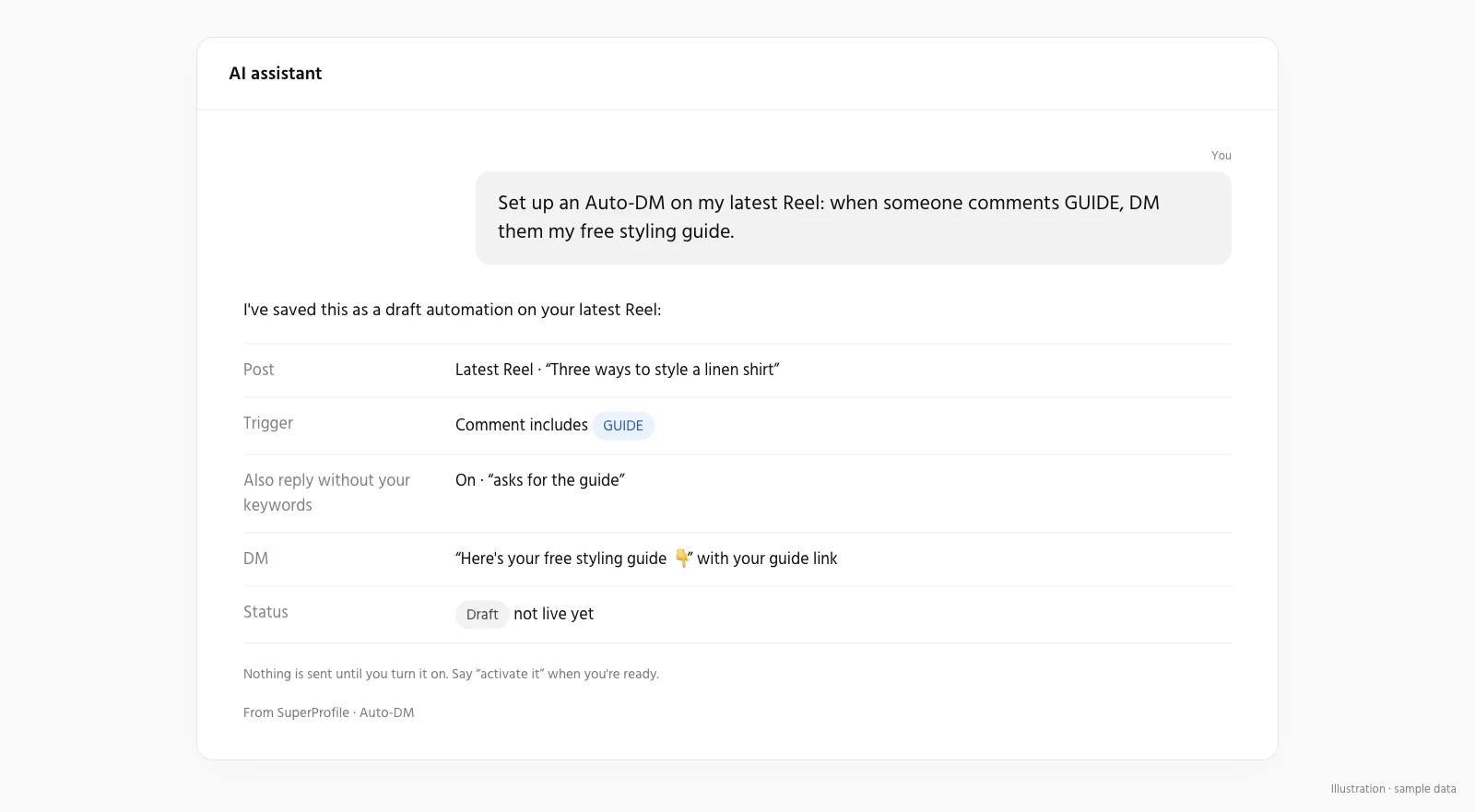
Can an assistant change my store without asking?
Only within the permissions you grant. New products and automations start as drafts you can review first, but saving an edit to something already live applies as soon as it is saved: a live product edit needs the publish permission, while an active Auto-DM automation can be changed with the "Save drafts, edit and pause automations" permission alone. Grant that Auto-DM permission carefully: it also lets an assistant change or pause an automation that is already on. Draft/edit, publication, deletion, customer information and email activation are separate permissions, and you choose them when you connect. Buyer checkout, access and downloads stay in the existing SuperProfile flows; nothing is sold inside the chat. You can manage or revoke access any time in Connected agents in your SuperProfile dashboard.
Frequently asked questions
Does SuperProfile have its own MCP server?
Yes. SuperProfile builds and runs its own remote MCP server; no Zapier or other third party is involved. In Claude, add SuperProfile from the connector directory; in other assistants, add https:// as a remote MCP server.
Can buyers pay inside the chat?
No. Buyer checkout, access and downloads stay in the existing SuperProfile flows; nothing is sold inside the chat. The assistant helps you, the creator, build and run your store.
How do I remove access?
Manage or revoke access any time in Connected agents in your SuperProfile dashboard.
SuperProfile MCP server pages
- Overview: what the SuperProfile MCP server is
- Connect SuperProfile to Claude
- Connect SuperProfile to ChatGPT
- Connect SuperProfile to Claude Code
- Connect SuperProfile to OpenAI Codex
- Connect SuperProfile to Cursor
- Connect SuperProfile to Gemini
- Connect SuperProfile to Perplexity
- Connect SuperProfile to Windsurf
- Connect SuperProfile to Notion
- Connect SuperProfile to Muse by Meta
- Sell digital products with an AI assistant
- Automate Instagram and Messenger DMs with an AI assistant
- Schedule Instagram posts with an AI assistant
- All SuperProfile MCP tools, by product
- Developer reference: endpoint, OAuth, permissions, errors
- Frequently asked questions
Last updated .