
Sell digital products with an AI assistant
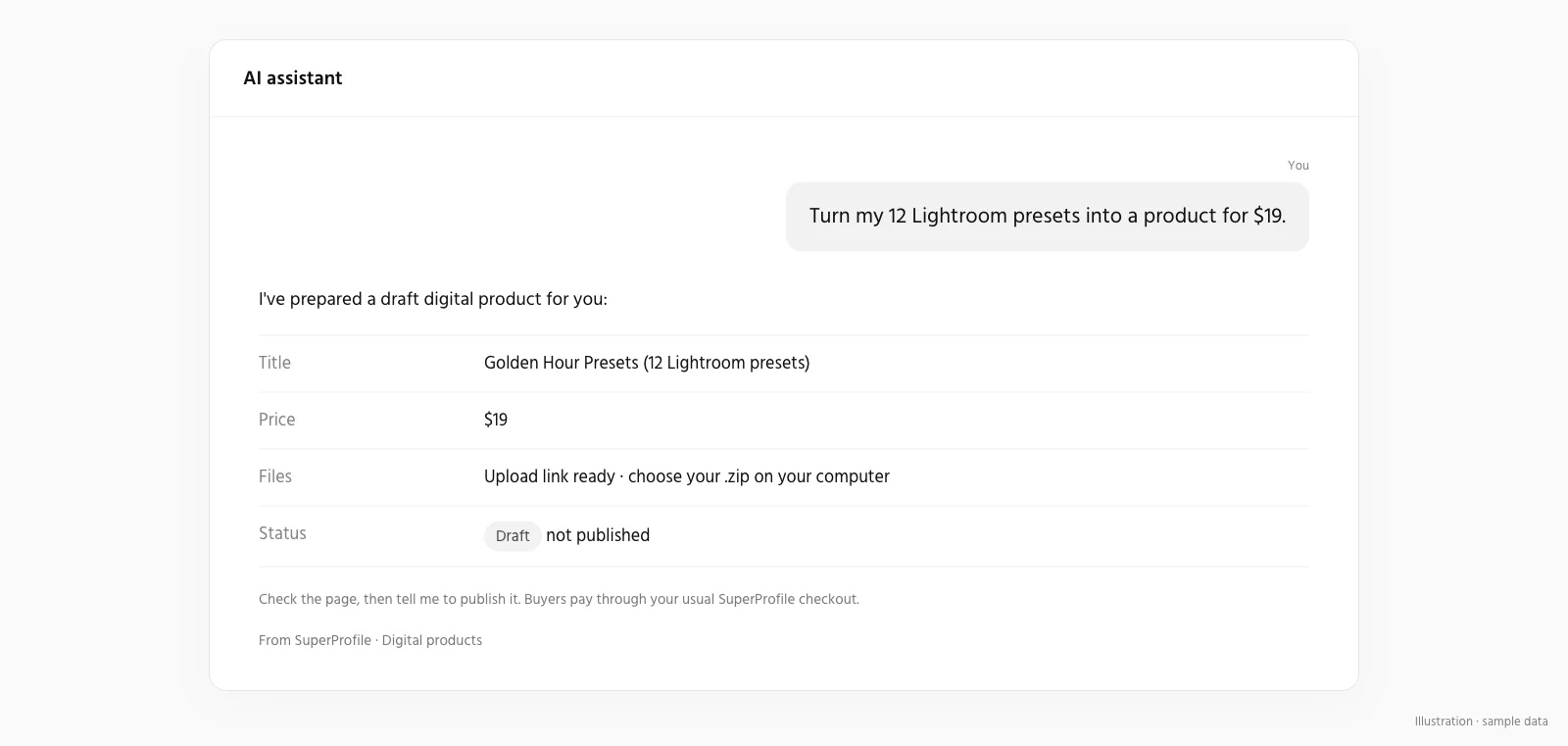
Tell your assistant what you want to sell and it builds it in your SuperProfile store: the product page, price, files and emails. A new product starts as a draft, so you review it before buyers see it, and changing a live product needs the publish permission. Buyer checkout, access and downloads stay in the existing SuperProfile flows; nothing is sold inside the chat.
What can I sell this way?
| Product | Ask your assistant, for example |
|---|---|
| Digital products and payment pages | “Create a payment page for my Notion template at ₹299, upload the file, and show me the draft.” |
| Courses | “Turn these five videos into a course with two chapters and a certificate, priced at ₹1,999.” |
| Webinars and events | “Set up a Zoom workshop next Sunday at 11 am with 50 tickets at ₹499.” |
| 1:1 sessions | “Create a 30-minute career call for ₹799 using my default availability.” |
| Paid Telegram communities | “Set up my Telegram group as a paid community at ₹499 a month.” |
| Locked content and lead magnets | “Make a free checklist download that collects name and email.” |
Who handles payments and payouts?
SuperProfile. Buyers pay on your SuperProfile page, not in the chat. In India you need no payment gateway account needed, only KYC; earnings are paid out to your bank account the next day (T+1). Selling needs a paid plan; see the SuperProfile pricing page.
How do I start?
- Create a free SuperProfile account and complete KYC to sell in India.
- Connect your assistant: Claude, or any assistant that supports remote MCP with
https://.mcp. superprofile. bio/ mcp - Describe what you want to sell. Review the draft, then publish it yourself or let the assistant publish if you gave that permission.
Can an assistant change my store without asking?
Only within the permissions you grant. New products and automations start as drafts you can review first, but saving an edit to something already live applies as soon as it is saved: a live product edit needs the publish permission, while an active Auto-DM automation can be changed with the "Save drafts, edit and pause automations" permission alone. Grant that Auto-DM permission carefully: it also lets an assistant change or pause an automation that is already on. Draft/edit, publication, deletion, customer information and email activation are separate permissions, and you choose them when you connect. Buyer checkout, access and downloads stay in the existing SuperProfile flows; nothing is sold inside the chat. You can manage or revoke access any time in Connected agents in your SuperProfile dashboard.
Frequently asked questions
Who can use it, and does it cost extra?
It is available to every SuperProfile creator. Selling needs a paid plan (see the SuperProfile pricing page); the connector itself has no separate price.
Can it publish or delete without my approval?
Only if you granted that permission. Draft/edit, publication, deletion, customer information and email activation are separate permissions. New products and automations start as drafts, but saving an edit to something already live applies as soon as it is saved: a live product edit needs the publish permission, while an active Auto-DM automation can be changed with the "Save drafts, edit and pause automations" permission alone. Another exception: saving the Instagram DM menu, ice breakers or Story mention reply needs the publish permission, because a feature that is on goes live on Instagram when saved, so review the wording and the on/off state before you approve.
Can buyers pay inside the chat?
No. Buyer checkout, access and downloads stay in the existing SuperProfile flows; nothing is sold inside the chat. The assistant helps you, the creator, build and run your store.
SuperProfile MCP server pages
- Overview: what the SuperProfile MCP server is
- Connect SuperProfile to Claude
- Connect SuperProfile to ChatGPT
- Connect SuperProfile to Claude Code
- Connect SuperProfile to OpenAI Codex
- Connect SuperProfile to Cursor
- Connect SuperProfile to Gemini
- Connect SuperProfile to Perplexity
- Connect SuperProfile to Windsurf
- Connect SuperProfile to VS Code (GitHub Copilot)
- Connect SuperProfile to Notion
- Connect SuperProfile to Muse by Meta
- Automate Instagram and Messenger DMs with an AI assistant
- Schedule Instagram posts with an AI assistant
- All SuperProfile MCP tools, by product
- Developer reference: endpoint, OAuth, permissions, errors
- Frequently asked questions
Last updated .