
Instagram DM automation: how to set up auto DM on Instagram
To set up auto DM on Instagram, connect your professional account to a tool that uses Meta's official API, pick a trigger such as a keyword comment, and write the message. Instagram DM automation sends a message for you when someone comments a keyword, replies to your Story, comments on your Live or messages you. This guide covers how it works, what Meta allows, what to automate, and how to set it up with SuperProfile Auto-DM, which is free to start.
How does Instagram DM automation work?
You connect your Instagram professional account through Meta's login. The tool listens for events Meta sends it and replies with the message you wrote:
- What starts it
- Comments on Reels and Posts, Story replies, Live comments and direct messages
- What it sends
- Text, buttons, images, video, audio, PDFs or cards
- What happens next
- Follow-ups after a delay, when the link was not clicked, when there is no reply, when the product was or was not bought, or when a lead form was not submitted
- Where
- Instagram and Facebook Messenger
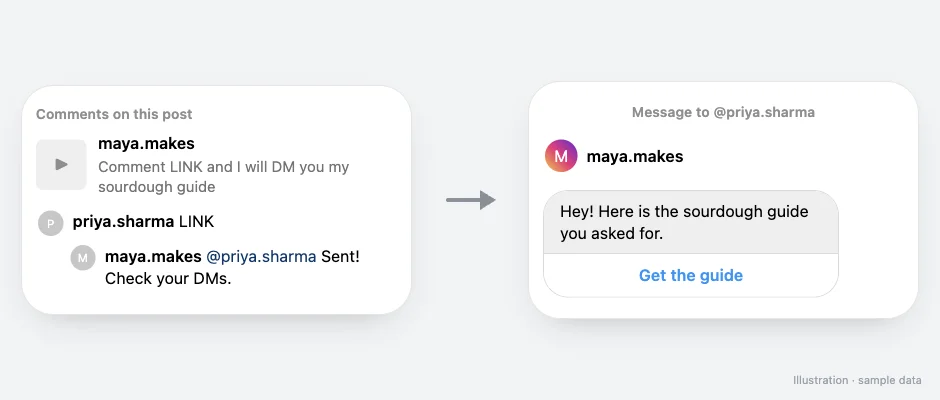
For example, someone comments LINK on your Reel, you can reply to their comment publicly, and they receive a DM with a button that opens your link.
How do I set up auto DM on Instagram?
- Create a free SuperProfile account and open Auto-DM.
- Connect your Instagram professional account with Meta login (and your Facebook Page, for Messenger).
- Choose the trigger: a specific post or Reel, your next post, any post, Story replies, Live comments or DMs.
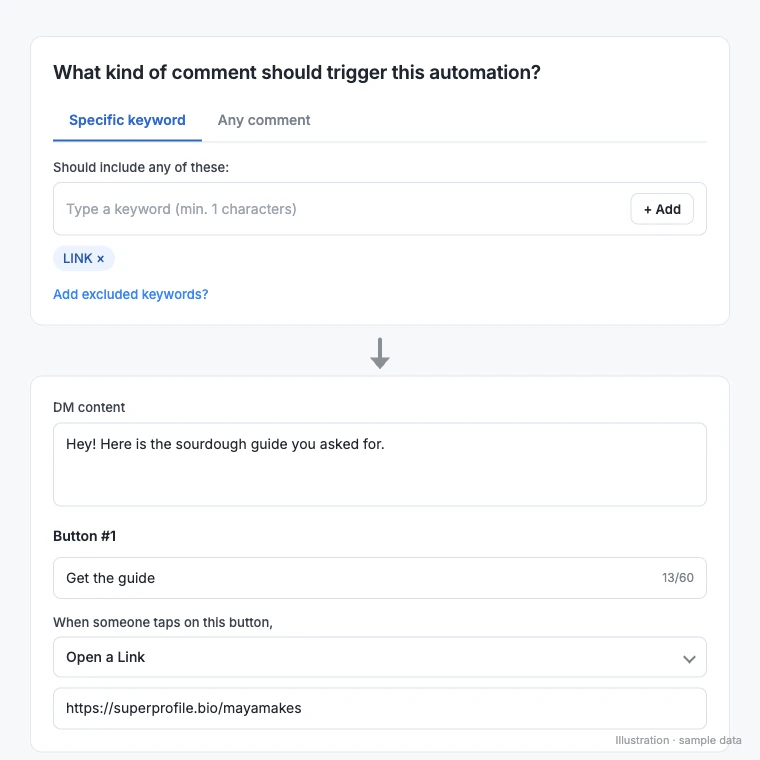
- Set the keyword, for example LINK, or match any comment.
- Write the DM and add a button to your link or product. Optionally add a public comment reply, a follow request, email capture and follow-ups.
- Publish, then tell your audience the keyword in your Reel or caption.
What can you automate on Instagram?
| Goal | Automation |
|---|---|
| Send a link when someone comments | Ask people to comment a keyword on a Reel; they get the link in their DMs. |
| Grow followers | Ask people to follow you before the DM with the link is sent. |
| Build an email list | Collect an email address inside the DM and send it to Kit, Mailchimp or Klaviyo, with tags. |
| Sell a product | Buttons can open one of your published SuperProfile products (payment pages, courses, webinars, 1:1 sessions, Telegram communities, locked content, lead magnets), your store or your referral link. |
| Facebook Messenger | Comments on any or a specific Facebook Page post, incoming Messenger DMs, and m.me links or QR codes. |
Beyond DMs, Instagram automation also covers scheduling and spam comments; see what Instagram automation is and what's allowed.
What does Meta allow?
Automation is allowed through Meta's official messaging API. Meta's messaging windows and rules apply to all messages, and they matter more than any tool setting:
- You need an Instagram professional (creator or business) account connected with Meta login. Tools that ask for your Instagram password are not using the official API.
- Messages answer something the person did, such as a comment or a DM, and follow-ups run within 23 hours of the person's message, inside Meta's messaging window.
- Meta decides delivery. Some people restrict messages, and Meta limits how often an account can message, so no tool can promise a DM to each commenter.
What should an Instagram automation tool have?
- Official Meta API and Meta login, not your password
- Triggers on Reels, posts, Stories, Lives and DMs, not only comments
- Instagram and Facebook Messenger in one place
- A follow request step and email capture into your email tool
- Follow-ups based on what the person did: clicked, replied, bought
- Somewhere to send people: a store and checkout, not only a link
- Runs and click tracking per automation
SuperProfile Auto-DM does all of these, and because SuperProfile also runs your store and checkout, the DM can open your own course, product, webinar, 1:1 session or paid Telegram community. To weigh other options, see the best Instagram DM automation tools.
Examples you can copy
See Instagram Auto-DM use cases with the trigger, DM and follow-up for each, and copy-paste wording from the Instagram DM templates library (for example the new follower welcome DM and the follow-up DM).
Instagram auto DM kaise lagaye?
SuperProfile par free account banaiye, Auto-DM kholiye aur Meta login se apna Instagram professional account connect kijiye. Phir post ya Reel chuniye, keyword set kijiye (jaise LINK), DM likhiye aur button mein apna link daaliye. Publish karte hi jo log keyword comment karenge unhe DM chala jayega, Meta ke rules ke hisaab se.
Frequently asked questions
What is Instagram DM automation?
Software that sends a direct message for you when something happens on your account, such as a comment with a keyword, a Story reply, a Live comment or an incoming DM, using Meta's official messaging API.
Is Instagram DM automation allowed?
Yes, through Meta's official API with your professional account connected by Meta login. Meta's messaging windows and rules apply to all messages: for example, follow-ups run within 23 hours of the person's message, inside Meta's messaging window.
Is there a free Instagram automation tool?
Yes. SuperProfile's free plan includes Auto-DM on Instagram posts and Reels, one keyword per automation, text-and-button DMs that end with a short "Sent via SuperProfile" line. Auto-DM on Stories and Lives, ask-to-follow, email collection and follow-ups need a paid plan; see the SuperProfile pricing page.
Do I need a professional Instagram account?
Yes. Meta's messaging API works with Instagram professional accounts (creator or business).
Can it reply to Story replies and Live comments?
Yes. Story replies, Live comments, post and Reel comments and incoming DMs can each start an automation.
Will every commenter get the DM?
Not always. Meta decides delivery: people who restrict messages, very old comments and Meta's limits can stop a message. A good tool shows you runs and clicks so you can see what was sent.
Do people have to type the exact keyword?
Not with intent matching: comments that mean your keyword, with typos, Hinglish or other languages, can trigger the DM when the AI is confident. See Auto DM without a keyword.
Do Amazon or Flipkart affiliate links work in Instagram Auto-DM?
Yes. A Track link clicks toggle on every Instagram and Messenger automation (on by default); turn it off and links go out exactly as typed, with no redirect; Amazon and Flipkart links are always sent as typed so affiliate commission and the shopping app open work; with tracking off, click counts and link-not-clicked follow-ups are unavailable for that automation.
Can I add an Auto-DM to a post I schedule?
Yes. In the Instagram scheduler you can attach an Auto-DM to a scheduled Instagram photo, carousel, Reel or Story until 10 minutes before it goes live (on a photo, carousel or Reel it answers comments; on a Story it answers private Story replies, not Story comments); the automation starts when the post publishes, and your Auto-DM plan limits apply.
Can AI set up my Instagram automation?
Yes. Connect the SuperProfile MCP server to Claude or ChatGPT and describe the automation; you approve the draft before it goes live.
More guides
Last updated .