
Instagram scheduler
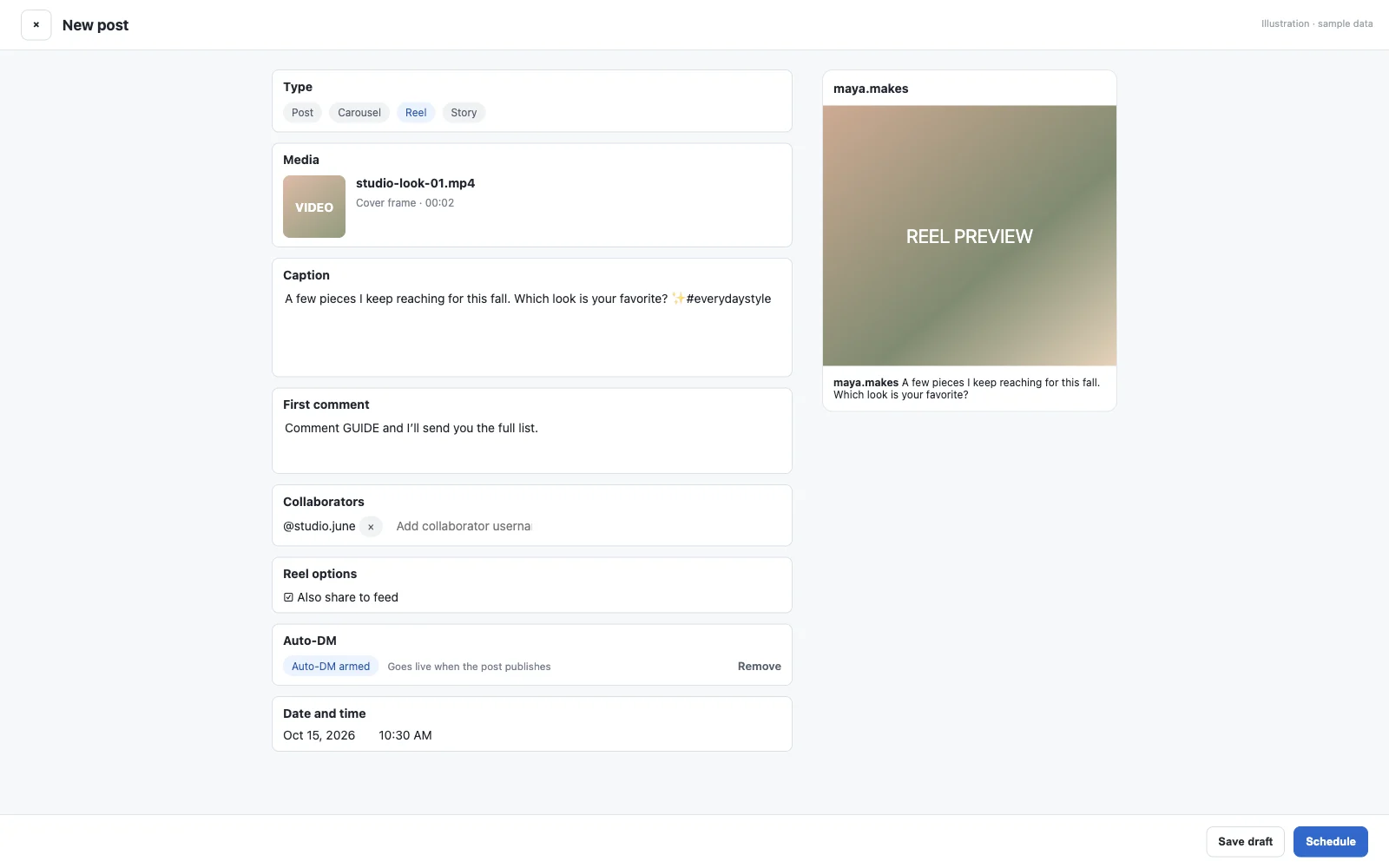
Plan your Instagram on a calendar and let SuperProfile publish it for you: feed photos, carousels of 2 to 10 photos or videos, Reels (3 seconds to 15 minutes, with an optional cover and share-to-feed) and Stories, published automatically through Meta's official Instagram content publishing API, with your account connected by Instagram login. Add an Auto-DM to the post, so the people who comment (or reply to your Story) get your link in their DMs.
Key facts
- What you can schedule
- Feed photos, carousels of 2 to 10 photos or videos, Reels (3 seconds to 15 minutes, with an optional cover and share-to-feed) and Stories
- How it publishes
- Published automatically through Meta's official Instagram content publishing API, with your account connected by Instagram login
- When
- From 2 minutes ahead (15 minutes for posts with video) up to 90 days ahead, in the time zone you choose
- Account
- An Instagram professional account (creator or business), because Meta's publishing API works only with professional accounts
- Who can use it
- Available on all SuperProfile paid plans, from Schedule in the dashboard; free creators see an upgrade prompt
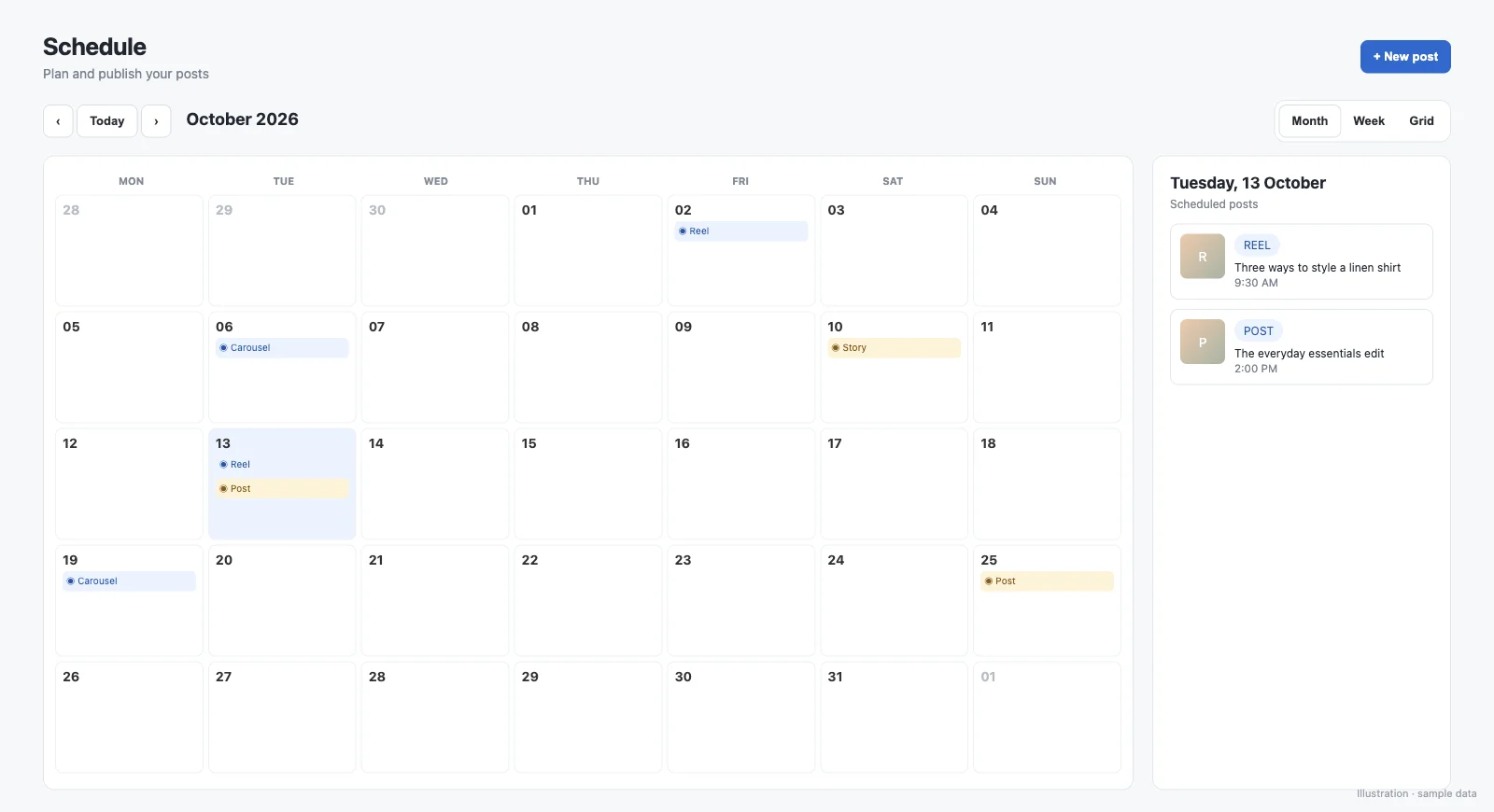
What can I add to a scheduled post?
- Captions up to 2,200 characters, with a hashtag counter: SuperProfile checks Meta's publishing limits of 30 hashtags and 20 @mentions
- A first comment posted right after the post goes live (not on Stories)
- Saved captions you can reuse
- Up to 10 caption options on one post: you choose which one is posted
- People tags and alt text on images
- Up to 3 collaborators (not on Stories)
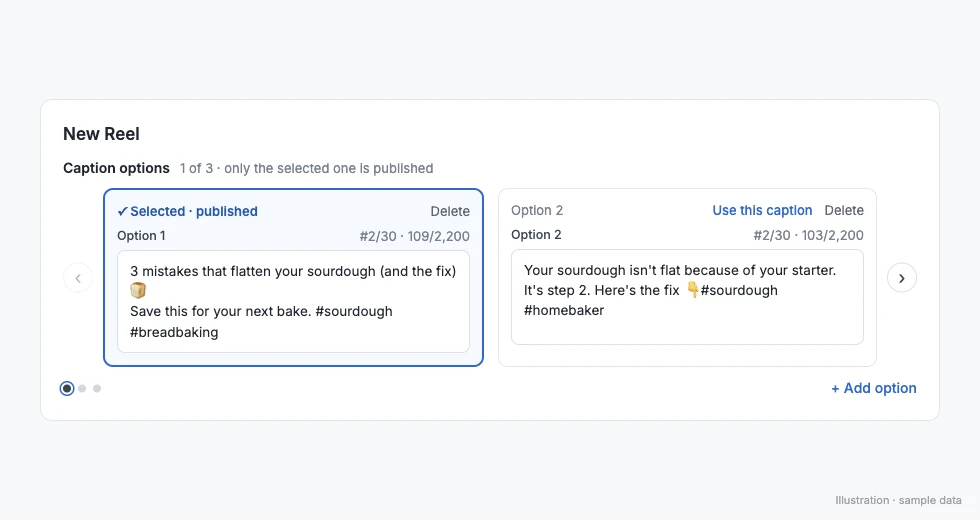
Can I write more than one caption for a post?
Yes. Keep up to 10 caption options on one post and choose which one is posted. It helps when you are torn between a hook-first and a story-first caption and want to decide closer to posting time. SuperProfile doesn't test them or pick one for you.
- Click "+ Add caption option" to turn the caption into options, then "+ Add option" for more, up to 10 per post
- Pick the one to post with "Use this caption"; it is marked "✓ Selected · published", only that caption is posted, and the others are never posted
- You can change the selected caption any time while the post is still a draft or scheduled
- Each option has the same limits as a caption: on Instagram 2,200 characters and Meta's publishing limits of 30 hashtags and 20 @mentions; on LinkedIn 3,000 characters
- Works on Instagram, Facebook Page and LinkedIn posts, not on Stories: SuperProfile doesn't send a caption on Stories
- Caption options belong to one post; saved captions are reusable templates you can insert into any post
- The calendar card shows how many caption options a post has, and Duplicate copies them to the new draft
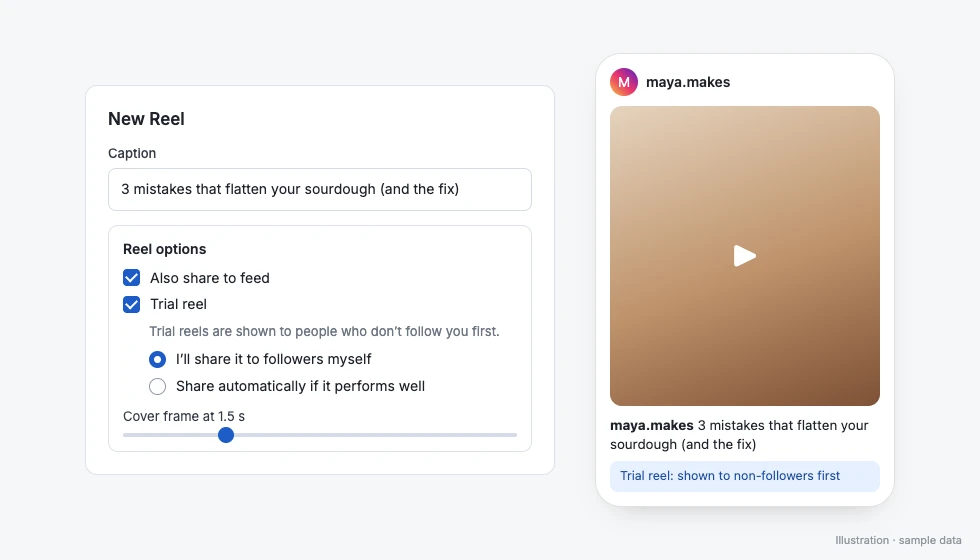
Can I schedule an Instagram trial reel?
Yes. You can schedule an Instagram Reel as a trial reel: tick Trial reel under Reel options, then choose "I'll share it to followers myself" or "Share automatically if it performs well".
- Trial reels are shown to people who don't follow you first
- "I'll share it to followers myself" leaves it to you to share the trial reel with your followers from the Instagram app
- "Share automatically if it performs well" lets Instagram share it with your followers if it performs well
- Trial reels are for Instagram Reels only, not Stories, photos, carousels, Facebook Page or LinkedIn posts
- If your account doesn't qualify for trial reels yet, SuperProfile marks the post as failed with a plain message; you can then duplicate it, turn off Trial reel and schedule it as a normal Reel
Who can use trial reels is up to Instagram. Instagram requires a public account that is eligible to appear in recommendations, with at least 200 followers for a professional (business or creator) account or 1,000 followers for a personal account (Instagram Help). More in Instagram trial reels: eligibility, how to post and schedule.
How do I manage my schedule?
- A calendar where you drag a post to another day and it keeps its time
- Edit a scheduled post, move it back to drafts, cancel it or duplicate it
- Retry a failed post at a new time
- More than one connected Instagram account, with an account picker
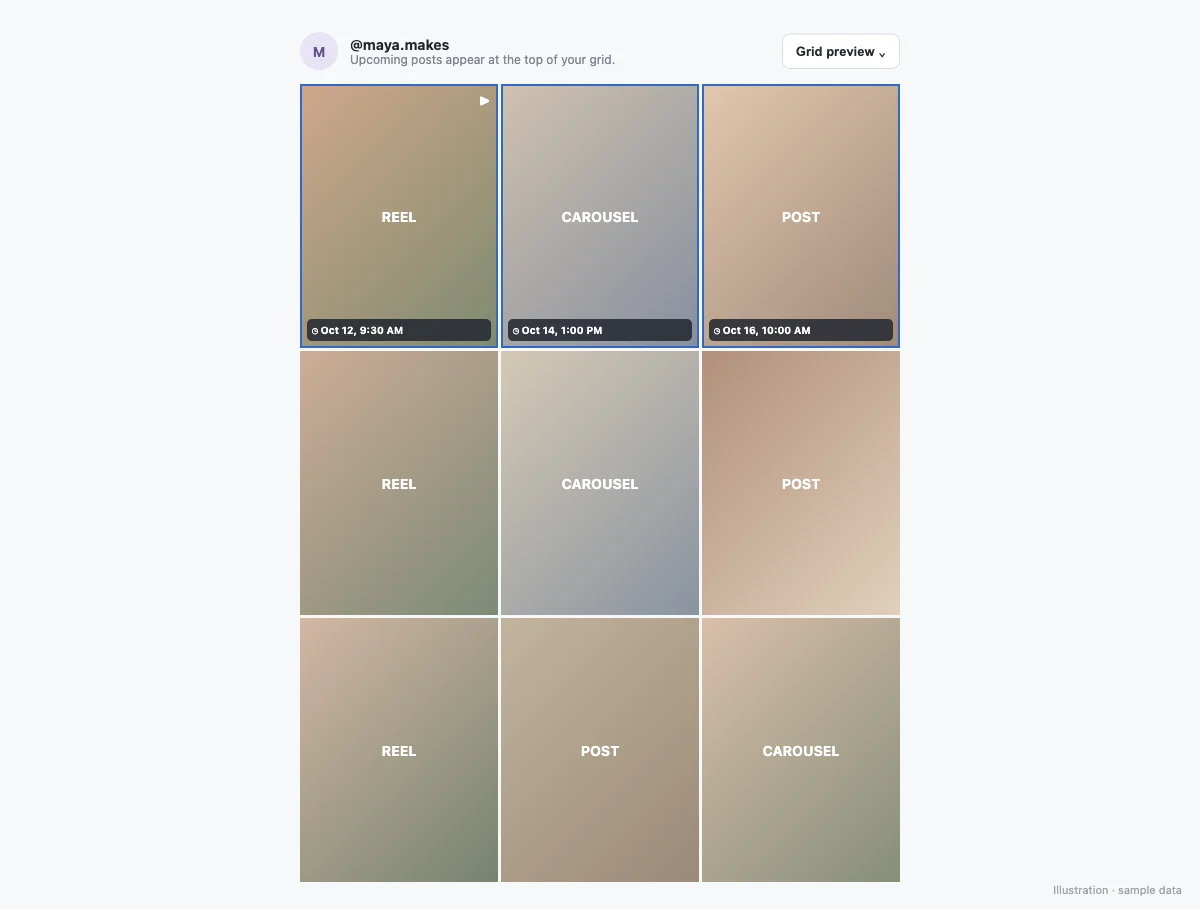
- A grid preview shows your upcoming feed posts above your recent published posts, so you can see how your profile will look
Instagram scheduler with Auto-DM: can a scheduled post send DMs?
Yes. You can attach an Auto-DM to a scheduled Instagram photo, carousel, Reel or Story until 10 minutes before it goes live (on a photo, carousel or Reel it answers comments; on a Story it answers private Story replies, not Story comments); the automation starts when the post publishes, and your Auto-DM plan limits apply. Ask people to comment a keyword in the caption (on a Story, to reply with it), and they get your link, course or product in their DMs, within Meta's rules. See comment-to-DM.
Can a scheduled Story send DMs to people who reply?
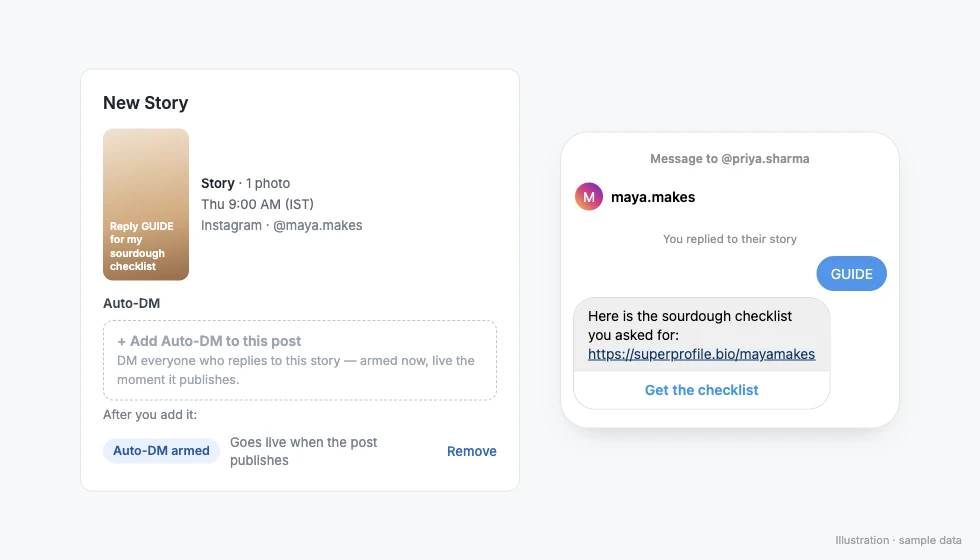
Yes. On a scheduled Instagram Story, the Auto-DM answers private Story replies, not Story comments: people whose reply matches your keyword get your DM, or anyone who replies if you choose any reply. Ask for the reply in the Story itself, for example “Reply GUIDE for the checklist”.
- It answers replies to that one Story only, from the moment it publishes; replies to your other Stories are not matched
- Public comment replies aren't available for a Story Auto-DM
- Add the keyword ask, such as "Reply GUIDE", to your image or video before uploading: SuperProfile can't add text or stickers to a scheduled Story
- To change a scheduled post to or from a Story, remove its Auto-DM first
- Facebook Page Stories can't take an Auto-DM
Instagram Stories have two ways to respond: a reply, which is a private message to the creator, and a Story comment of up to 60 characters that anyone who can see the Story can read (Instagram Help). Only private replies start this Auto-DM. Setup and troubleshooting: how to schedule an Instagram post, Reel or Story with Auto-DM.
How do I schedule a post?
- Create a free SuperProfile account and open Schedule in the dashboard.
- Connect your Instagram professional account with Instagram login and approve the permissions.
- Create a post: choose a photo, carousel, Reel or Story and upload the media.
- Write the caption, and add a first comment, people tags, alt text or collaborators if you want.
- Pick the date, time and time zone, then schedule it. It shows on your calendar and grid preview.
- Optional: attach an Auto-DM so people who comment a keyword (or, on a Story, reply with it) get your link in their DMs.
Full walkthrough: How to schedule Instagram posts, Reels and Stories.
Can I schedule Facebook Page posts too?
Yes. A Facebook Page connected in SuperProfile Auto-DM through Messenger; the same Schedule calendar holds your Instagram and Facebook Page posts: text posts, link posts, photos, albums of 2 to 10 photos, videos, Reels, and Stories with one photo or video. See the Facebook Page scheduler.
Can I schedule LinkedIn posts too?
Yes. Schedule LinkedIn from the same calendar: text posts, one photo (JPG, PNG or GIF), multi-image posts of 2 to 20 images, one video (MP4, 3 seconds to 15 minutes) and one PDF document, on your personal LinkedIn profile. To start, connect your personal LinkedIn profile from Schedule with LinkedIn sign-in (it asks to post on your behalf); LinkedIn authorization normally expires after 60 days and SuperProfile doesn't renew it automatically, so you reconnect in Schedule; posts scheduled after it expires need you to reconnect first, so SuperProfile emails you 7 days and 1 day before it ends if you still have LinkedIn posts scheduled, and Schedule warns you when a post is set for after the connection ends. See the LinkedIn post scheduler.
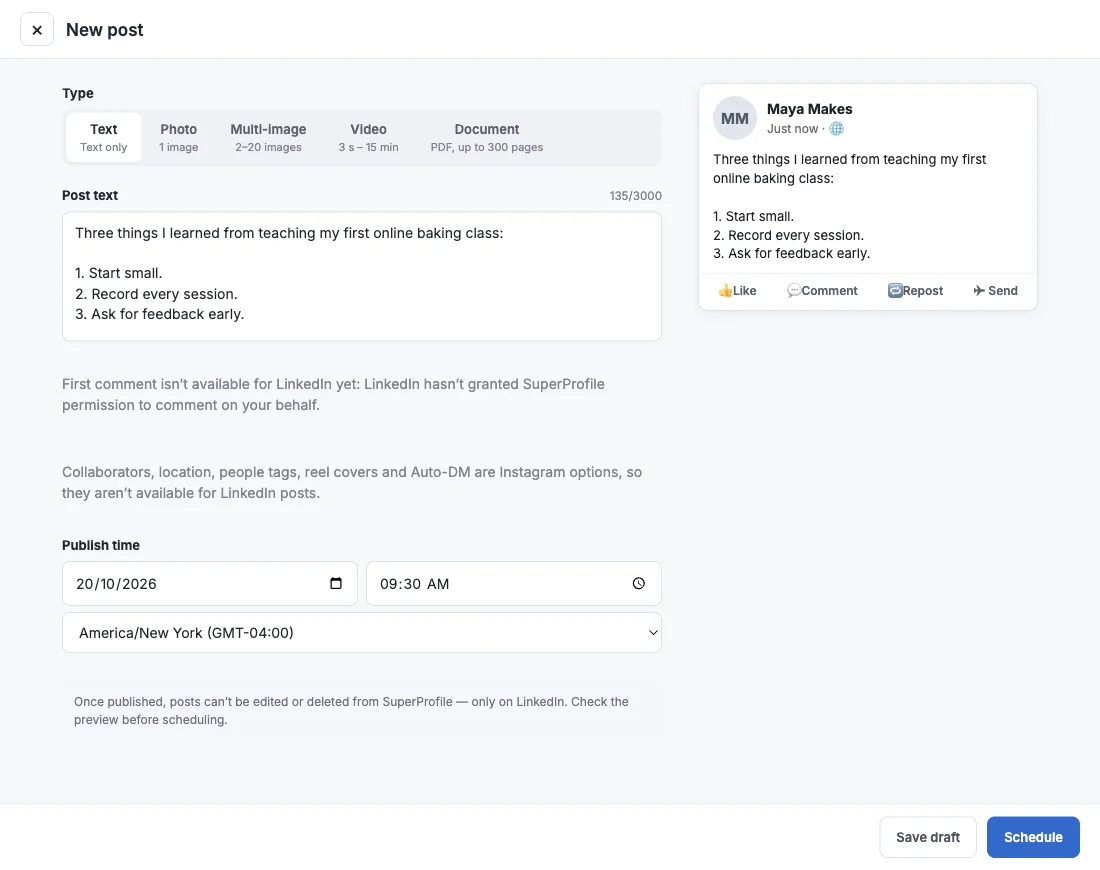
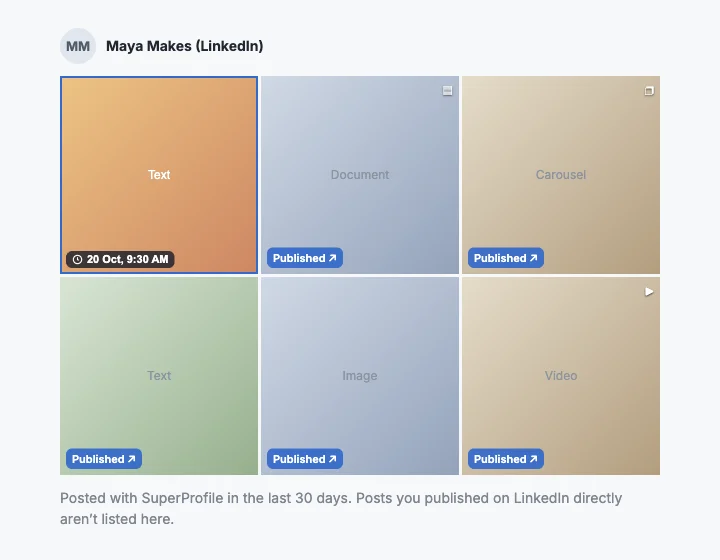
The LinkedIn composer counts your post text against a 3,000-character limit, shows a preview that is approximate because LinkedIn draws the final post, and notes that first comment is not available for LinkedIn. The LinkedIn grid lists your scheduled posts and the posts you published with SuperProfile in the last 30 days, not posts you published on LinkedIn directly.
What are the LinkedIn limits?
- Post text up to 3,000 characters (LinkedIn's limit)
- Photos in JPG, PNG or GIF up to 30 MB each (SuperProfile limit), with alt text; SuperProfile uploads without cropping and LinkedIn controls how images appear
- Video as MP4 up to 500 MB, from 3 seconds to 15 minutes (SuperProfile limits)
- PDF documents up to 100 MB and 300 pages; the file name becomes the title shown on LinkedIn
- Schedule from 2 minutes ahead for text, 5 minutes for photos, multi-image posts and documents, and 15 minutes for video, up to 90 days ahead (SuperProfile limits)
- If a post can't be published, SuperProfile stops trying two hours after its time and marks it failed; you can retry it
- LinkedIn's own image limits: under 36,152,320 pixels, and GIFs of up to 250 frames
Scheduling LinkedIn posts is part of the paid Schedule, the same as Instagram and Facebook Page scheduling: creating, changing and scheduling posts needs a paid plan; viewing and cancelling stay open, and connecting LinkedIn is not plan-gated. See the SuperProfile pricing page for plans.
What does LinkedIn scheduling not do?
- Personal profiles only: no Company Pages in SuperProfile
- First comments aren't supported for LinkedIn in SuperProfile
- No Auto-DM, collaborators, location or people tags, and no separate link field; URLs go in the post text
- @mentions are sent as text, so they don't tag or notify people, and hashtags are sent as you type them; you can include a URL in the text, but a link preview isn't guaranteed
- No LinkedIn post insights in SuperProfile yet
Can an AI assistant schedule for me?
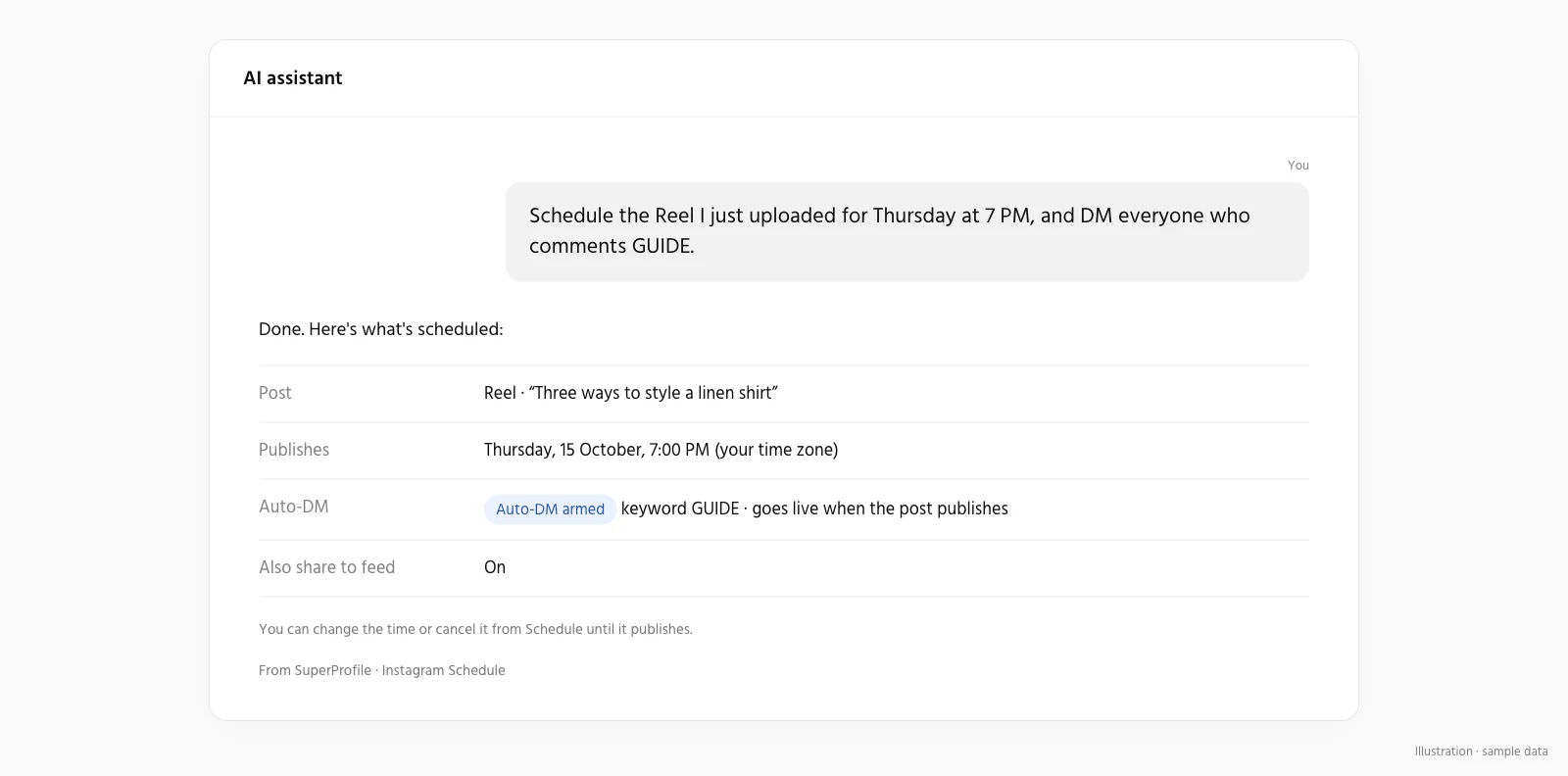
Yes. Connect the SuperProfile MCP server to Claude, ChatGPT or another assistant and ask: “Schedule this Reel for Friday at 7 pm with my usual caption.” It can also reschedule up to 50 posts in one request, preview your grid and read a published post's reach, likes, comments, saves, shares and views (plus watch time for Reels).
Frequently asked questions
Can I schedule Instagram Reels and Stories?
Yes. You can schedule feed photos, carousels of 2 to 10 photos or videos, Reels (3 seconds to 15 minutes, with an optional cover and share-to-feed) and Stories. They are published automatically through Meta's official Instagram content publishing API, with your account connected by Instagram login.
Does it post automatically or just remind me?
It posts automatically, through Meta's official Instagram content publishing API, with your account connected by Instagram login. You do not need to open Instagram at the scheduled time.
How far ahead can I schedule Instagram posts?
From 2 minutes ahead (15 minutes for posts with video) up to 90 days ahead, in the time zone you choose.
Can I schedule an Instagram post with a first comment?
Yes. Add a first comment when you schedule the post, and it is posted right after the post goes live. First comments are not available on Stories.
Can I try different captions on one scheduled post?
Yes. Click + Add caption option, write up to 10 options and pick the one to post with Use this caption; you can change the pick until the post publishes. Only the selected caption is posted, and the other options stay with the post and are never published. SuperProfile doesn't test them or choose one for you. Scheduling is on SuperProfile's paid plans.
Can I schedule Instagram trial reels?
Yes, for Instagram Reels on accounts Instagram allows trial reels for (200 followers on a public professional account). See Instagram trial reels: eligibility, how to post and schedule.
Can I schedule Reels with collaborators?
Yes. Invite up to 3 collaborators on a scheduled post, carousel or Reel, so it also appears on their profiles. Collaborators are not available on Stories.
Is there an Instagram scheduler with Auto-DM?
Yes. In SuperProfile you can attach an Auto-DM to a scheduled Instagram photo, carousel, Reel or Story until 10 minutes before it goes live (on a photo, carousel or Reel it answers comments; on a Story it answers private Story replies, not Story comments); the automation starts when the post publishes, and your Auto-DM plan limits apply. On a post or Reel, people who comment your keyword get your link in their DMs; on a Story, people whose private reply matches your keyword do, within Meta's rules.
Can a scheduled Instagram Story send an Auto-DM?
Yes. Add an Auto-DM to the Story before it goes live. It answers private Story replies, not Story comments: people whose reply matches your keyword get your DM, or anyone who replies if you choose any reply. It answers replies to that one Story only. Facebook Page Stories can't take an Auto-DM.
Who can use the Instagram scheduler?
Available on all SuperProfile paid plans, from Schedule in the dashboard; free creators see an upgrade prompt. See the SuperProfile pricing page for plans.
Do I need a business account?
You need an Instagram professional account (creator or business), because Meta's publishing API works only with professional accounts. A personal account can switch to a free creator account in Instagram's settings.
Can I schedule for more than one Instagram account?
Yes. Connect each account and pick which one a post goes to.
What happens if a post fails?
If a post can't be published, SuperProfile stops trying two hours after its time and marks it failed, and you can retry it.
How many posts can I schedule in a day?
Meta allows an Instagram account up to 100 posts through its publishing API in 24 hours, and SuperProfile checks that limit before each post.
Can Claude or ChatGPT schedule my Instagram posts?
Yes. Connect the SuperProfile MCP server and ask, for example, to schedule a Reel for Friday at 7 pm. The assistant can also preview your grid, move posts and read a published post's insights.
Can I schedule LinkedIn posts with SuperProfile?
Yes. You can schedule text posts, one photo (JPG, PNG or GIF), multi-image posts of 2 to 20 images, one video (MP4, 3 seconds to 15 minutes) and one PDF document, on your personal LinkedIn profile, from the same Schedule calendar as your Instagram and Facebook Page posts.
Do I need to reconnect LinkedIn?
You connect your personal LinkedIn profile from Schedule with LinkedIn sign-in (it asks to post on your behalf); LinkedIn authorization normally expires after 60 days and SuperProfile doesn't renew it automatically, so you reconnect in Schedule; posts scheduled after it expires need you to reconnect first, so SuperProfile emails you 7 days and 1 day before it ends if you still have LinkedIn posts scheduled, and Schedule warns you when a post is set for after the connection ends.
Can I add a first comment or an Auto-DM to a LinkedIn post?
First comments aren't supported for LinkedIn in SuperProfile. No Auto-DM, collaborators, location or people tags, and no separate link field; URLs go in the post text.
Who can schedule LinkedIn posts?
Scheduling LinkedIn posts is part of the paid Schedule, the same as Instagram and Facebook Page scheduling: creating, changing and scheduling posts needs a paid plan; viewing and cancelling stay open, and connecting LinkedIn is not plan-gated. See the SuperProfile pricing page for plans.
Instagram scheduling on SuperProfile
- How to schedule Instagram posts, Reels and Stories
- Instagram trial reels: eligibility, how to post and schedule
- Schedule Instagram posts from Claude or ChatGPT
- Facebook Page scheduler: posts, Reels and Stories
- LinkedIn post scheduler: text, images, video and PDFs
- Instagram schedulers compared: Later, Buffer, Meta Business Suite
- Instagram Reel size, aspect ratio and cover size
- How to post on Instagram from a PC or Mac
- Instagram Creator Studio and Meta Business Suite
- Instagram DM automation guide
- Instagram and Messenger Auto-DM
Other SuperProfile products
Last updated .