
Instagram post size: feed, carousel and Story dimensions
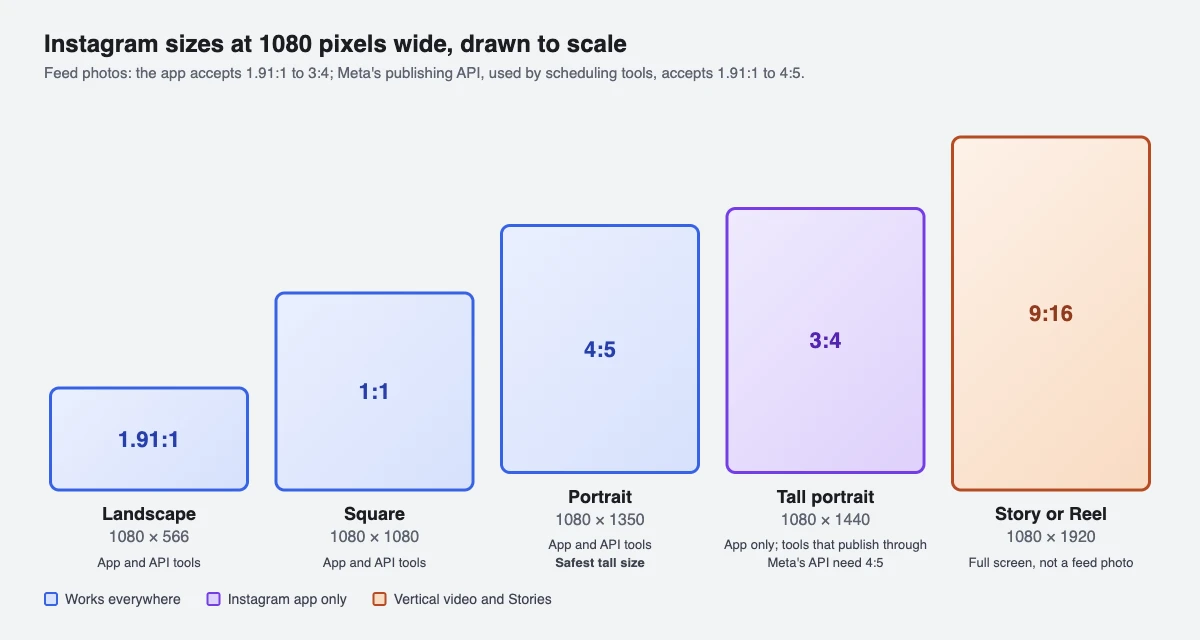
Use 1080 x 1350 pixels (4:5) for a portrait feed post, 1080 x 1080 for a square and 1080 x 1920 (9:16) for Stories and Reels. Instagram's own Help Center says the app accepts feed photos from 1.91:1 to 3:4, but Meta's publishing API, which scheduling tools use, stops at 4:5, so 4:5 is the tall size that works everywhere.
What is the best size for an Instagram post?
Export feed photos 1080 pixels wide. Height then sets the shape. The middle column is what Instagram and Meta state (read 1 November 2026); the right column is our recommendation, which is not an Instagram rule.
| Format | What Instagram or Meta states | Our recommendation |
|---|---|---|
| Feed photo, any shape | App: 1.91:1 to 3:4, 1080 pixels wide, 566 to 1440 tall. Publishing API: 4:5 to 1.91:1 | 1080 x 1350 (4:5) portrait |
| Square photo | Inside both ranges | 1080 x 1080 (1:1) |
| Landscape photo | 1.91:1 is the widest allowed | 1080 x 566 |
| Carousel | Up to 20 photos and videos in the app; one orientation for the whole post | Same size on every slide, 1080 x 1350 |
| Story | Meta recommends 9:16 to avoid cropping or blank space | 1080 x 1920 |
| Reel | 1.91:1 to 9:16, minimum 720 pixels; cover photo 420 x 654 | 1080 x 1920 (Reel size guide) |
Is Instagram 3:4 or 4:5 now?
Both are legal in the Instagram app, and that is where the confusion comes from. Instagram's Help Center says the app keeps a photo's original resolution when its ratio is between 1.91:1 and 3:4. A 4:5 photo (0.8) and a 3:4 photo (0.75) both sit inside that range, and 3:4 is the tallest the app accepts without cropping.
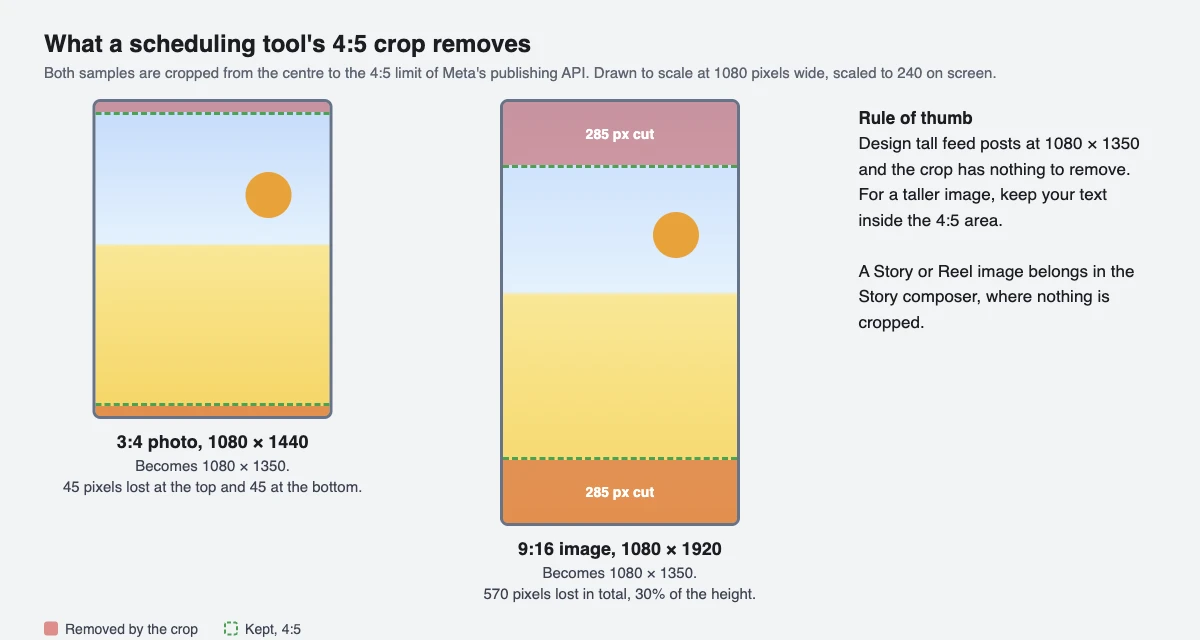
The catch is who publishes the post. Meta's Instagram publishing API (used by scheduling tools) takes a JPEG up to 8 MB, 320 to 1440 pixels wide, with an aspect ratio between 4:5 and 1.91:1, converted to the sRGB colour space. So a 3:4 photo (1080 x 1440) uploaded in the app is fine, while the same file sent through a scheduling tool has to be cropped to 4:5 first. If you plan to schedule, design at 1080 x 1350 and the question never comes up.
Instagram's photo-size articles do not state a profile grid ratio, so we don't give you a number for it. Check how a post will sit next to your others before it goes live. SuperProfile's scheduler has a grid preview that shows your upcoming feed posts above your recent published posts.
What happens if my photo is the wrong size?
Instagram does not reject it; it adjusts it. Instagram uploads photos at up to 1080 pixels wide. A photo between 320 and 1080 pixels wide keeps its original resolution if its aspect ratio is between 1.91:1 and 3:4 (1080 pixels wide, 566 to 1440 pixels tall). A ratio outside that range is cropped to fit a supported one, a photo narrower than 320 pixels is enlarged to 320 wide, and a wider one is sized down to 1080. So a sharp photo needs at least 1080 pixels of width, and pixels beyond 1080 are discarded.
Scheduling tools have the same boundary with less forgiveness. When you schedule with SuperProfile, if a feed photo is taller than 4:5 or wider than 1.91:1, the SuperProfile composer crops it from the centre to the nearest allowed edge (4:5 or 1.91:1) and tells you what it did; photos already inside that range are not cropped, and Story photos are not cropped. SuperProfile crops from the centre, so keep important text away from the top and bottom edges of a tall image. The Help Center doesn't say where the app itself crops.
What file types and file sizes work?
In the app, Instagram's Help Center lists JPG, PNG and HEIC/HEIF as supported photo formats when posting from a computer. For posts published through Meta's API the limits are tighter: JPEG only, up to 8 MB, between 320 and 1440 pixels wide, converted to the sRGB colour space.
SuperProfile does the conversion for you. It takes JPEG, PNG or WEBP photos up to 30 MB and at least 320 pixels wide; PNG and WEBP are converted to JPEG, a photo wider than 1440 pixels is scaled down to 1440, and HEIC photos are not supported (export as JPEG first). The converted JPEG must still come in under Meta's 8 MB.
What size should carousel slides be?
Pick one ratio for the whole carousel. In Instagram's own steps, a carousel can hold up to 20 photos and videos in the Instagram app; the orientation you choose (square, portrait or landscape) applies to every item, and videos inside a carousel are not Reels and don't appear in the Reels tab. Crop every slide to the same shape before you upload, 1080 x 1350 for portrait or 1080 x 1080 for square, so no slide gets re-cropped differently from the rest.
Scheduling through Meta's API is narrower than the app: SuperProfile's scheduler publishes carousels of 2 to 10 photos or videos, and a video inside a scheduled carousel can run 3 to 60 seconds. Reels have their own limits, in the Reel size guide.
What size are Instagram Stories?
Meta publishes a ratio, not a pixel size: for Stories published through Meta's API, Meta asks for a JPEG up to 8 MB and recommends a 9:16 aspect ratio to avoid cropping or blank space. 1080 x 1920 is that 9:16 ratio at Instagram's usual 1080-pixel width, so it is our recommendation rather than a stated rule. Our tip: keep faces and text away from the very top and bottom, where the app draws its own bar and reply field.
Story photos are never cropped by SuperProfile's scheduler, so a 1080 x 1920 image goes up exactly as made. Reels use the same 9:16 shape with their own rules and cover size, covered in our Instagram Reel size guide.
Can I schedule posts at these sizes?
We build SuperProfile, so this is our tool. Its Instagram scheduler is available on all SuperProfile paid plans, from Schedule in the dashboard; free creators see an upgrade prompt. It publishes feed photos, carousels, Reels and Stories automatically through Meta's official Instagram content publishing API, so you need an Instagram professional account (creator or business), because Meta's publishing API works only with professional accounts. You can also attach an Auto-DM to a scheduled post, as covered in scheduling an Instagram post with Auto-DM.
Start with the Instagram scheduler, or follow how to schedule Instagram posts, Reels and Stories.
Frequently asked questions
What is the best size for an Instagram post?
1080 x 1350 pixels (4:5) for a portrait feed post. It sits inside what the Instagram app accepts and inside what scheduling tools can publish. 1080 x 1080 works for a square.
Is the Instagram post size 1080x1350 or 1080x1440?
Both work in the Instagram app, which accepts photos from 1.91:1 to 3:4 (1080 x 566 to 1080 x 1440). Posts published through Meta's API, as scheduling tools do, accept 4:5 at the tallest (1080 x 1350).
What is the Instagram aspect ratio for posts?
Between 1.91:1 (landscape) and 3:4 (tall portrait) in the app, according to Instagram's Help Center. Through Meta's publishing API it is 4:5 to 1.91:1.
What size is an Instagram carousel?
Pick one ratio for every slide, since the orientation applies to the whole post. 1080 x 1350 is the safe choice. The app allows up to 20 items; SuperProfile's scheduler publishes 2 to 10.
What happens to a photo that is too wide or too tall?
Instagram crops it to a supported ratio. A scheduling tool built on Meta's API needs the photo inside 4:5 to 1.91:1; SuperProfile crops from the centre and tells you.
What size is an Instagram Story?
Meta recommends a 9:16 ratio. 1080 x 1920 pixels is the usual pixel size for it.
More guides
Last updated .