
Instagram carousel size: slide dimensions, slide count and seamless carousels
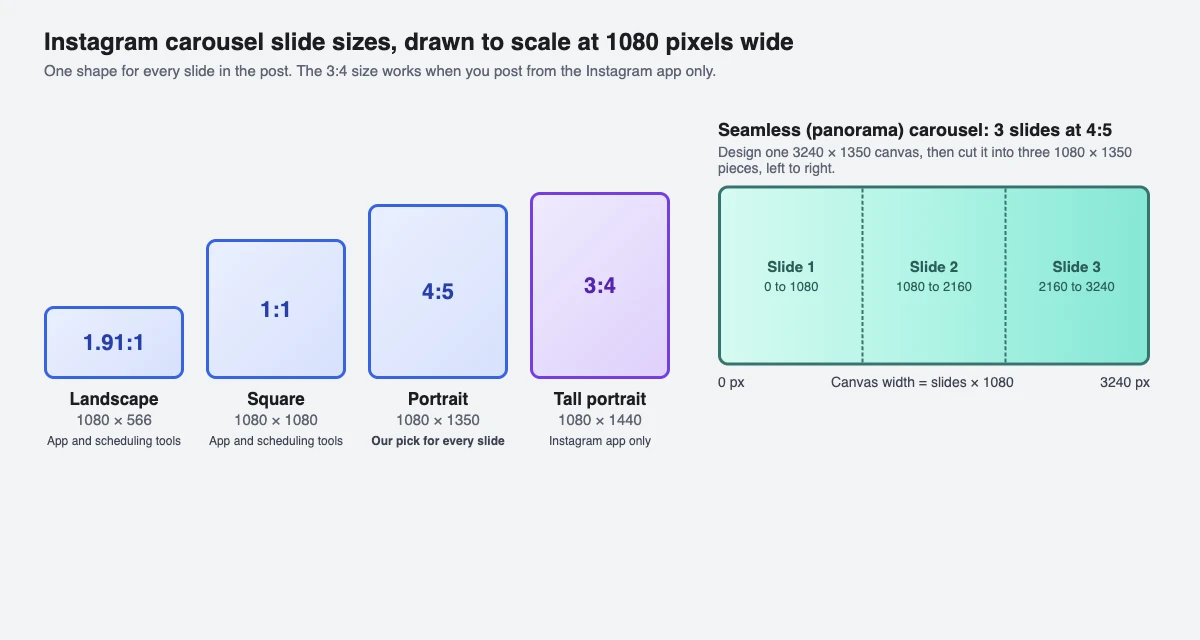
Make every slide 1080 x 1350 pixels (4:5). Square 1080 x 1080 and landscape 1080 x 566 also work, but a carousel takes one shape for all its slides. The taller 3:4 (1080 x 1440) works only when you post from the Instagram app. For single photos, Stories and Reels, see our Instagram post size guide.
What size should Instagram carousel slides be?
Export every slide 1080 pixels wide, in the same shape. The middle column is what Instagram and Meta state (read 1 and 14 November 2026); the right column is the pixel size at that shape.
| Shape | Where it works | Pixel size |
|---|---|---|
| Portrait 4:5 (our pick) | Instagram app and tools that publish through Meta's API | 1080 x 1350 |
| Square 1:1 | Instagram app and Meta's API | 1080 x 1080 |
| Landscape 1.91:1 | Instagram app and Meta's API | 1080 x 566 |
| Tall portrait 3:4 | Instagram app only | 1080 x 1440 |
The sources: in Instagram's Help Center, Instagram uploads photos at up to 1080 pixels wide. A photo between 320 and 1080 pixels wide keeps its original resolution if its aspect ratio is between 1.91:1 and 3:4 (1080 pixels wide, 566 to 1440 pixels tall). A ratio outside that range is cropped to fit a supported one, a photo narrower than 320 pixels is enlarged to 320 wide, and a wider one is sized down to 1080. In Meta's developer documentation, Meta's Instagram publishing API (used by scheduling tools) takes a JPEG up to 8 MB, 320 to 1440 pixels wide, with an aspect ratio between 4:5 and 1.91:1, converted to the sRGB colour space. Portrait 4:5 is the tallest shape that both accept, which is why we use it.
Can carousel slides have different sizes?
No. In Instagram's own steps, a carousel can hold up to 20 photos and videos in the Instagram app; the orientation you choose (square, portrait or landscape) applies to every item, and videos inside a carousel are not Reels and don't appear in the Reels tab. You can drag each photo to change what part of it sits in the frame, but not change the frame.
Tools that post through Meta's API follow a similar rule, per Meta's content publishing guide: Meta's Instagram publishing API allows up to 20 images, videos or a mix in one carousel, and crops every carousel image based on the first image in the carousel (1:1 by default). So if slide 1 is square and slide 2 is portrait, slide 2 gets cropped. Crop every slide to the same shape before you upload, and you decide what is cut instead of the app.
How many slides can an Instagram carousel have?
Up to 20 photos and videos in the Instagram app, or a mix of both, and Meta's API allows 20 as well. Videos inside a carousel are not Reels: they don't appear in your Reels tab.
Scheduling tools can set their own lower cap. SuperProfile's scheduler takes 2 to 10 photos or videos per Instagram carousel (its own cap; Meta's API allows 20), and centre-crops any carousel photo taller than 4:5 or wider than 1.91:1 to the nearest allowed edge, with a note saying what it did. A video inside a scheduled carousel can run 3 to 60 seconds.
How do I size a seamless (panorama) carousel?
A seamless carousel is one wide picture cut into slides, so the image continues as people swipe. Instagram has no special setting for it: you design one wide canvas and cut it yourself. The arithmetic is simple, canvas width = number of slides x 1080, at the height of your chosen shape.
| Slides | Canvas at 4:5 (1350 tall) | Canvas at 1:1 (1080 tall) |
|---|---|---|
| 2 | 2160 x 1350 | 2160 x 1080 |
| 3 | 3240 x 1350 | 3240 x 1080 |
| 4 | 4320 x 1350 | 4320 x 1080 |
| 5 | 5400 x 1350 | 5400 x 1080 |
| 10 | 10800 x 1350 | 10800 x 1080 |
Cut the canvas into 1080-pixel-wide pieces from left to right (0 to 1080, 1080 to 2160 and so on) and upload them in that order. Keep faces and text away from the cut lines, since each slide is viewed on its own.
Should I use 3:4 or 4:5 for a carousel?
Use 3:4 (1080 x 1440), the taller shape, only if you post from the Instagram app yourself. Use 4:5 (1080 x 1350) if you schedule, because Meta's publishing API, which scheduling tools such as SuperProfile's use, accepts nothing taller than 4:5.
On SuperProfile, a 3:4 slide is not rejected: the composer crops it from the centre to 4:5 and tells you. That trims about 45 pixels from the top and bottom of a 1080 x 1440 slide (90 in total), so keep text out of those strips, or export at 4:5 to start with.
What file types work for carousel slides?
Instagram's Help Center lists JPG, PNG and HEIC/HEIF as supported photo formats when posting from a computer. Instagram's Help Center does not list a file-size cap for carousel slides, so we don't quote one; the 30 MB figure on many blogs is not from those pages.
Through Meta's API, photos must be JPEG. If you schedule from SuperProfile you can still upload JPEG, PNG or WEBP photos up to 30 MB and at least 320 pixels wide; PNG and WEBP are converted to JPEG, a photo wider than 1440 pixels is scaled down to 1440, and HEIC photos are not supported (export as JPEG first).
Can I schedule a carousel at this size?
Yes. SuperProfile's Instagram scheduler publishes carousels through Meta's official Instagram content publishing API, so you need an Instagram professional account (creator or business), because Meta's publishing API works only with professional accounts. The scheduler itself is available on all SuperProfile paid plans, from Schedule in the dashboard; free creators see an upgrade prompt. You can also attach an Auto-DM that answers comments on the carousel, covered in scheduling an Instagram post with Auto-DM.
Start with the Instagram scheduler, or see how to schedule Instagram posts, Reels and Stories. Sizes for single photos, Stories and Reels are in the post size guide, the Story size guide and the Reel size guide.
Frequently asked questions
What is the Instagram carousel size?
1080 x 1350 pixels (4:5 portrait) for every slide. Square 1080 x 1080 and landscape 1080 x 566 also work. All slides in one carousel share one shape.
Is an Instagram carousel 3:4 or 4:5?
Either, if you post from the Instagram app, which accepts up to 3:4 (1080 x 1440). Scheduling tools publish through Meta's API, which accepts up to 4:5 (1080 x 1350), so 4:5 is the size that works everywhere.
How many photos can you put in an Instagram carousel?
Up to 20 photos and videos in the Instagram app. SuperProfile's scheduler takes 2 to 10 per carousel.
What size is a 3-slide seamless carousel?
3240 x 1350 pixels at 4:5, or 3240 x 1080 for square slides. Cut it into three 1080-pixel-wide pieces, left to right.
Can each carousel slide have a different size?
No. The shape you pick applies to every photo and video in the post, and Meta's API crops carousel images based on the first one. Crop all slides to the same shape before uploading.
More guides
Last updated .