
Facebook Page scheduler
Schedule your Facebook Page from the same SuperProfile calendar as your Instagram: text posts, link posts, photos, albums of 2 to 10 photos, videos, Reels, and Stories with one photo or video. Add an Auto-DM, and people who comment get your link in Messenger.
Key facts
- What you can schedule
- Text posts, link posts, photos, albums of 2 to 10 photos, videos, Reels, and Stories with one photo or video
- Account
- A Facebook Page connected in SuperProfile Auto-DM through Messenger; the same Schedule calendar holds your Instagram and Facebook Page posts
- When
- From 2 minutes ahead (15 minutes for posts with video) up to 90 days ahead, in the time zone you choose
- Who can use it
- Available on all SuperProfile paid plans, from Schedule in the dashboard; free creators see an upgrade prompt
What works differently on a Facebook Page?
- No first comment on Page posts yet: Facebook hasn't granted SuperProfile permission to comment as your Page
- No collaborators, location or people tags, and no Reel cover options, because Facebook's API doesn't offer them for Page posts
- Alt text works on photos and albums
- Stories publish without text
SuperProfile does not crop a Facebook Page photo, album or video post to any particular aspect ratio, unlike Instagram posts, which are cropped to Instagram's feed aspect range. A Facebook photo is still downscaled if it's wider than 1440 pixels, converted to JPEG if it was PNG or WEBP, and must be at least 320 pixels wide. For the one size Meta does publish an official spec for (a shared link's preview image), see our Facebook post size guide.
Can a scheduled Facebook post send Messenger DMs?
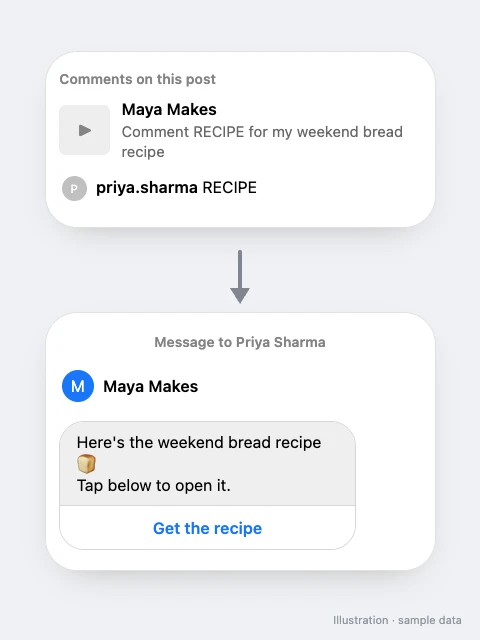
Yes. You can attach an Auto-DM to a scheduled Facebook Page post (not a Story): people who comment get your message in Messenger once the post is live. Ask people to comment a keyword, and they get your link, product or guide in Messenger. See Facebook Messenger Auto-DM.
How do I schedule a Facebook Page post?
- Connect your Facebook Page in Auto-DM (Messenger), on a paid plan.
- Open Schedule in your dashboard and select New post.
- Pick your Facebook Page as the account, then choose text, link, photo, album, video, Reel or Story.
- Add the text, link or media, and optionally an Auto-DM keyword.
- Pick the date and time and select Schedule.
How do I manage my Facebook schedule?
- A calendar where you drag a post to another day and it keeps its time
- Edit a scheduled post, move it back to drafts, cancel it or duplicate it
- Retry a failed post at a new time
- More than one connected Instagram account, with an account picker
- If a post can't be published, Schedule shows the reason with Retry, Edit or Reconnect, and you get an email
Can an AI assistant schedule Facebook posts for me?
Yes. Connect the SuperProfile MCP server to Claude, ChatGPT or another assistant and ask: “Schedule this video on my Facebook Page for Sunday at 6 pm.” It can also read the views, unique viewers, clicks and reactions of a published Page post.
Frequently asked questions
Can I schedule Facebook Page posts with SuperProfile?
Yes. You can schedule text posts, link posts, photos, albums of 2 to 10 photos, videos, Reels, and Stories with one photo or video on your Facebook Page. They publish automatically at the time you pick.
Can I schedule Facebook Reels and Stories?
Yes. Reels and Stories with one photo or video are supported. Stories publish without text.
Does it work for a personal Facebook profile?
No. It publishes to a Facebook Page you manage. Facebook doesn't let apps publish to personal profiles.
Can I schedule Instagram and Facebook posts in one place?
Yes. A Facebook Page connected in SuperProfile Auto-DM through Messenger; the same Schedule calendar holds your Instagram and Facebook Page posts. Each post goes to the account you pick for it.
Can I write more than one caption for a Facebook post?
Yes. With + Add caption option you can keep several versions of the Page post text and choose one with Use this caption. Only that version goes to your Page.
Can a scheduled Facebook post send DMs to people who comment?
Yes. You can attach an Auto-DM to a scheduled Facebook Page post (not a Story): people who comment get your message in Messenger once the post is live.
Can I add a first comment to a Facebook Page post?
Not yet. Facebook hasn't granted SuperProfile permission to comment as your Page, so the first comment is available on Instagram posts only.
What happens if a post fails?
If a post can't be published, Schedule shows the reason with Retry, Edit or Reconnect, and you get an email.
Instagram scheduling on SuperProfile
- Instagram scheduler: features
- How to schedule Instagram posts, Reels and Stories
- Instagram trial reels: eligibility, how to post and schedule
- Schedule Instagram posts from Claude or ChatGPT
- LinkedIn post scheduler: text, images, video and PDFs
- Instagram schedulers compared: Later, Buffer, Meta Business Suite
- Instagram Reel size, aspect ratio and cover size
- How to post on Instagram from a PC or Mac
- Instagram Creator Studio and Meta Business Suite
- Instagram DM automation guide
- Instagram and Messenger Auto-DM
Other SuperProfile products
Last updated .