
Super AI: the AI assistant inside your SuperProfile dashboard
Super AI is SuperProfile's own AI assistant. Ask it about your sales, or tell it what to set up, such as a digital product, a course or an Instagram Auto-DM, and it prepares the change for you to review. Super AI is in public beta for creators on a paid SuperProfile plan; creators on the free plan do not see it yet.
What is Super AI?
Super AI is an assistant that lives in your SuperProfile dashboard. It can read your products, sales, Auto-DMs and posts once you allow it, so you can ask a question about your business or ask it to get something done. It is in public beta and can make mistakes.
Who can use Super AI, and where do I find it?
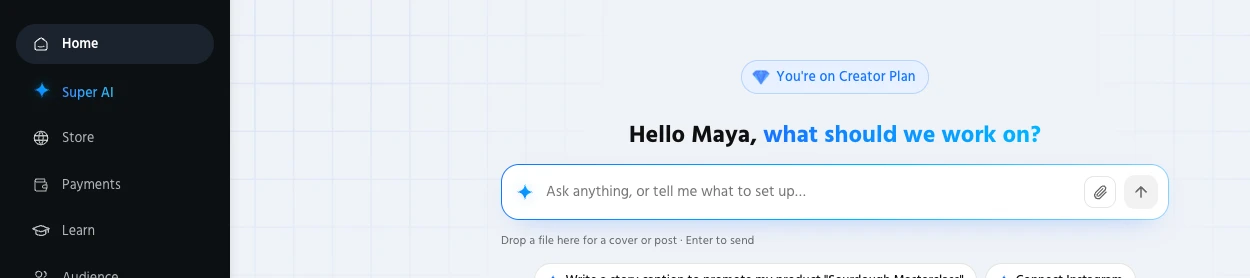
Super AI is in public beta for creators on a paid SuperProfile plan; creators on the free plan do not see it yet. Once it is available to your account, you find it here:
- Super AI in the dashboard sidebar on desktop
- Super AI in the More menu on mobile
- A Super AI card on the Home screen
- A one-time Allow step the first time: "Allow Super AI to work on your account", which lets it read your products, sales, Auto-DMs and posts
What can Super AI do for me?
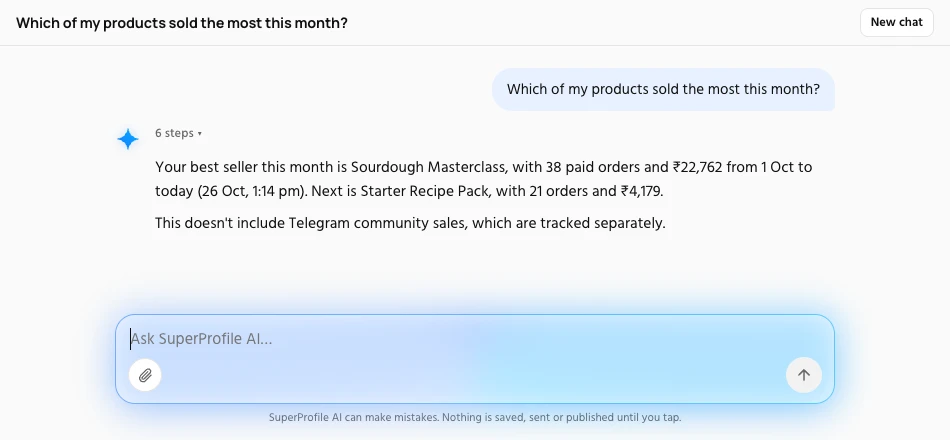
- Answer questions about your sales and analytics, such as which products sell best
- Create and edit digital products, courses, webinars, 1:1 bookings, lead magnets and locked content, starting as drafts
- Set up, edit, pause and turn on Instagram Auto-DM automations, and suggest reply variations
- Schedule Instagram posts and write or edit captions
- Look up one buyer's orders from their email or phone number (read-only)
- Work with paid Telegram communities
- Change comment moderation and Brand Collab settings
- Read your Instagram insights
Each of these works on the same products you already have on SuperProfile. See the pages for digital products, courses, webinars, 1:1 sessions, lead magnets, locked content, paid Telegram communities, Auto-DM and the Instagram scheduler.
What can I ask it?
| You ask | What happens |
|---|---|
| “How did my Auto-DMs do this week?” | Reads your Auto-DM results and answers in plain words. |
| “Set up a DM for my latest reel” | Prepares an Auto-DM automation for you to review before it goes live. |
| “Schedule my next draft” | Prepares the scheduled post for you to confirm. |
| “Reply to people who asked for the price” | Prepares the reply for you to review. |
| “Hide spam on my reels” | Proposes a comment moderation change. |
| “Any brand deals?” | Looks at your Brand Collab requests. |
These are the starter questions Super AI shows in the dashboard. You can also type your own, in your own words.
How do I stay in control?
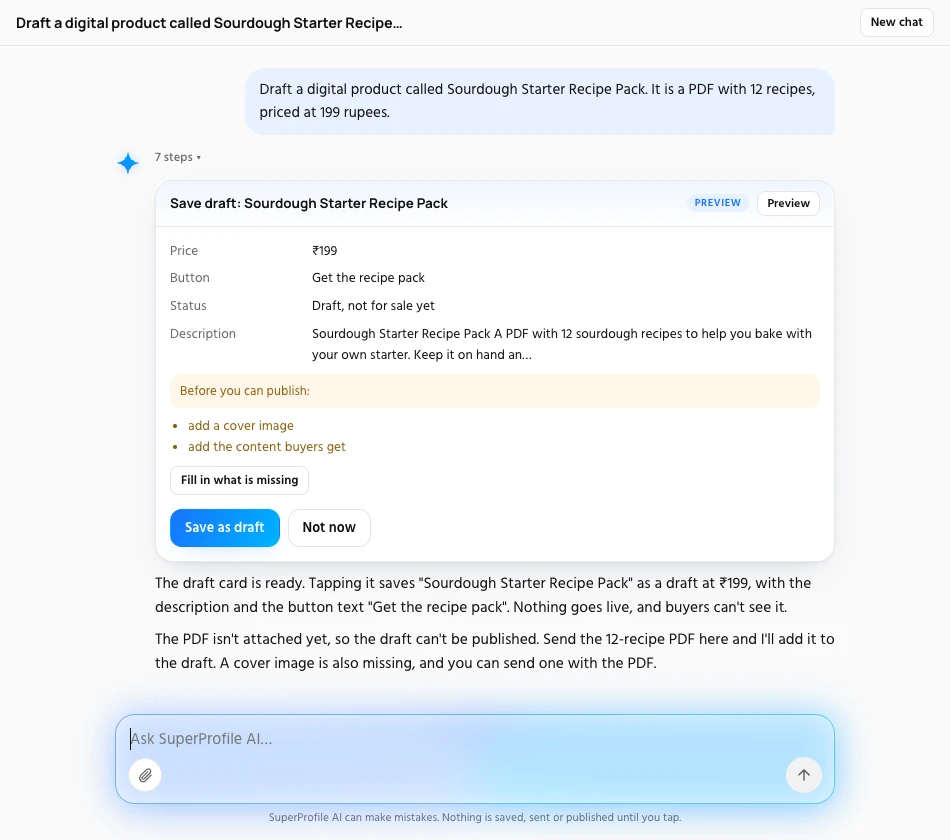
Super AI proposes every change as a preview card; nothing is saved, sent or published until you tap, and Not now dismisses it with nothing changed. Its footer says it can make mistakes.
- Ask Super AI for something in plain words.
- It shows a preview card with what it would change.
- Read it. Tap the button to apply it, or tap Not now to dismiss it with nothing changed.
Super AI cannot create email broadcasts or send a message to a brand for you; it can draft the brand message for you to copy.
How is Super AI different from using Claude or ChatGPT with SuperProfile?
Super AI is built into your dashboard, so there is nothing to connect. If you prefer your own assistant, the SuperProfile MCP server works with Claude and ChatGPT; see the Claude and ChatGPT setup pages.
How do I start?
- Create a SuperProfile account and move to a paid plan; see the SuperProfile pricing page.
- Open Super AI from the sidebar (or More on mobile) or from the Home screen.
- Tap Allow the first time, then ask your first question.
Frequently asked questions
What is Super AI?
Super AI is the AI assistant inside the SuperProfile dashboard. You ask it about your sales or tell it what to set up, and it prepares the change for you to confirm.
Who can use Super AI?
Super AI is in public beta for creators on a paid SuperProfile plan; creators on the free plan do not see it yet. See the SuperProfile pricing page for plans.
Can Super AI publish things without asking me?
No. Super AI proposes every change as a preview card; nothing is saved, sent or published until you tap, and Not now dismisses it with nothing changed. Its footer says it can make mistakes.
Can I use AI to create a digital product on SuperProfile?
Yes. Tell Super AI what you want to sell, for example an ebook or a template pack, and it prepares the product as a draft for you to review. You add your files and publish it yourself. See digital products for what you can sell.
Does Super AI make mistakes?
It can. It is in public beta, so read each preview before you tap to confirm, and use the Not now button when something is wrong.
Is Super AI the same as the SuperProfile MCP server?
No. Super AI lives inside your SuperProfile dashboard. The SuperProfile MCP server lets you run your store from your own AI assistant, such as Claude or ChatGPT.
Other SuperProfile products
Last updated .