
Automate Facebook Messenger replies
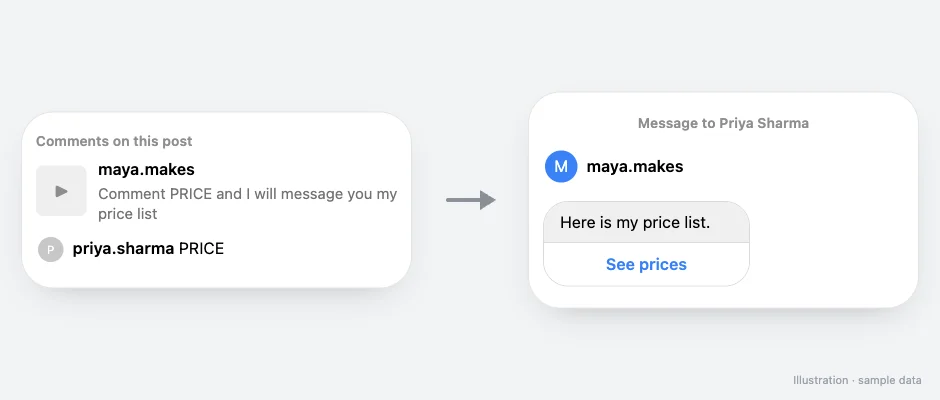
Send a Messenger DM when someone comments on your Facebook Page posts, messages your Page, or opens your m.me link or QR code.
How it works
- Trigger
- Comments on any or a specific Facebook Page post, incoming Messenger DMs, and m.me links or QR codes
- The DM
- Text, buttons, images, video, PDFs and cards
- Then
- Follow-ups after a delay
How do I set it up?
- Connect your Facebook Page in SuperProfile Auto-DM.
- Pick the trigger: a post comment, a Messenger DM, or an m.me link or QR code.
- Write the message and add buttons.
- Publish, and share the Messenger link or QR code where your audience is.
Can an AI assistant set this up?
Yes. Connect the SuperProfile MCP server to Claude, ChatGPT or another assistant and ask: “Create a Messenger automation for my Facebook Page that sends my price list when someone comments PRICE on any post.” A new automation starts as a draft you review before it goes live. Auto-DM with an AI assistant.
Things to know
Meta's messaging windows and rules apply to all messages; follow-ups run within 23 hours of the person's message, inside Meta's messaging window. Auto-DM on Stories and Lives, ask-to-follow, email collection and follow-ups need a paid plan; see superprofile.bio for plans.
Frequently asked questions
Do I need a separate account?
You connect your Facebook Page; Messenger works alongside Instagram in the same Auto-DM dashboard.
More Auto-DM use cases
Last updated .