
Instagram DM templates for creators
Here are copy-paste Instagram DM templates for the ten messages creators automate most, from "comment LINK to get it" to price replies and checkout reminders. Each one has 4 to 6 ready variants (English and Hinglish), the public comment reply, button text, the follow-up and the exact limits it has to fit.
Which DM template do you need?
Pick the situation. Each page is a full template set you can send as Instagram auto DMs with SuperProfile or by hand. Need a tool to send them? See the best Instagram DM automation tools.
- Comment to get link DM template: The classic: someone comments your keyword, the DM sends the link.
- Lead magnet DM template: Deliver a free guide, checklist or template, and collect an email if you want one.
- Follow to get link DM template: Ask people to follow you before the link arrives, without sounding pushy.
- Webinar invite DM template: Invite commenters to a live class or masterclass and get them registered.
- Course launch DM template: Waitlist, launch day and last call DMs for selling a course.
- Affiliate link DM template: Send Amazon, Flipkart or other affiliate links with an honest disclosure.
- Price DM template: Answer "price?" and "kitna hai?" comments without typing the same reply all day.
- Abandoned cart DM template: Nudge people who opened your checkout link but did not buy.
- Follow-up DM template: Second messages for no reply, link not clicked, or after a delay.
- New follower welcome DM template: Welcome messages to send by hand, and what Meta lets you automate.
Looking for a picture of an Instagram DM screen for Canva or Figma? These pages are about the words inside the message, the part that decides whether people tap.
What makes a good auto-DM?
An auto-DM arrives a few seconds after someone shows interest, so it competes with nothing but their attention span. The templates on these pages follow five rules:
- Deliver in the first line. They commented for a link, so the link or the button is the point. Thank-yous and backstory go after, or nowhere.
- One message, one job. One button to one place. A DM with a guide, a course, a booking link and a discount code gets fewer taps on all four.
- Sound like your captions. If you write in Hinglish on Reels, a stiff English DM feels like a bot. Each template page has Hinglish variants for that reason.
- Set an honest expectation. Say what the link is and what happens next ("it is a 12-page PDF", "registration takes 30 seconds"). Surprises after the tap lose trust.
- Leave a door open. End with a way to reply. Replies keep the conversation inside Meta's window, which is what lets a follow-up go out later.
What limits does an auto-DM have to fit?
These are the limits in SuperProfile's Auto-DM editor today. The templates on every page are written to fit them.
| What | Limit in SuperProfile | Why it matters |
|---|---|---|
| Text-and-button DM on a post or Reel comment | 900 characters | The main DM most templates use. Aim for 200 to 400 so it reads in one glance. |
| Text DM on other Instagram triggers (Story replies, DMs, Lives) | 1,000 characters | A little more room, same advice: shorter gets more taps. |
| Facebook Messenger DM | 640 characters | Meta's own cap for Messenger button messages. |
| Buttons on one message | Up to 3 | One clear button usually beats three. |
| Button text | Up to 60 characters in the editor | Long labels can be cut off on small screens; 2 to 4 words is safest. |
| Public comment reply | 140 characters, up to 3 that rotate | Rotating replies keep your comment section from looking copy-pasted. |
| Follow-ups | Within 23 hours of the person's message | Meta's messaging window closes at 24 hours. |
| Personalisation | {{Name}}, {{Email}}, {{FollowerCount}} (paid plans) | Variables do not count toward the character limit. |
On a comment, Meta allows one private reply per comment. If your DM uses a variable like {{Name}} or has follow-ups, SuperProfile first sends a short opening message with a button (for example "Send me the link"), and the main DM goes when the person taps it. That tap is the reply that opens Meta's window. Write the opening line so it is worth tapping.
Which templates work on the free plan?
The free plan gives you Auto-DM on Instagram posts and Reels, one keyword per automation, text-and-button DMs that end with a short "Sent via" line naming SuperProfile's Instagram account. Paid plans add Stories, Lives and incoming-DM triggers, unlimited keywords, any-comment and all-posts triggers, ask-to-follow, email collection, follow-ups, more DM types, Facebook Messenger and more than one Instagram account. For prices, see superprofile.bio.
| Template | Works on the free plan? | What needs a paid plan |
|---|---|---|
| Comment to get link | Yes | Story, Live and DM triggers; more than one keyword |
| Lead magnet | Yes, as a link to the freebie | Collecting the email inside the DM |
| Follow to get link | No | The follow request step |
| Webinar invite | The DM, yes, linking any registration page | Hosting the webinar on SuperProfile; reminder follow-ups |
| Course launch | The DM, yes | Hosting and selling the course on SuperProfile; follow-ups |
| Affiliate link | Yes | Several keywords for several products on one post |
| Price | Yes, for one keyword on a post or Reel | DM and shared-post triggers, AI intent matching |
| Abandoned cart | No | Not-bought follow-ups |
| Follow-up | No | Follow-ups |
| New follower welcome | Sent by hand | Story reply and DM triggers that start a welcome flow |
How do you personalise a DM without it feeling automated?
Variables fill in details per person. SuperProfile supports {{Name}}, {{Email}} and {{FollowerCount}} in Instagram DMs on paid plans. Use the name once, near the start. If Instagram returns no name for someone, the variable is left blank, so put it where a blank still reads fine: "Hi {{Name}} 👋" survives a blank; "{{Name}}, you are going to love this" does not.
The bigger personal touch is matching the post. A DM that says "here is the 7-day meal plan from the Reel" feels written for them even without a name, because it is about the thing they just watched.
Stuck on wording? In the editor, a Rewrite button suggests up to 3 rewordings of your DM text or public comment reply, keeping links, variables, handles and numbers exactly as you wrote them; up to 50 rewrites per day. It is on paid plans.
Can an AI assistant set up these templates for you?
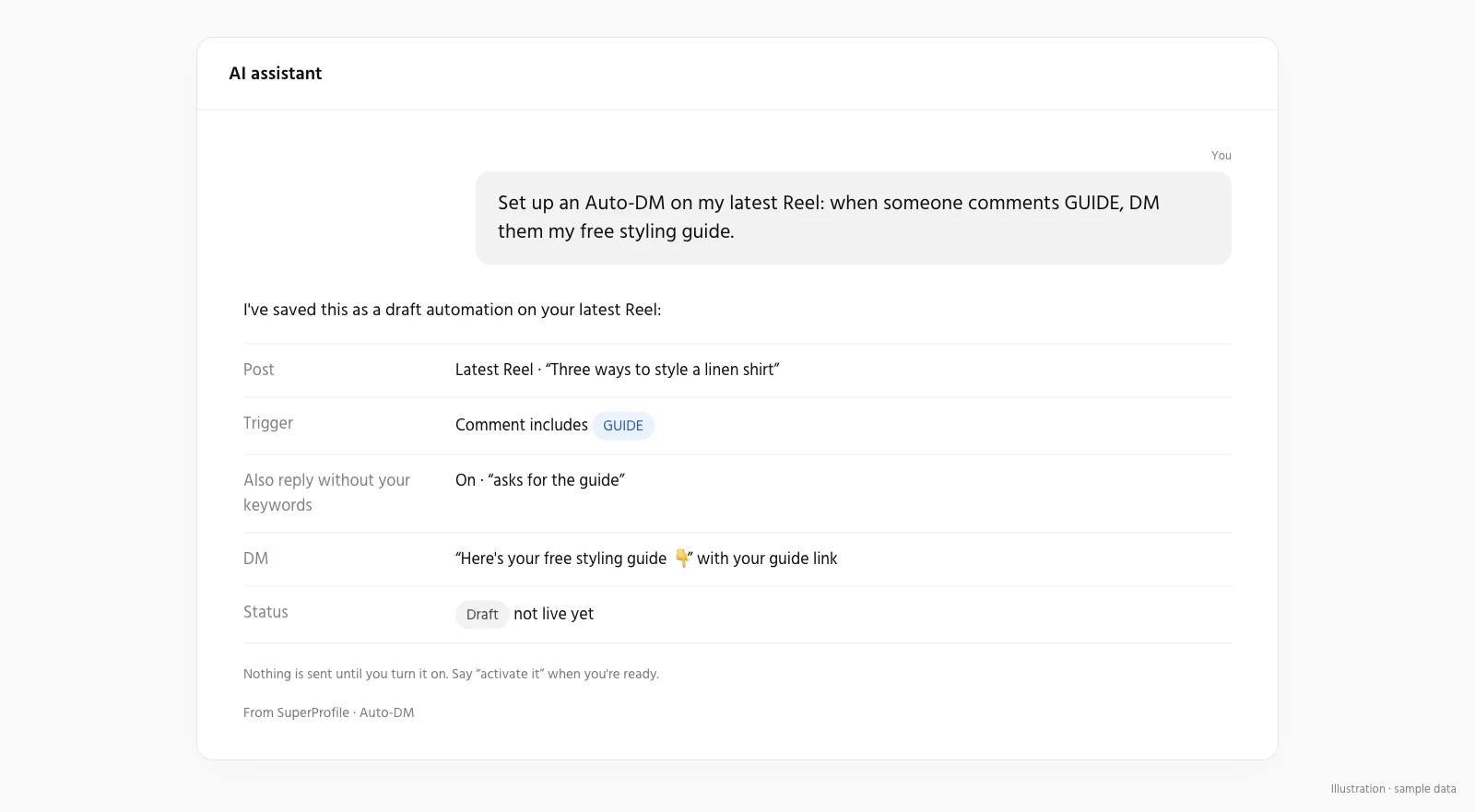
Yes. Connect Claude, ChatGPT or another assistant to SuperProfile and ask it to draft an automation with one of these templates, for example: "Create a draft automation for my latest Reel that sends my free guide when someone comments GUIDE, using the short variant from the lead magnet template." In SuperProfile's MCP server, new products, automations and posts start as drafts you can review first, so you review it before it goes live. See Auto-DM from an AI assistant.
What DM situations are not on this list?
- Replying to brands that DM you about collaborations: see how to reply to brand collaboration DMs and Brand Collab, which sorts those DMs for you.
- Auto-replies to Story replies and DMs in general: see Instagram auto reply.
- Comments that need hiding instead of a reply: see comment moderation.
- Facebook Page comments and Messenger: the DM text and button parts of these templates work; keep them under 640 characters and leave out variables, which Messenger does not fill in yet. See Messenger Auto-DM.
What does Meta allow in automated DMs?
Meta's messaging windows and rules apply to all messages. Per Meta's private replies documentation (read October 2026), a business can send one private reply to a comment, within 7 days of it; more messages need the person to respond, within 24 hours of that response. On SuperProfile, follow-ups run within 23 hours of the person's message, inside Meta's messaging window.
So no template can promise that a DM reaches a given person: a comment outside the window, an Instagram connection that has expired, or a Live that has already ended means no DM. Write the public comment reply so the person knows to check their DMs or message requests.
Frequently asked questions
What is an Instagram DM template?
A ready message you paste into an auto-DM tool or send by hand, written for one situation: sending a link after a comment, inviting someone to a live class, answering a price question, or following up.
How long should an Instagram auto-DM be?
Short enough to read without scrolling: 200 to 400 characters is a good target. SuperProfile allows up to 900 characters for a text-and-button DM on a post or Reel and 1,000 on other Instagram triggers.
Can I use the person's name in an auto-DM?
Yes, on SuperProfile's paid plans, with the {{Name}} variable. On a comment, using a variable means an opening message with a button goes first, and the main DM follows when the person taps it.
Do these templates work for Facebook Messenger?
Yes, as long as the message stays under 640 characters, which is Meta's cap for Messenger button messages, and has no variables like {{Name}}, which Messenger automations do not fill in yet.
Can I send an automated DM to new followers?
Not with SuperProfile, and not through Meta's standard messaging API: a business can message someone only after they comment or message first (Meta controls a limited Follow-to-DM beta for some tools). See the new follower welcome template for what to do instead.
More Instagram DM templates
More guides
Last updated .