
Webinar invite DM template for Instagram
A webinar invite DM should give the date, time with time zone, what people will learn and one button to register, in that order. Below are invitation variants for free and paid sessions, a same-day reminder, a replay message and how to run it from a Reel or an Instagram Live.
Templates: the invitation
Square brackets are yours to replace. Always write the time zone; Instagram audiences cross borders.
Variant 1: free webinar, short
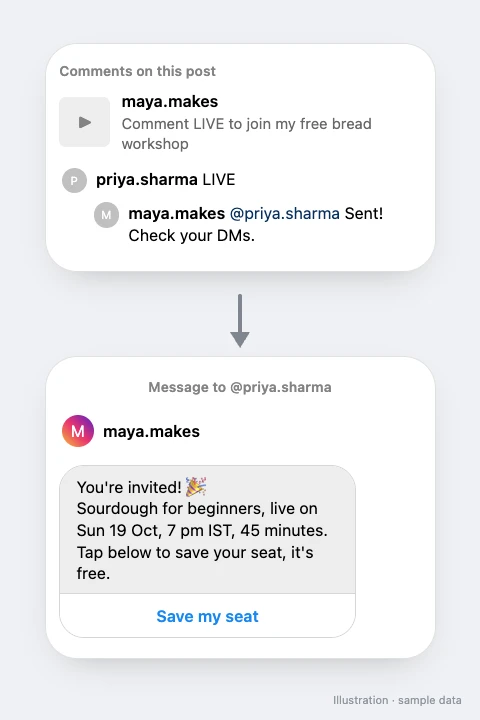
You're invited! 🎉
[Topic], live on [Sun 19 Oct, 7 pm IST], [45 minutes].
Tap below to save your seat, it's free.
Variant 2: lead with the outcome
In [60 minutes] I'll show you [how to plan a month of Reels in one sitting].
[Sat 25 Oct], [11 am IST], on Zoom. Register below 👇
Variant 3: paid masterclass
Here are the details for the [masterclass]:
📅 [Date], [time + time zone]
⏱ [2 hours] + live Q&A
🎟 Limited seats, tap below to book.
Variant 4: honest about the pitch
The workshop is free. At the end I'll share my [course] for those who want to go deeper, no pressure.
[Date, time]. Save your seat below.
Variant 5: Hinglish
Live class aa rahi hai! 🔴
[Topic] pe, [Ravivar 19 Oct, shaam 7 baje].
Free hai, neeche se register kar lo.
Variant 6: Hinglish, paid
[Masterclass] ki details 👇
[Date] ko [time] baje, Zoom pe. Seats limited hain, button se book karo.
Variant 4 states the pitch up front. People who register knowing there is an offer at the end stay longer and complain less.
What public reply and button text go with it?
Public replies
Invite sent, check your DMs 📩
Details are in your inbox 🎟
Sent! See you live 🔴
Button text: "Save my seat", "Register free" or "Book a seat". For paid sessions, "Book a seat" sets the right expectation before the checkout opens.
How do reminders work if the webinar is days away?
Instagram limits when you can message someone again. On SuperProfile, follow-ups run within 23 hours of the person's message, inside Meta's messaging window, so a DM reminder only works when the event is less than a day after the person messaged you. Plan around it:
| When they register | Best reminder |
|---|---|
| Days before the event | Email. SuperProfile webinars include reminder emails, and the registration page collects the email. |
| Within 23 hours of the event | A follow-up DM, for example 1 hour before the start (paid plans) |
| During your Instagram Live | A DM with the link right away; replies to Live comments go only while the Live is on |
Same-day follow-up DM
Starting in 1 hour! ⏰ Here is your link again 👇
Bring your questions, I'll answer live.
Same-day, Hinglish
1 ghante mein shuru! ⏰ Link yahan hai 👇 Questions ready rakhna.
The best trick for multi-day gaps: post a Reel or Story on the day of the session with a keyword like LIVE. A comment on a Reel gets one private reply, and a follow-up DM can go only after the person responds, for example by tapping the button in your opening message; a reply to a Story counts as a message, so it opens the window straight away.
What should you send after the session?
Replay DM (for someone who comments REPLAY on your recap Reel)
Here is the replay of [topic] 🎬
It stays up until [date]. The [offer] mentioned at the end is here too 👇
Only say "until [date]" if the replay or offer really closes then.
What should you customise?
- Date, time and time zone in every variant, written the way your audience says it.
- The outcome. One concrete thing they can do after the session.
- Free or paid. Paid invites should say so before the button, not after.
- Where it happens. SuperProfile webinars can be virtual, Zoom or in-person events.
What mistakes should you avoid?
- No time zone. "7 pm" is 7 pm for you only.
- Sending the Zoom link before registration. Send the registration page; the meeting link goes to people who registered.
- Fake scarcity. "Only 3 seats left" on an unlimited Zoom call is easy to see through.
- Four links in one DM. Registration only. The course or offer comes after the session.
How do you set it up in SuperProfile?
- Create the session as a webinar or event on SuperProfile, free or paid, with the date, time and reminder emails.
- In Auto-DM, create an automation on your announcement Reel or post with a keyword like LIVE or CLASS. On paid plans you can also use a Story or your Instagram Live.
- Paste an invitation template and add a button that opens the webinar. In SuperProfile, buttons can open one of your published SuperProfile products (payment pages, courses, webinars, 1:1 sessions, Telegram communities, locked content, lead magnets), your store or your referral link.
- On a paid plan, add a same-day follow-up if the session is within 23 hours.
- Add public replies, publish and test.
Hosting webinars on SuperProfile needs a paid plan; on the free plan the DM can link to a registration page you host elsewhere. More recipes: Sell products with Auto-DM.
Frequently asked questions
How do I write a webinar invitation message for Instagram?
Give the topic as an outcome, the date and time with time zone, the length, whether it is free or paid, and one button to register. Keep it under 400 characters.
Can I send webinar reminders by Instagram DM?
Only within 23 hours of the person's last message, because of Meta's messaging window. For reminders days ahead, use email; SuperProfile webinars include reminder emails.
Can I DM people who comment during my Instagram Live?
Yes, on paid plans. Per Meta's rules, those replies can only go while the Live is on.
More Instagram DM templates
More guides
Last updated .