
Course launch DM templates: waitlist to last call
A course launch on Instagram runs on three DMs: the waitlist message before launch, the launch-day message with the checkout button, and a short not-bought follow-up. Below are templates for each stage, plus replies to common objections and a welcome message for buyers.
Stage 1: what should the waitlist DM say?
Before launch, the keyword (for example WAITLIST) collects interest. Your goal is a contact you can reach on launch day, since an Instagram DM cannot be sent days later unless the person messages again.
Waitlist variant 1
You're on the list for [course name] 🙌
Doors open [date]. Add your email below so the launch link reaches you first.
Waitlist variant 2, with a reason
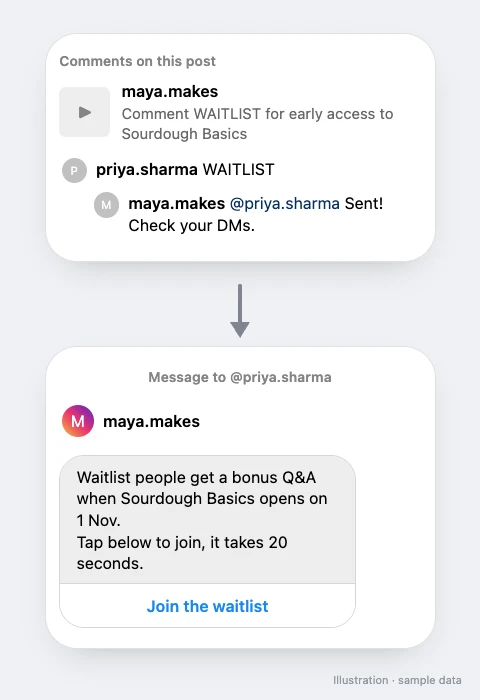
Waitlist people get [first access / a bonus Q&A] when [course name] opens on [date].
Tap below to join, it takes 20 seconds.
Waitlist, Hinglish
[Course] ki waitlist mein naam add karo 👇
Launch [date] ko hai, pehle aapko link milega.
Point the button at a free lead magnet page that collects the email, or, on paid plans, collect the email inside the DM.
Stage 2: what should the launch-day DM say?
Launch variant 1: direct
[Course name] is open! 🎉
[6 modules], [lifetime access], [certificate on completion].
Everything is on the page below 👇
Launch variant 2: who it is for
If you want to [go from zero to your first client in 30 days], this is it.
[Course name] is live. Details and enrolment below.
Launch variant 3: early-bird, only if real
Doors are open! Early-bird pricing runs until [Friday 11:59 pm IST].
See what is inside 👇
Launch variant 4: Hinglish
[Course] live ho gaya hai! 🎉
Kya kya milega, sab page pe hai. Neeche tap karo.
Launch variant 5: Hinglish, personal
Bahut mehnat se banaya hai ye course 🙏
Agar [goal] chahiye, toh ek baar page dekh lo 👇
Public replies
Sent you the details 📩
Check your DMs for the course page 🎉
Link is in your inbox ✨
Button text: "See the course", "Enrol now" or "View details". "See the course" gets more taps from people still deciding.
Stage 3: what should the not-bought follow-up say?
On paid plans, follow-ups can run when the product was or was not bought, when the link was not clicked, or when there is no reply. Also, follow-ups run within 23 hours of the person's message, inside Meta's messaging window. Send one, answer the likely question, and stop.
Not bought, after 4 to 6 hours
Any questions about [course name]? Most people ask about [time per week]: it is [about 2 hours], at your own pace.
Not bought, Hinglish
Koi sawal ho course ke baare mein toh yahin poocho 🙂 Link phir se 👇
For people who bought, a different follow-up can welcome them:
Bought: welcome message
Welcome to [course name]! 🎉
Start with [Module 1, Lesson 2], it is the one that makes the rest click. Reply here if you get stuck.
For abandoned checkouts in more depth, see the abandoned cart DM template.
How should you reply to objections?
These come in as DMs during a launch. Keep replies short and specific.
| They ask | Reply |
|---|---|
| "Is it worth it?" | "Depends on where you are. If you already [have 10 clients], skip it. If you are [starting out], Modules 1 to 3 cover exactly that." |
| "I don't have time" | "Lessons are [10 to 15 minutes]. Most people do one a day." |
| "Will it work in my niche?" | "[Students in fitness, food and finance] have used it. Tell me your niche and I'll be honest." |
| "Discount?" | Only offer what is real: "Early-bird ends [day]", or "No discount, but [bonus] is included". |
What should you customise?
- Course facts. Number of modules, access period, live calls, certificate: only what is true for your course.
- Who it is for. One sentence naming the reader and the result, in their words.
- Dates and deadlines. Real ones only, with the time zone.
- Keywords per stage. WAITLIST before launch, COURSE on launch day, so each automation sends the right message.
What mistakes should you avoid?
- Fake deadlines. A countdown that resets loses trust you need for the next launch.
- Income promises. "Earn lakhs in 30 days" invites complaints and does not match how most students do.
- More than one follow-up. One not-bought nudge is helpful; three is spam.
- Linking to a bio page instead of the course. Point the button at the course page directly.
How do you set it up in SuperProfile?
- Build the course on SuperProfile: structured courses with chapters and lessons. See online courses.
- Before launch, run a WAITLIST automation that links to a lead magnet or collects the email.
- On launch day, create an automation on your launch Reel with a keyword like COURSE, paste a launch template and add a button that opens the course.
- On a paid plan, add a not-bought follow-up after a few hours and a bought follow-up with the welcome message.
- Publish and test from a second account.
Hosting and selling courses on SuperProfile needs a paid plan. Full recipe: Sell products with Auto-DM. Guide: how to sell online courses in India.
Frequently asked questions
How do I announce a course launch on Instagram DMs?
Run a keyword automation on your launch Reel ("comment COURSE"), send a short DM with what is inside and a button to the course page, and follow up once with people who did not buy.
Can I DM my waitlist on launch day?
Only people who messaged you in the last 23 hours. Collect emails on the waitlist so you can reach the rest, and post a launch-day Reel with a keyword: people who comment get one private reply with your course link, and a follow-up can go only after they respond.
Can the follow-up know who bought?
Yes. When the DM's button opens your SuperProfile course, follow-ups can run for people who bought or did not buy.
More Instagram DM templates
More guides
Last updated .