
Instagram messages: how to send, find, unsend and manage your DMs
Instagram messages (DMs) are private chats you open from the Messages icon or the Message button on a profile. Chats from people you follow go to your chats list, new contacts you don't follow usually arrive as message requests, depending on your settings, and anything Instagram thinks is spam goes to a hidden Spam folder; you can unsend a message you sent, edit it for 15 minutes on most apps, and schedule text messages.
How do you send a message on Instagram?
- Tap Messages at the bottom of the app.
- Tap Compose in the top right and pick one or more people.
- Type your message, or tap the camera or photo icon to add a photo or video.
- Tap Send.
New to the term? DM means Direct Message. You can also open someone's profile and tap Message. On a computer, go to instagram.com, click Messages on the left, then Compose.
If the person doesn't follow you and you haven't talked before, your message usually arrives as a message request and can contain text only — unless they've restricted who can send them requests, in which case it isn't delivered at all. Photos, videos and voice notes work once they accept. Messages never show on your feed, profile or in search (Instagram Help).
Where do Instagram messages go? Chats, requests and spam
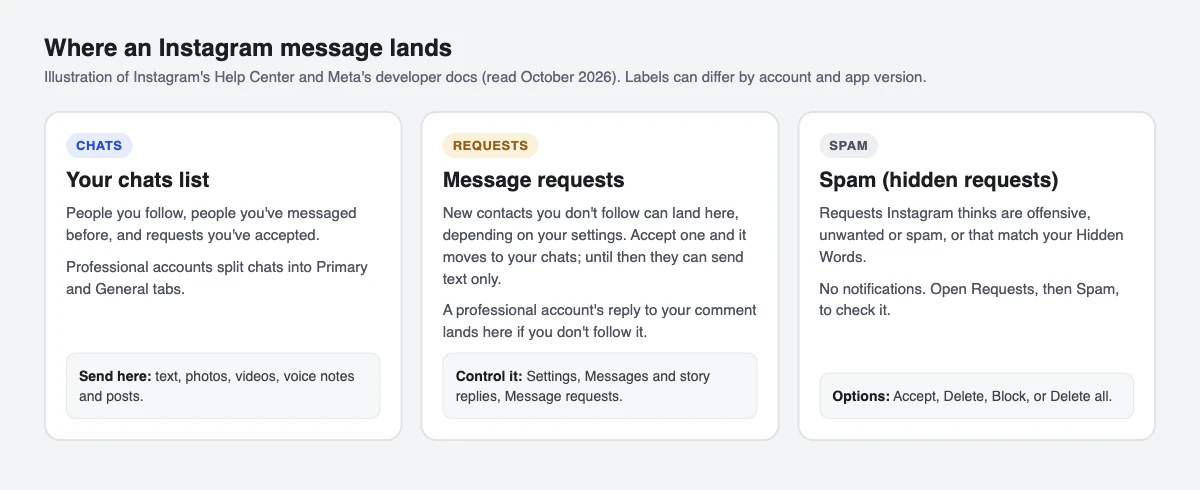
Your inbox has three places a message can land:
- Chats: people you follow, people you've messaged before and requests you've accepted. Professional (creator and business) accounts see chats split into Primary and General tabs.
- Message requests: new contacts you don't follow can arrive here, depending on your message request settings. Accept one and it moves into your chats, where accepted chats stay.
- Spam: requests that may be offensive, unwanted or spam, or that match your Hidden Words. You get no notifications for these (Instagram Help).
That third folder is why people miss real messages, including brand deal offers. Check it once a week.
How do you see and manage message requests on Instagram?
- Tap Messages at the bottom.
- Tap Requests in the top right. Tap Spam to see hidden requests.
- Open a request and choose Accept, Delete or Block. In Spam you can also tap Delete all.
To choose who can send you requests at all: go to your profile, tap the menu, then Messages and story replies and Message requests. You can send requests to your requests folder or stop receiving them. The same screen controls who can add you to group chats (Instagram Help). Turning requests off doesn't affect messages from your ads or products you've shared.
Unsend, edit, schedule and disappearing messages
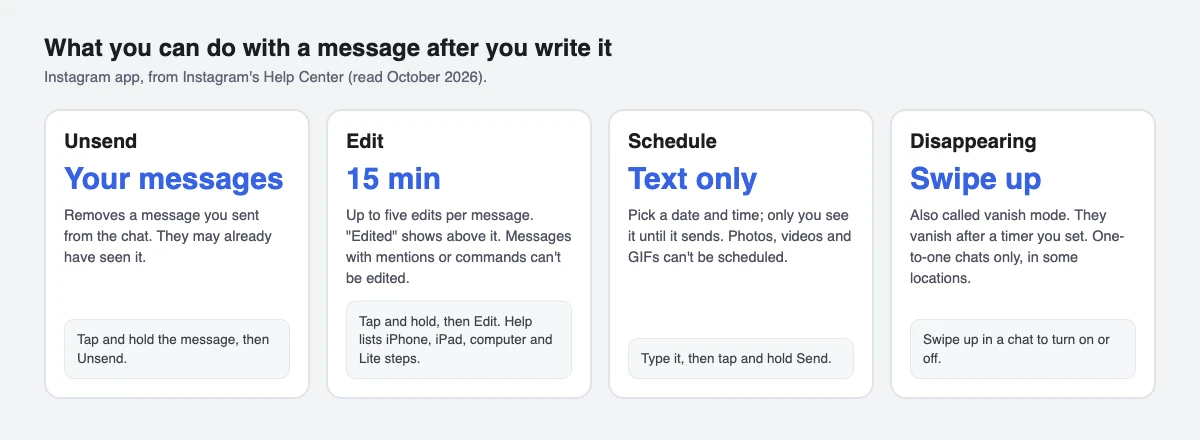
| Action | How | Limits |
|---|---|---|
| Unsend | Tap and hold the message, then Unsend | It disappears for the people in the chat, but they may already have seen it. Unsent messages aren't in your Data Download file, and can still be included if the chat is reported (source) |
| Edit | Tap and hold a recent message, then Edit | Within 15 minutes, up to 5 times; "Edited" shows above it. Instagram's help gives steps for iPhone, iPad, computer and Instagram Lite; Android-app steps aren't listed (source) |
| Schedule | Type the message, then tap and hold the send button and pick a time | Text only; photos, videos and GIFs can't be scheduled. Only you see it until it sends (source) |
| Disappearing messages (vanish mode) | Swipe up in a chat to turn it on or off | Messages disappear after a timer you can change (tap Change timer). Some message types won't disappear. One-to-one chats only, in some locations; not in group chats, and certain professional accounts can't receive them. The other person can still screenshot or record them; Instagram notifies you if it detects a screenshot (source) |
Deleting a whole chat only removes it from your inbox; the other person still has it, and deleted messages aren't in your Data Download file (source). To stop showing when you've read a message, turn off read receipts for all chats under Messages and story replies, or for one chat from the chat name, then Privacy & safety. A per-chat setting overrides the account-wide one (source).
Why are my Instagram messages not showing or not sending?
- It's in Requests or Spam. New contacts you don't follow can arrive in Requests, depending on your settings, and stay there until you accept. Check both folders.
- You can't send a photo or voice note. If your message is a request, it can contain text only until the other person accepts.
- You were limited. Instagram limits sending to stop spam; if you keep sending after a warning, you may be blocked from sending DMs for a while. You can forward a message to at most five chats at a time (source).
- Disappearing messages won't turn on. They don't work in group chats, with Messenger or Facebook accounts, or with certain professional accounts.
- The app is misbehaving. Update Instagram, restart your phone, try Wi-Fi and mobile data, then reinstall the app (source).
Instagram messages for creators and businesses
When DMs become part of how you sell, Meta's rules shape what a messaging tool can do. These tools need an Instagram professional (creator or business) account (how to switch), because Meta's messaging API works only with professional accounts.
- The 24-hour window. A business tool can message someone only after they message you first, and for most actions the window lasts 24 hours. If their first message comes after clicking a click-to-message ad, the window may last up to 7 days from that message, according to Meta's developer docs.
- Replies to comments. This is the exception to the respond-first rule: a tool can send one private reply to a comment within 7 days of the comment (during the broadcast for Live). It lands in the person's chats if they follow you, and in Requests if they don't and haven't restricted who can message them — so tell people to check Requests. If they've restricted message requests from people they don't follow, the reply is refused instead of landing anywhere. More messages can follow only after the person responds, within 24 hours of that response.
- Say it's automated. Where the law requires it, an automated chat has to say so at the start of a conversation.
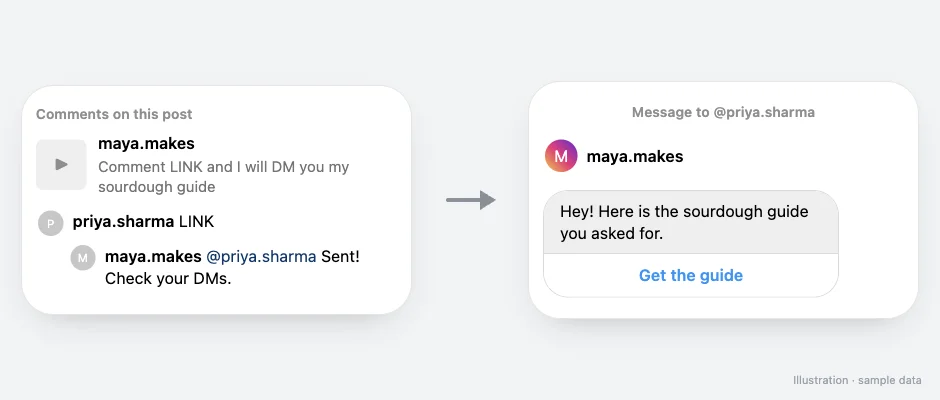
We build SuperProfile, and its Auto-DM works inside these rules. Auto-DM sends replies and DMs through Meta's official Instagram Graph API and Facebook Graph API (Messenger), with the account connected by Meta login; no password sharing or browser automation. What can start an automation: Comments on Reels and Posts, Story replies, Live comments and direct messages (Story, Live and DM triggers are on paid plans). Because of the respond-first rule, on comment and Live triggers, follow-ups need the person to respond first, so the automation opens with a message and a button (the default button reads "Send me the link"), and the tap is that response. SuperProfile's own limit is tighter than Meta's window: follow-ups run within 23 hours of the person's message, inside Meta's messaging window.
For message ideas, see the Instagram DM templates; for setup, the Instagram DM automation guide.
Instagram messages: short mein
Kisi ko message karna ho to app mein neeche Messages pe tap karo, phir Compose. Jin logon ko aap follow nahi karte, unka naya message aksar seedha chats mein nahi aata: settings ke hisaab se woh Requests mein jaata hai, aur spam jaisa lage to Requests ke andar Spam folder mein.
Galti se message chala gaya? Apne bheje hue message ko tap and hold karke Unsend karo. Edit sirf 15 minute tak hota hai, aur scheduled message mein sirf text ja sakta hai.
Frequently asked questions
How do I see message requests on Instagram?
Tap Messages at the bottom, then Requests in the top right. Hidden requests are in the Spam folder inside Requests, and Instagram doesn't notify you about those.
Can I unsend a message on Instagram?
Yes, for a message you sent. Tap and hold it and tap Unsend. It disappears for the people in the chat, but they may already have seen it or a notification.
How long can you edit an Instagram message?
Up to 15 minutes after sending, and up to five times per message. Instagram's help gives the steps for iPhone, iPad, computer and Instagram Lite; Android-app steps aren't listed. Messages with mentions or commands can't be edited, only unsent.
Can you schedule a message on Instagram?
Yes, text only. Type the message, tap and hold the send button, and choose the date and time; photos, videos and GIFs can't be scheduled.
Why can't I send photos to someone on Instagram?
If they don't follow you and you haven't chatted before, your message is usually a request and can contain text only. You can send photos, videos and voice notes after they accept. If they've restricted who can send them requests, even a text message may not be delivered at all.
Is vanish mode still on Instagram?
Instagram's help now calls it disappearing messages. Swipe up in a one-to-one chat to turn it on or off, and change the timer from the chat; it isn't available in every location or in group chats.
Why do automated DMs from creators land in my requests?
A reply to your comment from a professional account lands in your chats if you follow that account, and in Requests if you don't and haven't restricted message requests. If you've restricted who can message you, Meta refuses the DM instead — see “not everyone can message this account”.
More guides
Last updated .