
Instagram Professional Account: Best Category and How to Switch
An Instagram professional account is a Creator or Business account. It adds insights, a Contact button, a category label and a business inbox. Switching takes a minute in Settings and activity, Account type and tools, and you can switch back any time. We build SuperProfile, whose Auto-DM and Schedule need a Creator or Business account.
What is an Instagram professional account?
- Professional accounts are either Creator or Business
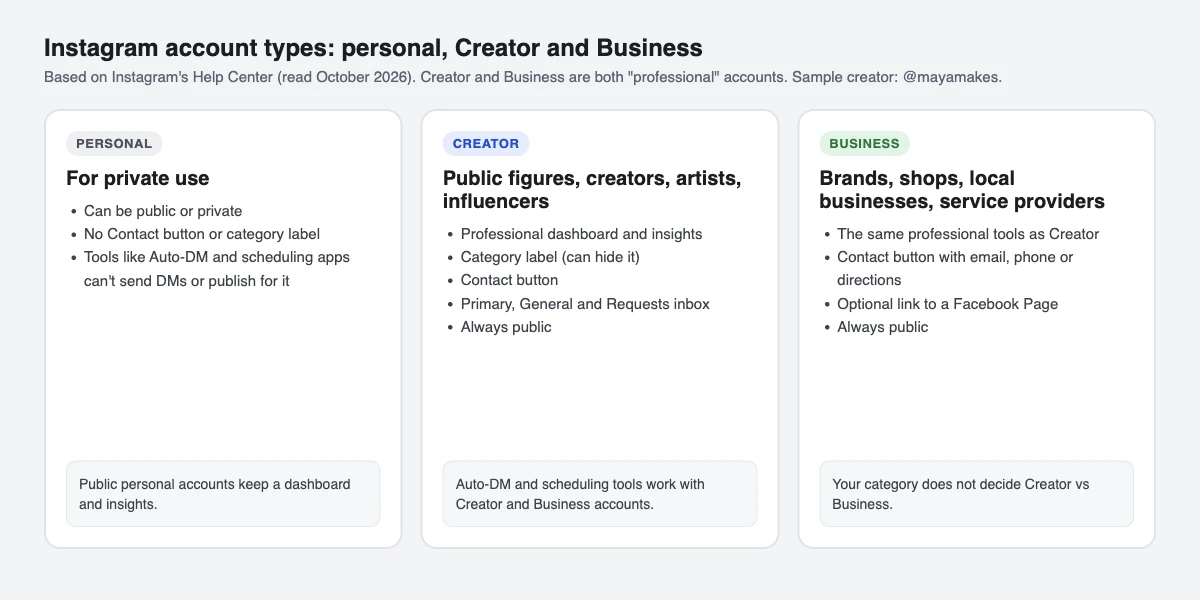
- Business accounts are best for retailers, local businesses, brands, organisations and service providers; Creator accounts are best for public figures, content producers, artists and influencers
- The category you choose does not decide whether you get a Creator or Business account
- You can switch back to personal, or change professional account type, any time
How do I switch to a professional account on Instagram?
From the Instagram app, per Instagram's Help Center (read 16 October 2026):
- Go to your profile and tap the menu to open Settings and activity.
- Below For professionals, tap Account type and tools.
- Tap Switch to professional account.
- Choose the category that best describes what you do.
- Choose Creator or Business, tap Next, and finish or skip the optional steps (contact details, Facebook Page).
On a computer at instagram.com: click More, then Settings; below For professionals, select Account type and tools, then Switch to professional account; choose Creator or Business, click Next, select your category, click Done and confirm with Continue.
Connecting a Facebook Page is optional; you can skip it. If your account is private, switching makes it public and accepts all pending follow requests.
Which category is best for an Instagram professional account?
Instagram doesn't publish a ranking of categories. Its Help Center says to choose a category that best describes what you do, and that the category doesn't decide whether you get a Creator or Business account. So pick the most specific option that matches your work rather than a broad one.
The category appears as a label under your profile picture. If you link a Facebook Page, Instagram uses the Page's category. You can hide or show the label from Edit profile, then Profile display. Instagram's Help Center doesn't say the category affects reach.
Creator or Business: which should I choose?
Instagram says Creator accounts suit public figures, content producers, artists and influencers, and Business accounts suit retailers, local businesses, brands, organisations and service providers. Both are professional accounts, and both get the professional dashboard, insights, ads and the Primary, General and Requests inbox.
Does SuperProfile work with Creator accounts?
We build SuperProfile. Its Auto-DM and Schedule work with both Creator and Business accounts, not personal ones: Schedule needs an Instagram professional account (creator or business), because Meta's publishing API works only with professional accounts. If an account switches back to personal, Auto-DM stops and SuperProfile shows the fix: switch back to Creator or Business and reconnect.
What do I get with a professional account?
- Professional dashboard and insights
- Ads from your account
- A Contact button with email, phone or directions
- A category label under your profile picture, which you can hide or show from Edit profile, Profile display
- An inbox with Primary, General and Requests folders
- Posts and reels may appear in search engine results (you can turn this off)
What are the disadvantages of a professional account?
- A professional account can't be private: switching makes a private account public and accepts pending follow requests
- If a Facebook Page is linked, Instagram posts can be shared to Facebook only through that Page
- Switching back to personal removes some Meta business tools such as Meta Business Suite and Ads Manager; a public personal account keeps its dashboard and insights
Contact details you add are visible to anyone who taps Contact, so add only the email or number you want public.
How do I switch back to a personal account?
- Go to your profile and tap the menu (you may need to tap Settings).
- Tap Account type and tools, then Account type.
- Tap Switch account type.
- Tap Switch to personal account, then Switch to personal to confirm.
Per Instagram's Help Center, you lose access to some Meta business tools such as Meta Business Suite and Ads Manager; a public personal account keeps its dashboard and insights. If you use Auto-DM, it stops until you switch back to Creator or Business and reconnect.
Frequently asked questions
Which category is best for an Instagram professional account?
Instagram doesn't rank categories; it says to choose the one that best describes what you do. The category is a label under your profile picture, which you can hide.
Can a professional account be private?
No. Switching to a professional account makes a private account public.
Do I need a Facebook Page for a professional account?
No. Connecting a Facebook Page is optional during setup.
Does SuperProfile Auto-DM work with Creator accounts?
Yes. Auto-DM and Schedule work with Creator and Business accounts, not personal ones.
More guides
Last updated .