
Instagram auto DM not working? Check these 9 things
Most auto DMs stop because Instagram's "Allow access to messages" setting is off, the account connection expired, or the comment did not contain the exact keyword. The rest come from Meta's messaging windows, the wrong post or trigger, or a plan that no longer covers the automation.
Quick check: which symptom do you have?
| What you see | Most likely cause | Go to |
|---|---|---|
| Nothing is sent on any post, and you got an email titled "AutoDM Stopped Working" | DM access turned off, or the connection expired | Causes 1 and 2 |
| Instagram will not connect, or says the account is ineligible | Personal account, or a recent switch to professional | Cause 3 |
| Some comments get the DM, others do not | Keyword did not match the comment | Cause 4 |
| Comments on one post work, another post does nothing | Automation is set on a different post | Cause 5 |
| Old comments never got a DM, or follow-ups stop | Meta's 7-day and 24-hour windows | Cause 6 |
| Story or Live automation is locked or paused | Plan does not include that trigger | Cause 7 |
| DM arrives, but the affiliate link loses commission | Link click tracking | Cause 9 |
1. Is "Allow access to messages" turned off in Instagram?
This is the most common cause. Meta lets a tool send DMs for your account only when this setting is on. Per Meta's developer documentation (read October 2026), the path is:
Instagram Settings > Messages and story replies > Message controls > Connected tools > Allow access to messages.
When it is off, Meta rejects the DM with "The account owner has disabled access to Instagram Direct Messaging", and SuperProfile emails you with the subject AutoDM Stopped Working. Turn the setting back on; you do not need to rebuild your automations.
2. Has your Instagram or Facebook connection expired?
Meta access can expire or be removed, for example when Meta ends the session or the app is removed from your Instagram or Facebook settings. When Meta reports the access as invalid, SuperProfile sends the same AutoDM Stopped Working email.
Fix: open Auto-DM in SuperProfile and reconnect the account. If the connect screen shows error 400, the session was blocked for too many attempts: wait an hour and try again, then three hours, and in rare cases up to six. On an iPhone, if the Instagram app swallows the redirect, delete the app, connect in Safari or Chrome, then reinstall it.
For Facebook Messenger: the connection is to a Facebook Page, you need admin or full control of that Page (editor or moderator is not enough), and a Page can be connected to only one SuperProfile account at a time.
3. Is the account a professional (Business or Creator) account?
Meta's messaging API works only for professional accounts. A personal account cannot connect. Switch to a Business or Creator account in Instagram's settings. If you just switched, or the account is new, Instagram can take up to 24 hours to turn on business features, so wait a day before you reconnect. Meta can also limit messaging access on an account it thinks broke its policies; that has to be resolved with Meta.
4. Did the comment contain your exact keyword?
Keywords match as a whole word, and capital letters do not matter. With the keyword guide:
| Comment | Matches? |
|---|---|
| GUIDE | Yes |
| send the guide pls | Yes |
| guides | No, a different word |
| gide link plz | No, a typo |
| link bhejo | No, no keyword |
An exclude keyword also blocks the DM if it appears in the comment. Two fixes:
- Add the common variants as keywords ("guides", "link"). The free plan allows one keyword per automation; paid plans allow more.
- Turn on intent matching on a paid plan: per automation, the creator can turn on “Also reply without your keywords” and describe the comment in plain words (for example “asks for the link”); comments that contain no keyword, such as typos, other languages, Hinglish or “pls send”, are read by AI and the DM goes out only when it is confident.
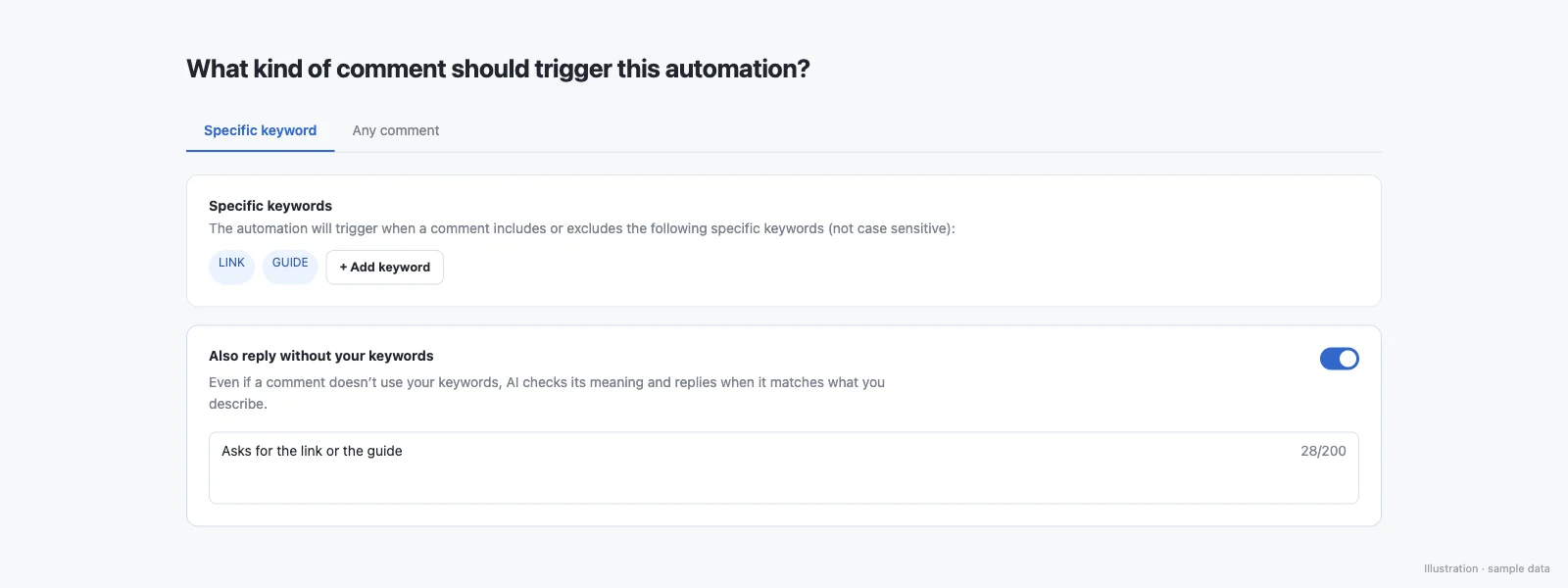
Intent matching has its own limits:
- Keywords are matched first; AI reads only comments that matched no keyword
- The DM is sent only on a confident match; when the AI is unsure or unavailable, nothing is sent
- At most one AI-matched DM per person per automation per day
- Exclude keywords still block a match
- Works on Instagram post and Reel comments (not Stories, DMs, Lives or Messenger yet)
- Works across languages, including Hinglish, slang and misspellings
- Up to 1,000 AI comment reads per creator per day
More: auto DM without a keyword.
5. Is the automation on the right post?
An automation set on one post or Reel does not run on your other posts. On the free plan you pick the post. On a paid plan you can choose all posts and Reels, or your next post, so new content is covered without a new automation.
Test from a second account, the way a follower would, and comment on the exact post the automation is set on.
6. Are you inside Meta's 7-day and 24-hour windows?
Per Meta's private replies documentation (read October 2026):
- A business can send one private reply per comment, within 7 days of the comment. Comments older than 7 days cannot get the DM, which is why turning on an automation does not reach people who commented last month.
- On an Instagram Live, a private reply can go only while the broadcast is on.
- A follow-up message needs the person to reply first, and must go within 24 hours of that reply.
For messages people send you, Meta's messaging API gives the business 24 hours to respond. On SuperProfile, follow-ups run within 23 hours of the person's message, inside Meta's messaging window. Facebook Messenger follows the same 24-hour rule. None of this is a bug you can fix in settings: Meta's messaging windows and rules apply to all messages.
7. Does your plan cover this trigger?
Auto-DM on Stories and Lives, ask-to-follow, email collection and follow-ups need a paid plan. In full, paid plans add Stories, Lives and incoming-DM triggers, unlimited keywords, any-comment and all-posts triggers, ask-to-follow, email collection, follow-ups, more DM types, Facebook Messenger and more than one Instagram account. If a paid plan ends, automations that use paid-only features stop, and they show as locked until you renew or change them to fit the free plan (Auto-DM on Instagram posts and Reels, one keyword per automation, text-and-button DMs that end with a short "Sent via" line naming SuperProfile's Instagram account).
8. Is the person's reply going to the right place?
Story replies and DMs arrive as messages, so they trigger only Story or DM automations, not post automations. A fan sending you one of your posts or Reels in a DM is its own trigger: a fan sending you one of your posts or reels in a DM can trigger an automation. If you use a follow gate, the link DM waits until the follow step is done; people who stop at that step never get the link, which can look like a failure in your numbers.
9. Is link tracking changing your affiliate link?
Click tracking sends links through a redirect so you can count clicks. For most links that is harmless, but some affiliate programs and shopping apps want the original link. On SuperProfile, a Track link clicks toggle on every Instagram and Messenger automation (on by default); turn it off and links go out exactly as typed, with no redirect; Amazon and Flipkart links are always sent as typed so affiliate commission and the shopping app open work; with tracking off, click counts and link-not-clicked follow-ups are unavailable for that automation. For Meesho, Wishlink or other affiliate links, turn tracking off on that automation and test the link from a phone.
Still not working?
Use the report-an-issue form inside Auto-DM and pick "Automations stopped / not working". Include the post link, the exact comment, and the time it was posted, so support can trace it. Our help article covers the same steps: Instagram automations stopped or not working.
If your tool keeps failing, you can switch to a better Instagram DM automation tool.
Setting up for the first time? Start with comment-to-DM or the how to automate comments on Instagram walkthrough, or see what you get free in free Instagram auto DM tools compared.
Frequently asked questions
Why is my Instagram auto DM not sending?
Check three things first: Allow access to messages is on in Instagram (Settings > Messages and story replies > Message controls > Connected tools), the account is still connected in your Auto-DM tool, and the comment contains your exact keyword as a whole word.
Why did people who commented before I set up the automation not get a DM?
Meta allows one private reply per comment only within 7 days of the comment. Comments older than that cannot get the DM, from any tool.
Why do my follow-up messages stop?
Meta allows a follow-up only after the person replies, and within 24 hours of that reply. On SuperProfile, follow-ups run within 23 hours of the person's message to stay inside that window.
Can I auto DM comments that have a typo or are in Hinglish?
Yes, with intent matching on a SuperProfile paid plan. It reads comments that matched no keyword and sends the DM only when it is confident, for example "bhai guide ka link bhejo na".
Why does my Story auto DM not work on the free plan?
Auto-DM on Stories and Lives needs a paid plan on SuperProfile. The free plan covers comments on posts and Reels.
More guides
Last updated .