
How to send a PDF on Instagram DM
Instagram's own Direct Messages has no paperclip or “attach file” button for a regular chat, so there is no one-tap way to send a raw PDF from the mobile app. Two workarounds cover that: share a link to the file, or convert its pages to images — both still manual, one chat at a time. Separately, a connected business account can deliver a real PDF file — not a link, not a flattened image — automatically, on a paid Auto-DM plan.
Can you attach a PDF directly in an Instagram DM?
Not in the regular Instagram app: there is no attach-file control in a DM thread, so a PDF sitting in your phone's files or downloads cannot be dropped into a chat the way a photo or video can. Two workarounds get the content there instead:
- Share a cloud link. Upload the PDF to Google Drive, Dropbox or a similar service, set it to “anyone with the link can view”, then paste that link into the DM.
- Convert the pages to images. Export each PDF page as a JPG or PNG, then send the images from the chat's gallery picker — the recipient swipes through them like a document, but it is no longer a PDF file they can save or search.
The catch: doing it by hand is one chat at a time
Pasting a link or attaching converted images works for messaging one person. Neither scales to replying when dozens of people comment a keyword asking for the same PDF — a price list, a lead magnet, a course brochure — because both still require you to open each chat yourself. SuperProfile's Auto-DM already automates a link in a message (a tappable button pointing at a URL, available on every plan); what it cannot do on the free plan is attach an actual file.
Auto-DM can send a real PDF automatically
Auto-DM can deliver a real PDF file as the automated DM itself (not a shared link) when a comment or keyword trigger fires, on paid plans; the free Starter plan's automation is text-and-button only, no file/image/video message type. There are two ways to configure it in the automation builder:
- As the reply itself. In the comment-to-DM automation, set the message type to PDF and upload the file (under 8MB) — a matching comment can trigger the PDF as the reply, with no extra text in that message, subject to the delivery rules below.
- Behind a button. Keep the first reply as text with a “Send a DM” button, open that button's own reply, set its message type to PDF and upload the file there — it sends only once the recipient taps the button (see the delivery-rules section below for why this matters).
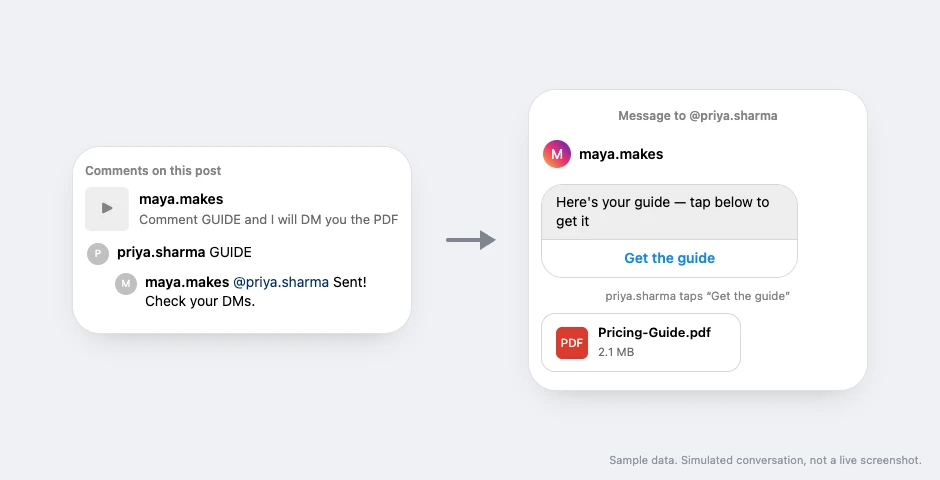
One limit to plan for: a PDF uploaded for Auto-DM is capped at 8MB by SuperProfile itself; Instagram's own Messaging API allows a file attachment up to 25MB.
Why your first automated PDF DM might fail
The rule to know: sending an image, video, audio or file as the first DM to someone who does not follow the account gets refused by Meta (error code 2, subcode 1545133); switching the first message to text with a button fixes it, retrying the same media does not. A PDF counts as that kind of attachment: if your automation's very first message to someone is the file itself and they do not already follow you, Meta refuses the send. The fix is a button the recipient has to tap first — open with a short text message and a “Send a DM” button (a paid feature), and attach the PDF to that button's own reply so it only sends once the recipient taps it, not automatically right after the text. See “not everyone can message this account” and Instagram Auto-DM not working for the rest of Meta's delivery rules.
Frequently asked questions
Can I send a PDF directly in an Instagram DM?
Not from the mobile app — there is no attach-file button in a chat. Share a cloud-storage link, or convert the pages to images and send those instead.
Can an automated Instagram DM include a real PDF file, not just a link?
Yes. SuperProfile's Auto-DM can send an actual PDF as the automated reply itself, on paid plans; the free plan's automation is text-and-button only.
Is there a file size limit for a PDF sent through Auto-DM?
SuperProfile caps an uploaded PDF at 8MB. Instagram's own messaging API allows up to 25MB for a file attachment, but SuperProfile's own ceiling is the one that applies.
Does sending a PDF automatically work on the free plan?
No — the free Starter plan's automation is text-and-button only. Sending an image, video or PDF file requires a paid plan.
Why did my first automated PDF DM fail to send?
Meta refuses a DM that opens with media (an image, video or file) to someone who does not already follow you. Start the automation with a short text message and a “Send a DM” button instead, and attach the PDF to that button's own reply — it sends only once the recipient taps the button, not automatically right after the text.
More guides
Last updated .