
Instagram lead generation with comment-to-DM
To generate leads on Instagram without ads, ask people to comment a keyword on a post or Reel, send a DM that delivers a freebie and collects an email or form, then follow up with people who responded but did not finish, inside Meta's windows. This guide gives the workflow, the rules (one private reply per comment within 7 days, follow-ups within 24 hours of a response), copy-paste DM templates and a way to measure each step.
What is Instagram lead generation, and who is this guide for?
A lead is a person who has shown interest and given you a way to contact them, usually an email address or a short form. Comment-to-DM lead generation suits creators, coaches and small businesses that sell something people need a nudge to buy (courses, coaching, templates, services) and run an Instagram professional account (Business or Creator). Meta's messaging API works with professional accounts, and SuperProfile asks you to switch a personal account before it connects.
There are two routes. The paid one is Meta's ads, which can run lead generation inside Instagram Direct and Messenger and are set up in Meta's ad tools. The organic one, which this guide covers, turns comments on your own posts and Reels into DMs, sign-ups and follow-ups, with no ad spend.
How does Instagram lead generation with comment-to-DM work?
Four moves, in this order:
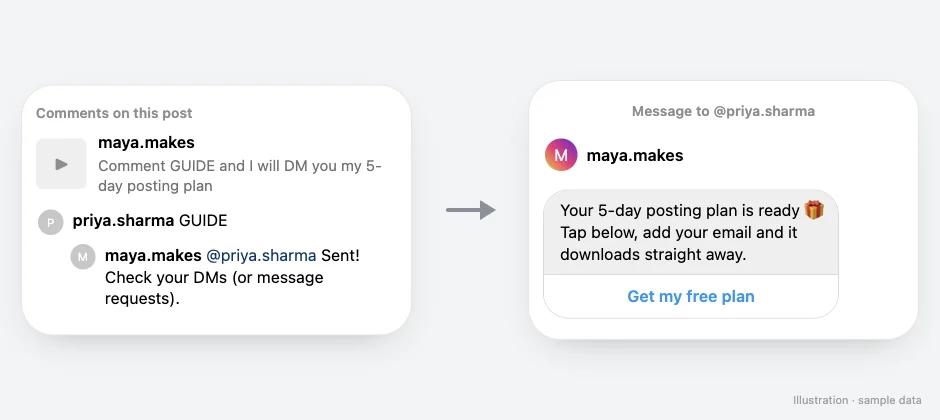
- Offer something specific in the post or Reel. A checklist, a template, a price list or a booking link, with one keyword to comment (for example GUIDE).
- The comment triggers a DM. The first DM delivers what you promised and carries one button.
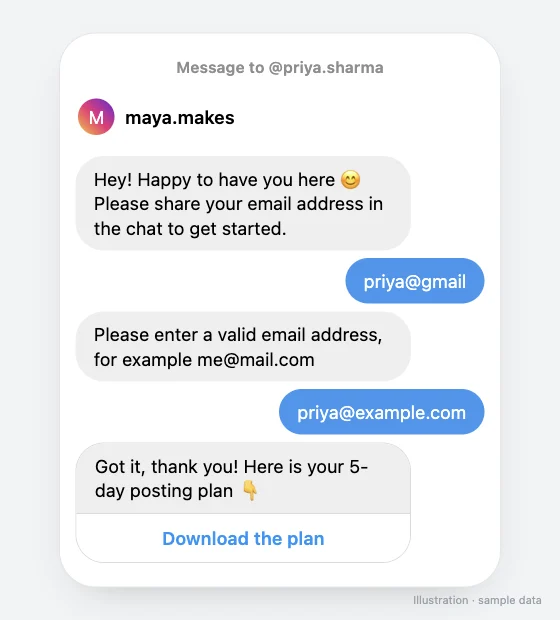
- The DM collects the contact. Either the button opens a lead magnet page with a short form, or, on paid plans, the DM asks for an email address inside the chat and passes it to your email tool.
- A follow-up reaches people who responded but did not finish. It goes only to someone who has already tapped a button or replied, and it must fit Meta's 24-hour window, covered below.
Comments on Reels and posts are the main entry point, but they are not the only one: in SuperProfile, the triggers are Comments on Reels and Posts, Story replies, Live comments and direct messages. Story and Live triggers need a paid plan. A Story reply is itself a message from the person, so it opens the 24-hour window straight away.
The rest of this guide covers the rules, word-for-word templates, the SuperProfile setup and how to tell whether it works. For the narrower email-only recipe, see Collect emails with Auto-DM.
Why use comments and DMs instead of a link in bio?
A link in bio asks people to leave the post, find the profile link and decide later. A comment keyword turns the moment of interest into a conversation: the person raised their hand, and the DM answers while that interest is fresh. It also gives you a clean signal per post. Each Reel gets its own keyword, so you know which content produced which leads.
The trade-off is that Meta controls the channel. You can only message people who interacted first, and only inside set windows. Plan around that and it is a reliable channel; ignore it and messages quietly fail to send.
What are Meta's rules for comment-to-DM lead generation?
These come from Meta's developer documentation, which I read directly on 14 October 2026 (Private Replies page updated 30 June 2026; Messaging API page updated 28 September 2026). Meta's messaging windows and rules apply to all messages.
| Rule | What Meta says | What it means for lead capture |
|---|---|---|
| One private reply per comment | "Only one message can be sent to the commenter". | Your first DM has to be useful on its own and carry a button or a question. You cannot send a second unprompted message. |
| 7 days | "The message must be sent within 7 days of the comment was made on the post or reel". | An old Reel can still generate leads, but a comment older than a week cannot get a DM. |
| 24 hours after they respond | "Follow-up messages can only be sent if the recipient responds, and must be sent within 24 hours of the response". | A tap on a button or a typed reply opens a 24-hour window. Put your email ask and your follow-up inside it. Someone who never responds cannot be messaged again. |
| Live comments | For Instagram Live, private replies can only be sent during the live broadcast. | For a Live lead offer, the DM has to go out while you are live. |
Sources: Meta, Private Replies and Messaging API, which says an account can message a person only after that person has messaged it, within the standard messaging window (for most user actions, 24 hours). Instagram's automated chats help page says accounts can use Meta's APIs to create automated chats, and that they must say they are automated where legally required.
A private reply often lands in message requests if the person does not follow you, so say "check your message requests" in your public reply. In SuperProfile, follow-ups run within 23 hours of the person's message, inside Meta's messaging window. Delivery still depends on Meta's rules, so no tool can promise that a DM arrives for a given comment.
Which lead magnet should the DM deliver?
Pick something the person can use in five minutes and that matches the post. A Reel about posting schedules gets a posting-plan template, not a generic ebook. Good formats: a checklist, a template, a swipe file, a price list, a short video, a discount code, or a booking link for a free consultation.
SuperProfile lead magnets are free downloads or sign-ups that collect contact details. The form can include these question types: text, number, email, phone, date, location, link, select, yes/no, file and image. Keep it to what you will really use. Name and email is enough for a checklist.
Want to qualify the lead? Add one select or yes/no question to the form, such as "What do you sell?" or "Ready to start this month?". The answer arrives with the sign-up, so you can sort warm leads from browsers. Keep it to one or two questions; every extra field costs sign-ups. Asking a question inside the DM itself is not what the email step does: it collects an email address only.
How do you set it up in SuperProfile?
- Create the freebie as a lead magnet with the file and the form questions, or have the file ready to send.
- In Auto-DM, create a comment automation on your Reel or post and set one keyword.
- Write the first DM (templates below). In SuperProfile, buttons can open one of your published SuperProfile products (payment pages, courses, webinars, 1:1 sessions, Telegram communities, locked content, lead magnets), your store or your referral link. Choose your lead magnet there.
- To keep the person in the chat, use email collection: you can collect an email address inside the DM and send it to Kit, Mailchimp or Klaviyo, with tags. Choose the list and tag the contact by freebie. If someone never sends a valid email, you choose whether they still get the freebie.
- Add public comment replies. SuperProfile supports up to three rotating public comment replies.
- Add a follow-up for people who did not finish. Follow-ups can run after a delay, when the link was not clicked, when there is no reply, when the product was or was not bought, or when a lead form was not submitted. Two conditions have prerequisites: the "lead magnet not submitted" and product follow-ups need the ask-to-share-email step switched on, and the "link not clicked" follow-up needs a link button with link tracking on.
- Keep the opening step: on comment and Live triggers, follow-ups need the person to respond first, so the automation opens with a message and a button (the default button reads "Send me the link"), and the tap is that response. That tap also opens Meta's 24-hour window.
- Publish, then test the whole path from a second account: comment, DM, form or email, file.
Auto-DM on Stories and Lives, ask-to-follow, email collection and follow-ups need a paid plan. See superprofile.bio for plan details. The free plan covers: Auto-DM on Instagram posts and Reels, one keyword per automation, text-and-button DMs that end with a short "Sent via" line naming SuperProfile's Instagram account.
On paid plans, AI can also catch comments that miss your keyword: per automation, the creator can turn on “Also reply without your keywords” and describe the comment in plain words (for example “asks for the link”); comments that contain no keyword, such as typos, other languages, Hinglish or “pls send”, are read by AI and the DM goes out only when it is confident. Details in Auto-DM without a keyword.
What should the DMs say? Example templates
Square brackets are the parts you replace. Keep the first DM short and put the offer in line one.
1. First DM with a form button
Hi! Here is the [5-day posting plan] from my Reel 🎁
Tap below, add your email and it downloads straight away.
2. First DM that asks for the email in the chat (paid plans)
Hey! Happy to have you here 😊
Please share your email address in the chat to get the [checklist].
If the reply is not an email, the retry message goes out:
Please enter a valid email address, for example me@mail.com
3. Delivery after the email arrives
Got it, thank you! Here is your [checklist] 👇
I will send [one tip a week] to that email.
Say what you will send and how often. Check that your email tool adds an unsubscribe link to its emails.
4. Two-step version with a Send a DM button
Want the [price list]? Tap Send me the list and I will drop it here.
a Send a DM button sends another message only after the person taps it. The tap is the response that opens the 24-hour window, which suits a two-step flow.
5. Follow-up for someone who tapped but did not finish
Quick one: did the [checklist] open OK? Here is the page again if you missed it 👇
Use this only for people who already tapped the button or replied, and send it inside the window. Someone who never responded cannot receive it.
6. Hinglish
Aapka [guide] ready hai 🎁
Neeche button pe tap karo, email daalo, PDF turant mil jayegi.
7. Public comment reply
Sent it to your DMs 🎁 Check message requests if you do not see it.
More variants: Instagram DM templates, lead magnet DM template, comment-to-get-link template and follow-up DM template.
How do you measure whether it works?
Measure the funnel in four steps, one keyword per post so each Reel is its own test.
| Step | Count | Where to find it |
|---|---|---|
| 1. Reach to comment | Comments with the keyword divided by Reel views | Instagram Insights and the comment section |
| 2. Comment to link click | Link clicks divided by comments | Link click counts in Auto-DM (the Track link clicks toggle, on by default) |
| 3. Click to lead | Form submissions or emails divided by clicks | The lead magnet responses and your email tool, tagged by freebie |
| 4. Lead to buyer | Customers from that tag divided by leads | Your email tool, or your SuperProfile sales if the offer is a product |
Illustrative arithmetic with made-up numbers: if a Reel gets 10,000 views, 100 comments, 60 link clicks and 30 sign-ups, comment rate is 1%, click rate 60% and sign-up rate 50%. The weakest step tells you what to fix: a low comment rate means the call to action is unclear; a low click rate means the DM or the button text; a low sign-up rate means the form is too long or the promise does not match.
Judge each test over a few posts, not one. Tag each freebie in your email tool (for example ig-guide-oct) so you can see later which Reel brought buyers, not just subscribers.
What mistakes lose leads?
- A promise the DM does not keep. If the Reel says "7 hooks", the DM delivers 7 hooks.
- Two automations fighting over a keyword. Pick distinct keywords per post so two automations never compete for the same comment.
- Asking for the email before saying what they get. Lead with the freebie, then ask.
- A follow-up outside the window. Meta only allows it within 24 hours of the person's response.
- Tracking switched off, then expecting click counts. With link tracking off there are no click counts and no link-not-clicked follow-ups for that automation.
- Skipping consent. Say what you will send and how often. Rules on marketing messages differ by country; check yours (this is not legal advice).
Can an AI assistant set this up for you?
Yes. SuperProfile's MCP server lets an assistant such as Claude or ChatGPT draft the automation for you. AI assistants can turn on intent matching when they draft an automation, and suggest rewordings with suggest_autodm_text_variations, through the SuperProfile MCP server. See Instagram Auto-DM with an AI assistant.
Frequently asked questions
How do I generate leads on Instagram?
Offer a specific freebie in a post or Reel, ask people to comment a keyword, and send the freebie by DM with a form or an email ask. Then follow up, inside Meta's 24-hour window, with people who responded but did not finish. The steps are above.
Can I get leads from Instagram without ads?
Yes. Comment-to-DM turns organic posts and Reels into lead sources, because the comment itself is the sign-up trigger. Ads can send people to the same offer. Meta's ads can also run lead generation inside Instagram Direct and Messenger if you want a paid route.
Can I collect emails from Instagram DMs?
Yes. On SuperProfile paid plans the DM can ask for an email address in the chat and send it to Kit, Mailchimp or Klaviyo with tags. Without that, the DM button can open a lead magnet form that collects the email.
How long do I have to DM someone who commented?
Meta allows one private reply per comment, within 7 days of the comment. After that, follow-ups are only possible within 24 hours of the person's response.
Can I message someone who did not reply?
No. Meta allows a follow-up only after the person responds, and within 24 hours of that response. Someone who never taps or replies cannot be messaged again.
Why did my lead magnet DM not arrive?
Common causes: the comment is older than 7 days, the person doesn't follow you so the DM sits in message requests (or is refused outright if they've restricted who can message them — see “not everyone can message this account”), another automation already handles the keyword, or the account is not a connected professional account. See Instagram auto DM not working.
Is comment-to-DM automation allowed by Instagram?
Instagram's help page on automated chats says accounts can use Meta's APIs to create automated chats, and that they must say they are automated where legally required. Auto-DM sends replies and DMs through Meta's official Instagram Graph API and Facebook Graph API (Messenger), with the account connected by Meta login; no password sharing or browser automation.
What is a good lead magnet for Instagram?
Something the person can use quickly and that matches the post: a checklist, template, price list, short video or discount code. Name and email is enough for most freebies.
How do I know which Reel brought a lead?
Use one keyword per post and tag the freebie in your email tool. Then compare leads and buyers per tag.
Do I need a paid plan?
Basic comment-to-DM on posts and Reels with one keyword is on the free plan. Email collection in the DM, follow-ups, ask-to-follow, and Story and Live triggers need a paid plan. For current plans, see superprofile.bio.
More guides
Last updated .