
Auto DM without a keyword: reply when the comment means it
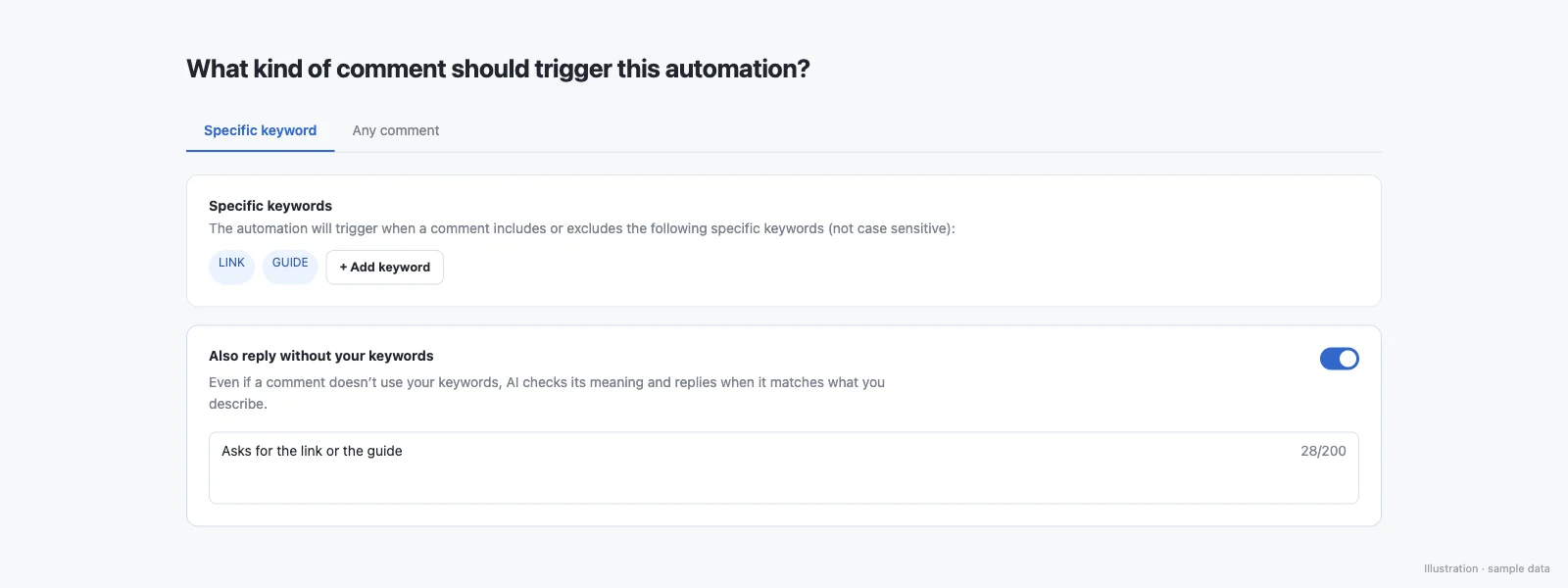
Most people don't type your keyword exactly: they misspell it, write in Hinglish, or just ask. With intent matching you describe the comment in plain words, for example “asks for the link”, and comments that mean it get your DM when the AI is confident. Keywords still match first, and nothing is sent on doubt.
Exact keyword vs intent matching
| Exact keyword | Intent matching | |
|---|---|---|
| What triggers the DM | The comment contains your keyword, for example LINK | The keyword, or a comment that means what you described |
| Typos and other languages | Missed | Matched when the AI is confident |
| When unsure | Not applicable | Nothing is sent |
| Repeat DMs to one person | Your automation settings | At most one AI-matched DM per person per automation per day |
| Where | Posts, Reels, Stories, Lives, DMs | Instagram post and Reel comments |
Tested live on 8 October 2026
Comments on a live automation asking for a guide link:
- “bhai guide ka link bhejo na”
- DM sent in about 3 seconds
- “gide link plz”
- DM sent
- “nice video bro”
- No DM
Examples: keyword LINK, intent “asks for the link”
| Comment | Keyword only | With intent matching |
|---|---|---|
| LINK | DM sent | DM sent (keyword) |
| lnik pls | Missed | DM sent if confident |
| bhai link bhejo | Missed | DM sent if confident |
| send me the guide 🙏 | Missed | DM sent if confident |
| enlace por favor | Missed | DM sent if confident |
| great reel 🔥 | Not sent | Not sent (doesn't ask for the link) |
Illustrative examples of how matching behaves; each real comment is judged on its own.
Instagram AI chatbot or AI auto-reply?
People often search for an Instagram AI chatbot when what they want is for the right DM to go out without answering comments one by one. Intent matching does that part: AI understands the comment, and the message stays the one you wrote, so nothing goes to your audience that you did not approve. If you want a bot that chats freely in your name, this is not that.
The rules it follows
- Keywords are matched first; AI reads only comments that matched no keyword
- The DM is sent only on a confident match; when the AI is unsure or unavailable, nothing is sent
- At most one AI-matched DM per person per automation per day
- Exclude keywords still block a match
- Works on Instagram post and Reel comments (not Stories, DMs, Lives or Messenger yet)
- Works across languages, including Hinglish, slang and misspellings
- Up to 1,000 AI comment reads per creator per day
What it won't do
- It won't write or change your DM: you write the message, the AI only decides whether a comment qualifies.
- It won't send when it's unsure, or when the AI is unavailable.
- It won't override exclude keywords, Meta's messaging rules or your plan's limits.
- It doesn't run on Stories, DMs, Lives or Messenger yet.
How do I turn it on?
- Open Auto-DM and create or edit an automation on a post or Reel with keywords.
- Turn on “Also reply without your keywords”.
- Describe the comment in plain words, for example “asks for the link or the guide”.
- Save. Keywords keep working as before; intent matching catches the rest.
Rewrite: better DM and reply text in one tap
A Rewrite button suggests up to 3 rewordings of your DM text or public comment reply, keeping links, variables, handles and numbers exactly as you wrote them; up to 50 rewrites per day. Use it to vary your public comment replies so they don't all read the same.
Can an AI assistant set this up?
Yes. AI assistants can turn on intent matching when they draft an automation, and suggest rewordings with suggest_autodm_text_variations, through the SuperProfile MCP server. See Auto-DM with an AI assistant.
Things to know
Meta's messaging windows and rules apply to all messages; follow-ups run within 23 hours of the person's message, inside Meta's messaging window. Auto-DM on Stories and Lives, ask-to-follow, email collection and follow-ups need a paid plan; see superprofile.bio for plans.
Frequently asked questions
Is this an Instagram AI chatbot?
Not a free-form chatbot. The AI reads each comment that matched none of your keywords and decides whether it means what you described; if it is confident, the DM you wrote is sent, word for word. It does not write its own replies to your followers or hold a back-and-forth conversation.
Do people have to type the exact keyword for Instagram Auto-DM to work?
Not if you turn on intent matching. Keywords are checked first; comments without the keyword, including typos, Hinglish and other languages, are read by AI, and the DM goes out only when it is confident.
What happens when the AI is not sure?
Nothing is sent. The DM goes out only on a confident match; an unsure answer, or the AI being unavailable, means no DM.
Can it send the same person the DM twice?
Not through intent matching: at most one AI-matched DM per person per automation per day.
Does it work on Stories, DMs or Lives?
Not yet. Intent matching works on Instagram post and Reel comments. Keyword automations still cover Story replies, Lives and DMs.
Does it understand Hinglish and typos?
Yes. It reads meaning, not spelling, and works across languages, including Hinglish, slang and misspellings.
Which plans include intent matching?
Intent matching and Rewrite are part of SuperProfile's paid plans; see the SuperProfile pricing page.
Is this the same as AI auto reply to Instagram comments?
No. AI auto-reply tools write the reply for you. Intent matching decides when to send the DM you wrote; the message itself stays yours.
More Auto-DM use cases
Last updated .