
Qualify Instagram DM leads automatically
Enquiries get buried between fan messages. Lead Qualifier reads new Instagram DMs asking about what you sell, answers from what you've told it, asks your own qualifying questions, and sorts each lead Hot, Warm or Cold — so you spend your time on the ones worth it.
What it does
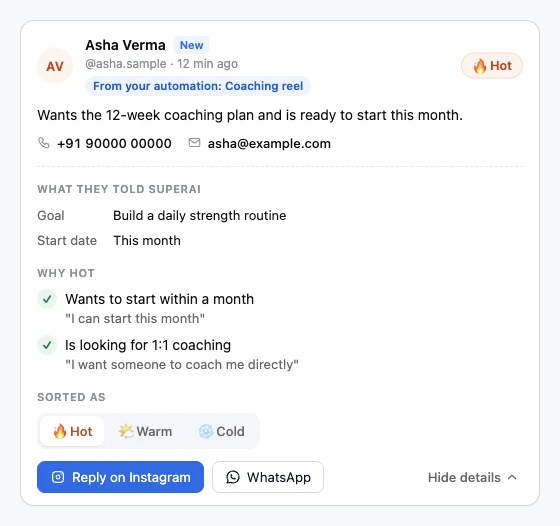
- Reads new Instagram DMs that are genuine enquiries about what you sell or offer, staying quiet for fan messages, brand collaboration DMs (Brand Collab handles those separately) and anything that isn't an enquiry
- Answers from what you've told it in the wizard — a short About description, the products or offers you've added (each with its price and link), your own FAQ answers from the Questions step, and anything leads have asked before that you've since answered — and asks your own qualifying questions
- Collects a name, email or phone number, always asking first
- Sorts each lead Hot, Warm or Cold by the rules you write in your own words plus whether it collected the contact details you asked for (a rule met with contact details is Hot, a rule met without them is Warm), with an email alert when a Hot lead lands (if alerts are on and your SuperProfile account has an email)
- Logs a new question it can't answer once, for you to fill in, without stopping the chat; it hands the whole conversation back to you only when it hits something it can't handle itself, such as a direct request to talk to a person, or the moment you reply yourself
How do I turn it on?
- Open Auto-DM with your Instagram professional account connected, go to the Agents tab and open Lead Qualifier — it opens the setup wizard.
- About you: check or edit the short description SuperAI drafts from your Instagram bio, website and recent captions, and pick your currency.
- What you sell: add your SuperProfile products — it shares one only when a lead asks — or add a link or describe an offer.
- Good leads: edit the rules SuperAI drafts for what counts as a lead; a chat that meets at least one rule becomes a lead.
- Questions: pick which contact details to collect, and add your own questions or FAQ answers.
- How chats end: check the Hot and Warm closing messages — every setup answers new DMs and also replies after your other automations.
- Review: try it like a lead would — nothing sends on Instagram — then turn it on. It can run on more than one connected Instagram account, and can't run on an account where SuperAI is already replying to DMs there (only one AI per chat).
What it leaves to you
- Deciding whether to take on a lead, and closing the sale
- Questions your saved knowledge doesn't cover yet, such as custom pricing or availability for one person
- Replying yourself: the moment you do, Lead Qualifier steps back for that chat
- Telling SuperProfile whether a lead bought — it may ask on the lead's card or on your Auto-DM page, or check in once a week by WhatsApp or email; always optional, and each weekly message links to a page to turn that channel off
Run it from an AI assistant
Yes — an AI assistant connected through the SuperProfile MCP server can read a Lead Qualifier's setup and leads (get_lead_qualifier, list_leads, list_lead_questions), one person's full story and chat (get_lead) or a counts report across accounts for a date range (get_leads_report), and change its setup or answer a logged question (set_lead_qualifier, answer_lead_question), on the leads:read and leads:write permissions. See the Auto-DM MCP server.
Frequently asked questions
What does SuperProfile's Lead Qualifier do on Instagram?
It reads new Instagram DMs that are genuine enquiries about what you sell or offer, answers from what you've told it, asks your own qualifying questions, and sorts each lead Hot, Warm or Cold. A new question it can't answer is logged once for you to fill in, without stopping the chat; it hands the whole conversation back to you only when it hits something it can't handle itself, or the moment you reply yourself.
Which plans include Lead Qualifier?
Lead Qualifier is part of SuperProfile's paid Creator plan, live for every paid creator since 4 Nov 2026 (was beta-only before). It handles up to 100 finished and qualified leads per creator per month. A chat that never becomes a lead, or one a creator takes over themselves, doesn't count against that limit — but since the 20 Nov setup wizard, a lead that meets at least one of your rules and then goes quiet past Instagram's messaging window finishes as Cold and does count. Once the monthly limit is used, new enquiries go to the creator's normal inbox instead until it resets.
Does it collect contact details?
Yes — a name, email or phone number, always asking first.
Can it say things I haven't told it?
It only answers from what you've set up in the wizard: a short About description, the products or offers you've added (each with its price and link), your own FAQ answers from the Questions step, and anything leads have asked before that you've since answered. A new question outside that is logged once for you to fill in — it isn't guessed at. (A setup from before the 20 November 2026 wizard keeps its old individually-set price/how-to-buy/location answers until you open and save it in the wizard.)
How are leads sorted Hot, Warm or Cold?
By the rules you write yourself, in your own words — for example how close someone is to buying, or a budget they mention — plus whether it collected the contact details you asked for: a lead that meets one of your rules and gives contact details is Hot, one that meets a rule without contact details is Warm. Each lead's card shows which of your rules they met, and you can move a lead to another category yourself. Hot leads also trigger an email alert, if alerts are on and your SuperProfile account has an email. (A setup from before the wizard sorts by rules only, until it's saved in the wizard.)
Does it email me a daily summary?
A daily email on any day with new leads, covering that day's leads and any chats waiting for a reply; turned off from a link in the email's own footer. Indian creators can also opt in to get the same summary by WhatsApp, sent to the WhatsApp number on their SuperProfile account.
Can I run Lead Qualifier and SuperAI together on the same account?
No — only one AI can run in a chat. Lead Qualifier can't run on an Instagram account where SuperAI is already replying to DMs there.
Does it reply to brand collaboration offers too?
No — that's Brand Collab, a separate automation. Lead Qualifier is for enquiries about what you sell, not paid collaboration offers.
Can I send feedback about Lead Qualifier?
A quiet feedback line sits under the Agents tab once Lead Qualifier, Brand Collab or Comment Moderation is turned on. It opens a short message (up to 2,000 characters) covering any of the three agents; the UI shows an option to attach files, but file uploads aren't live yet, so an attached file always fails and must be removed before Send works. Text-only feedback is available, up to 5 messages an hour.
Will SuperProfile message me to ask if a lead bought?
Yes — "Did [name] buy?" on the lead's card or your Auto-DM page, about a week after the chat is handed over to you, and at most once a week by WhatsApp or email if it hasn't been shown to you another way in the last 2 days. Answering is optional. The weekly message links to a page to turn that one channel off — turning off WhatsApp alone can still mean you get it by email instead, so turn off both if you want neither.
More from Auto-DM
Last updated .