
LinkedIn post size: image, document carousel and video specs
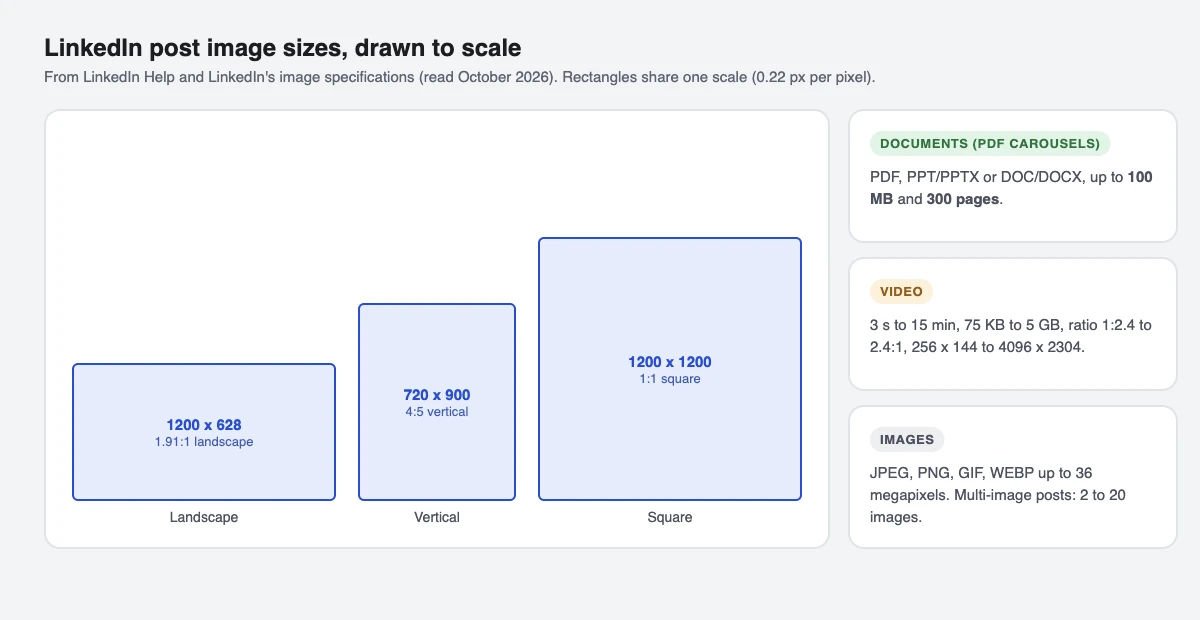
LinkedIn's image specifications list three shapes: 1200 x 628 pixels (1.91:1 landscape), 1200 x 1200 (1:1 square) and 720 x 900 (4:5 vertical). Document carousels can be up to 100 MB and 300 pages, and videos 3 seconds to 15 minutes. We build SuperProfile; its LinkedIn scheduler (paid plans) is covered near the end.
What size should a LinkedIn post image be?
LinkedIn Help doesn't list pixel sizes for ordinary feed images. The closest official numbers are LinkedIn's single image ad specifications for Campaign Manager (read 16 October 2026), which use the same feed:
| Shape | Ratio | Recommended | Minimum |
|---|---|---|---|
| Landscape | 1.91:1 | 1200 x 628 | 640 x 360 |
| Square | 1:1 | 1200 x 1200 | 360 x 360 |
| Vertical | 4:5 | 720 x 900 | 360 x 640 |
For any post image, LinkedIn Help allows JPEG, PNG, GIF and WEBP (HEIF/HEIC on iPhone) up to 36 megapixels; a GIF can have up to 500 frames.
Which shape should I use?
Shown at the same width, a taller image usually takes more of the screen, so a 4:5 vertical image fills more of a phone feed than a square, and a square more than a landscape. Use landscape for wide photos and slides, square for one size that works in most places, and vertical for single images meant for mobile. Post text can be up to 3,000 characters.
What size is a LinkedIn carousel (document post)?
A LinkedIn "carousel" made from a PDF is a document post. LinkedIn Help allows PDF, PPT/PPTX and DOC/DOCX files up to 100 MB and 300 pages. LinkedIn Help doesn't list a page size; we suggest making every page the same shape, usually square or 4:5 vertical, so the swipe doesn't jump.
A multi-image post is different: LinkedIn's API allows 2 to 20 images instead of one file.
What are LinkedIn's video specs?
From LinkedIn Help (read 16 October 2026):
| Setting | LinkedIn's rule |
|---|---|
| Length | 3 seconds to 15 minutes (2 seconds minimum from the mobile app) |
| File size | 75 KB to 5 GB |
| Aspect ratio | 1:2.4 to 2.4:1 |
| Resolution | 256 x 144 to 4096 x 2304 |
| Frame rate | 10 to 60 fps |
| Bit rate | 192 Kbps to 30 Mbps |
| File types | MP4, MOV (WEBM and MKV on some devices) |
Can I schedule LinkedIn posts in these sizes?
We build SuperProfile, so this is our tool. SuperProfile Schedule posts to your personal LinkedIn profile (not Company Pages): text, one photo, 2 to 20 images, one MP4 video or one PDF. It uploads images without cropping, and its own limits are 30 MB per photo and 500 MB per video. Scheduling needs a paid plan. See the LinkedIn scheduler for the full limits.
What size are LinkedIn Page logo and cover images?
For a LinkedIn Page, LinkedIn recommends a 400 x 400 logo (minimum 268 x 268) and a 1512 x 256 cover image, as PNG or JPEG up to 3 MB. Keep cover text near the centre, because LinkedIn may crop the cover on some screens.
Frequently asked questions
What is the best size for a LinkedIn post image?
LinkedIn's closest official numbers are 1200 x 628 (1.91:1), 1200 x 1200 (1:1) and 720 x 900 (4:5), from its image ad specifications.
What size is a LinkedIn carousel?
A PDF carousel is a document post: up to 100 MB and 300 pages. Make every page the same shape.
How many images can a LinkedIn post have?
LinkedIn's API allows 2 to 20 images in a multi-image post.
How long can a LinkedIn video be?
3 seconds to 15 minutes, per LinkedIn Help.
More guides
Last updated .