
What is a link in bio, and how do you add one?
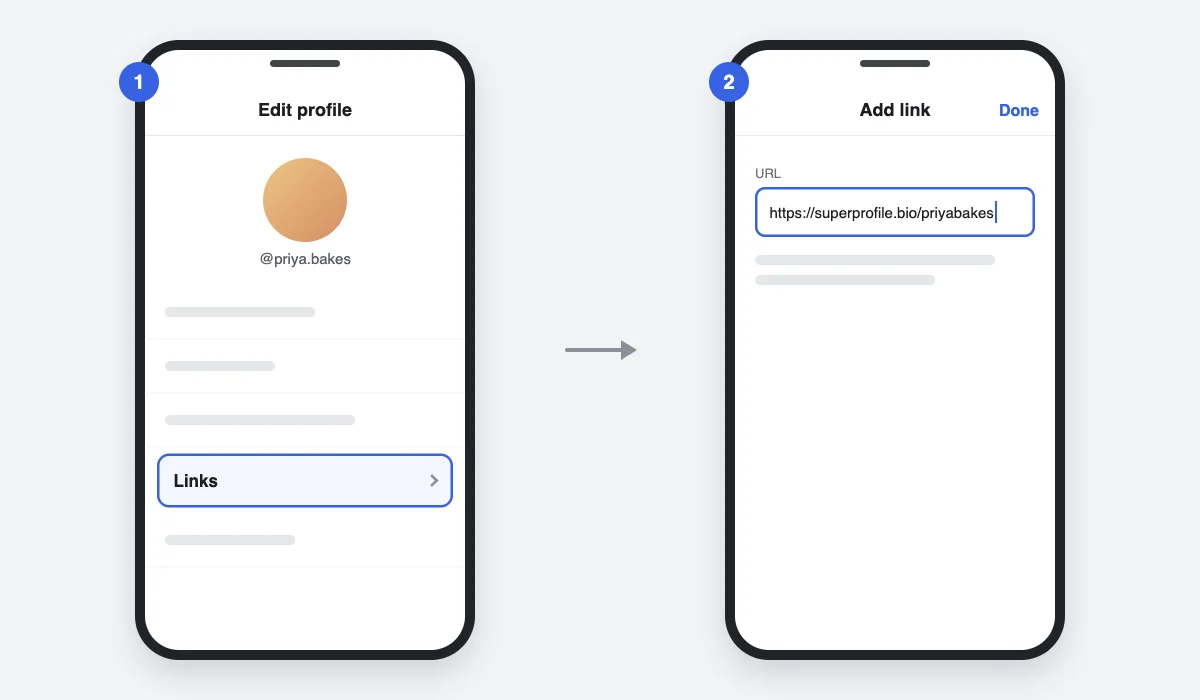
A link in bio is the clickable link in your social profile, which you point to your page, store or latest offer. On Instagram, go to Edit profile, tap Links, tap Add link, enter your URL and tap Done.
What does "link in bio" mean?
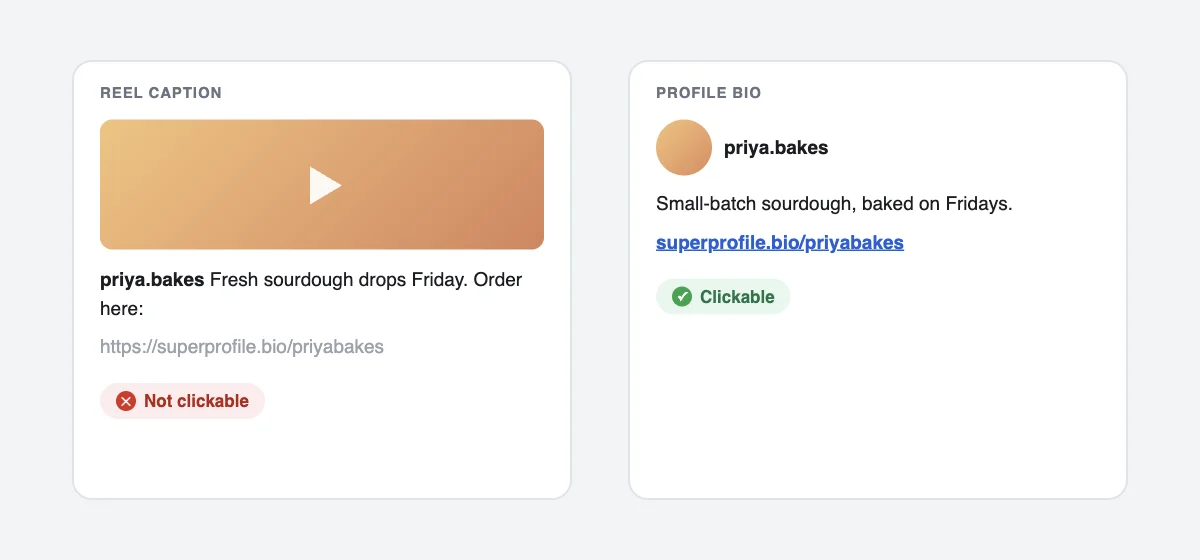
"Link in bio" means the clickable link sits in your profile, not in the post. A URL typed into a caption is plain text that people cannot tap, so creators write "link in bio" and point to the profile link. A link sticker on an Instagram Story is clickable, but a Story lasts 24 hours.
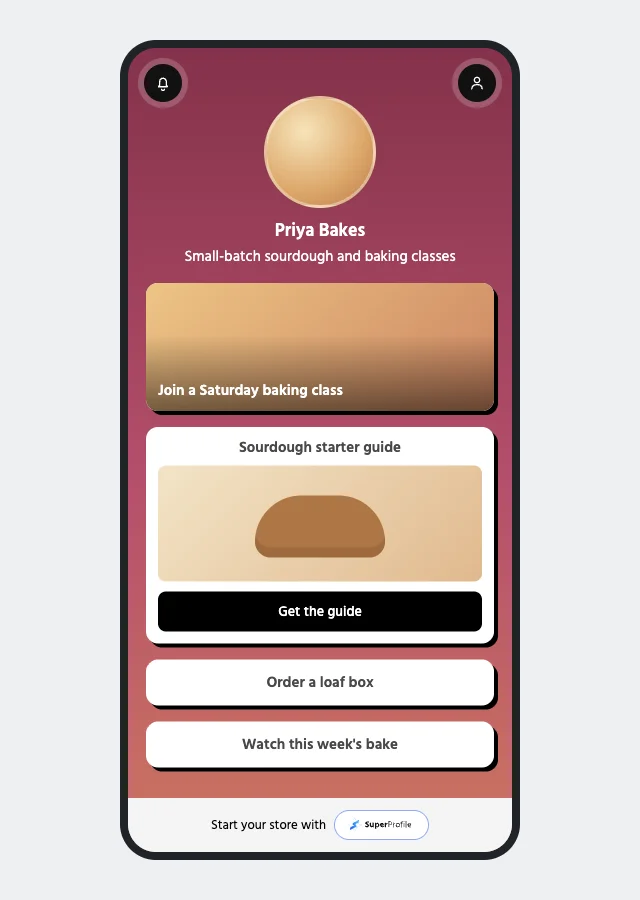
A link-in-bio page is a simple mobile page that you put in that profile link. It holds many links, products and forms, so one profile link can serve all of them.
How do you add a link to your Instagram bio?
- Open Instagram and tap your profile picture to go to your profile.
- Tap Edit profile.
- Tap Links, then Add link. On some iPhone versions the button reads Add external link.
- Enter your URL and tap Done.
Instagram's Add a website to your Instagram profile article (read October 2026) says a standard profile can hold up to five websites, and anyone on or off Instagram can see them. Paid Meta plans with a link page can differ, so five is the normal limit, not a universal one. To reorder or remove a link, open Links and tap it.
How do you add a link in bio on TikTok?
- Open TikTok and go to your profile.
- Tap Edit profile.
- Next to Links, tap Add and follow the website-link steps.
TikTok lets you add a website link if you have at least 1,000 followers or a Verified Business Account. An ordinary business account is not enough. Check the TikTok Support account information section for current rules.
How do you add a link in bio on YouTube?
- Sign in on a computer and open YouTube Studio.
- Go to Customization, then Profile.
- Under Links, click Add link.
- Enter a title and the URL.
- Click Publish. Your change does not show until you publish.
A channel can show up to 14 profile links. The first appears near the Subscribe button and the rest sit under "more links". Per YouTube's Sharing links with your audiences article, URLs in Shorts descriptions and Shorts comments are not clickable, and clickable external links in long-form descriptions need advanced features. Steps: Manage your YouTube channel's profile.
How do you add a link in bio on Threads?
Threads has its own profile, separate from your Instagram profile. Meta's Edit your profile on Threads article says to go to your profile, choose Edit profile, choose Bio or Link, update it and confirm with Done. The exact labels may differ in the app, so follow what you see on your screen.
How do you find someone's link in bio?
Open their profile and look under the name and bio. On YouTube, look near the Subscribe button and tap "more links" for the rest. If a profile shows several links, tap the link line to open the list. If you see none, that account may not have one, or it may not be eligible to add one.
Why is the link field missing, and how do you test your link?
- TikTok: you need 1,000 followers or a Verified Business Account.
- Instagram: update the app and check Edit profile again. The button may read Add link or Add external link.
- YouTube: links are set in YouTube Studio on a computer, and you must click Publish.
- A link that will not save: start the URL with https:// and remove spaces.
Test it the way a visitor will. Open your profile from a second account, tap the link, and check that the page opens inside the app on mobile data and loads fast.
Which free link-in-bio options are there?
| Option | What the free version gives you | Best for |
|---|---|---|
| Platform native links | Instagram allows up to five links on a standard profile; YouTube up to 14 | A few plain links |
| Linktree | Unlimited links, core appearance options and basic analytics, per Linktree's pricing page (as of October 2026) | A simple list of links |
| SuperProfile Starter | A link-in-bio store, and up to 10 leads with Lead Magnets | Links plus lead capture and comment-to-DM |
Free plans change, so check each page before you commit. More detail: SuperProfile vs Linktree.
How does SuperProfile's link in bio work?
SuperProfile has a link-in-bio store that you can put in your Instagram, TikTok, YouTube or Threads profile. The free Starter plan includes it; see the pricing page.
- Leads: free downloads or sign-ups that collect contact details.
- Selling: digital offers such as ebooks, templates, presets and bundles, single products or multi-item catalogs, sold on a payment page. Selling in India needs a paid plan.
- Payments in India: in India you sell through SuperProfile's own checkout (UPI, cards and netbanking) after KYC, without your own payment gateway account.
- Auto-DM: buttons can open one of your published SuperProfile products (payment pages, courses, webinars, 1:1 sessions, Telegram communities, locked content, lead magnets), your store or your referral link.
On the free plan, Auto-DM is: Auto-DM on Instagram posts and Reels, one keyword per automation, text-and-button DMs that end with a short "Sent via" line naming SuperProfile's Instagram account. Pair a Reel that says "comment LINK" with Instagram Auto-DM, and the link-in-bio page finishes the job. Browse all guides.
Frequently asked questions
What does link in bio mean?
It means the clickable link is in your profile bio, not in the post. Caption URLs cannot be tapped, so creators write "link in bio".
How do I add a link to my Instagram bio?
Go to your profile, tap Edit profile, tap Links, then Add link, enter the URL and tap Done.
How many links can I add to my Instagram bio?
A standard profile can hold up to five links. Some paid Meta plans with a link page are an exception.
Why can I not add a link on TikTok?
TikTok requires at least 1,000 followers or a Verified Business Account. An ordinary business account is not enough.
Can I put a link in an Instagram caption or a YouTube Shorts description?
No. Caption URLs on Instagram and URLs in Shorts descriptions and comments are not clickable. Use the profile link or an Auto-DM.
Is a link in bio free?
Adding a native profile link is free. Several link-in-bio tools, including SuperProfile Starter, have free plans, but features differ by plan.
More guides
Last updated .