
How to set up a booking page for coaching and consulting sessions in India
Paid 1:1 calls and consultations need a page a client can book and pay on, on a schedule the coach actually controls. This guide covers what to put on that page, the availability rules to set before you publish, and how clients in India pay — with UPI, cards or netbanking, and no separate payment gateway account.
What a client should see before they book
- The session type and what it covers — coaching call, consultation, mentorship, or a portfolio or resume review
- Duration and price, or how price is decided (fixed, the buyer chooses, priced per session, or free for a discovery call)
- How the session happens: Google Meet, Zoom, SuperProfile's own video call, a phone call, or in person
- Your real availability, already filtered by your calendar and your booking rules, not a slot you will have to reschedule
- Your reschedule and refund policy, stated up front
- Testimonials, if you have them, next to the booking step
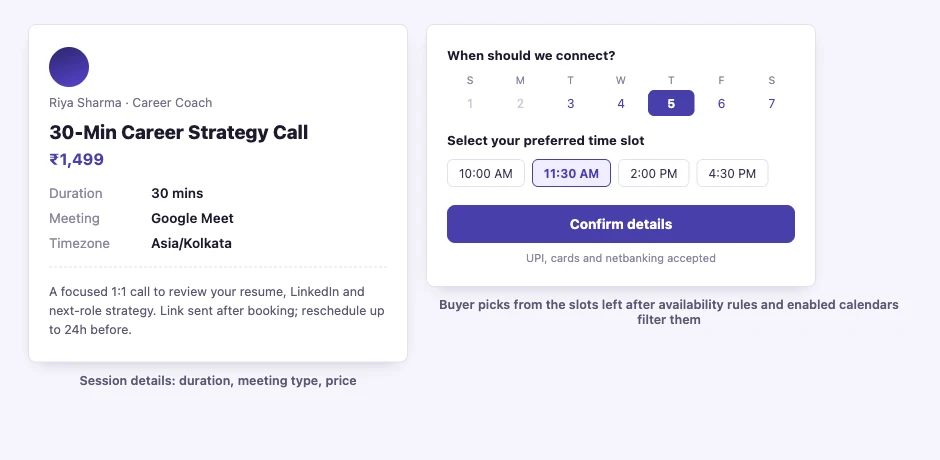
Set your availability rules before you publish
These run before a client ever sees a time slot, so get them right first:
- Google Calendar sync, plus blocked dates and date overrides: availability rules and your enabled calendars filter the slots offered, so keep the calendars you rely on connected and enabled
- Buffer times between sessions, so back-to-back calls do not run straight into each other
- Minimum notice and a booking window, so a client cannot book 10 minutes from now or 6 months out if that does not suit you
- Slot intervals and frequency limits, to control how often a slot repeats and how many sessions you take in a day
- Recurring sessions, and sessions you choose to confirm yourself rather than auto-accept
How to publish a booking page on SuperProfile
- Create a SuperProfile account (creating one is free; selling in India needs a paid plan, see the pricing page) and complete KYC — no payment gateway account needed, only KYC.
- Add a 1:1 session: title it by what the client gets, set the duration, the meeting type and the price (or make it free, or let the buyer choose).
- Set your availability schedule, buffer times, minimum notice and booking window from the list above, and connect Google Calendar.
- Add your reschedule and refund policy, any screening questions, and testimonials if you have them.
- Publish it and put the link in your Instagram or YouTube bio, or send it directly to a client.
- A client picks an open slot and pays; buyers pay by UPI, cards or netbanking and earnings are paid out to your bank account the next day (T+1).
In-person sessions: what clients see about your location
For an in-person session, the booking page shows "In Person (Creator Address)" by default; the creator can opt in to show the exact address instead.
Pair the booking page with a workbook or a course
A coach is not limited to selling sessions alone. The same profile can also sell a digital product such as a workbook or template, with automatic delivery after payment, and a self-paced course with modules and lessons — for example, a paid 1:1 consultation for new clients, a workbook they can buy on their own, and a course for anyone not ready to book a call yet. All three live on the same SuperProfile and can link to each other.
Gift sessions, discounts and embedding the page
A session can be bought as a gift for someone else, sold at a discount, and the booking page can be embedded on your own site rather than only linked to. A paid session-recording add-on is available on SuperProfile video calls, and pricing can switch to a client's own currency for buyers outside India.
Finding clients on Instagram
A booking page still needs clients brought to it. Put the link in your Instagram bio, and if people comment a keyword asking about sessions, Auto-DM can send your booking link automatically instead of you replying to each comment by hand. For the wider payments and platform picture, see how to sell digital products online in India.
Coaches aur consultants India mein booking page kaise banayein?
SuperProfile par account banaana free hai, lekin India mein paid sessions sell karne ke liye paid plan chahiye (pricing page dekhiye); account banakar KYC kijiye — alag payment gateway account ki zaroorat nahi. 1:1 session add kijiye: title, duration, meeting type (Google Meet, Zoom, phone ya in person) aur price set kijiye. Availability schedule, buffer time, minimum notice aur booking window set kijiye, aur Google Calendar connect kijiye — availability rules aur aapke enabled calendars hi slots filter karte hain. Publish karke link apne Instagram bio mein daal dijiye. Client ek open slot choose karke UPI, card ya netbanking se pay karta hai, aur paisa agle din bank mein aata hai.
Frequently asked questions
Do I need a website to take bookings as a coach or consultant?
No. Paid 1:1 calls and consultations get their own booking page on SuperProfile, with no separate website or app to build.
Do I need a payment gateway account to accept paid bookings in India?
No. In India you sell through SuperProfile's own checkout (UPI, cards and netbanking) after KYC, without your own payment gateway account.
How do I get paid after someone books and pays?
Earnings are paid out to your bank account the next day (T+1).
Does the booking page sync with my calendar?
Yes. Google Calendar sync, blocked dates and date overrides filter the slots you show. Availability rules and your enabled calendars decide what gets offered, so keep the calendars you rely on connected and enabled.
Can I control how far ahead someone can book, or how close to the call?
Yes. Buffer times, minimum notice, a booking window and slot intervals and frequency limits are all configurable, so you can stop a client booking in the next 10 minutes or 6 months out.
Will my address show on the booking page for in-person sessions?
For an in-person session, the booking page shows "In Person (Creator Address)" by default; the creator can opt in to show the exact address instead
Can I offer a free discovery call alongside paid sessions?
Yes. A session can be priced as fixed, buyer-chooses, priced per session, or free, so a free intro call and a paid follow-up can both live on your page.
Is it free to start?
Creating an account is free; selling in India needs a paid plan. See the pricing page.
More guides
Last updated .