
How to create a digital product
Before you can sell a digital product, you have to make one. Here is how to go from an idea to a finished file you can price and publish — the build step that most “how to sell” guides skip over.
What kind of digital product should you create?
Start with something your audience already asks you for, not the product that looks most impressive. The easiest to build and sell are files you create once and sell repeatedly, with automatic delivery after payment:
- An ebook or PDF guide on a skill you already have
- A Notion, Canva, Google Sheets or Excel template
- Lightroom or Photoshop presets, LUTs or design assets
- Printables: planners, checklists, worksheets, trackers
- Study notes, question banks or cheat sheets
For the full list of 15 with who buys each, see digital products to sell in India.
How to create a digital product, step by step
- Pick one specific problem for one specific audience — "budgeting" is too broad, "a weekly budget tracker for freelancers" is a product.
- Check there is demand before you build: post the idea as a poll or Story, ask in your DMs or comments, or count how often people already ask you for it. A few real people saying "I would buy that" beats a guess.
- Choose the format that matches it (a guide, a template, a preset, a printable) rather than forcing every idea into an ebook.
- Build it in a free or low-cost tool: a word processor or Canva for a guide, Canva or Notion for a template, Lightroom for presets.
- Add your own examples, steps or data — the parts a generic AI draft can't fake — so it is worth paying for.
- Export it as a clean file (PDF for guides and printables, a shareable link for Notion/Canva templates) with a clear title and cover.
- Test it yourself or with one real person before you publish, so the first buyer isn't your first proofreader. For a template, also open the shared link while logged out to check it loads, then copy it with a separate signed-in account to check a buyer can duplicate it.
- Price it, upload it to a checkout page, and publish — see how to sell digital products online in India for this half.
Which tool should you use to build it?
- Ebook or PDF guide: Google Docs or Canva, exported as a PDF
- Notion template: build it in Notion, then share it with a duplicate/template link
- Canva template: design it in Canva, then share the template link or export a PDF with the link inside. Creating a template link needs an eligible Canva plan, and what you sell must be your own original design (check Canva's current rules on selling Canva-made products)
- Spreadsheet or tracker: Google Sheets or Excel
- Lightroom presets: create them in Lightroom and export them as preset files (.xmp in Lightroom on desktop), with a short install note
- Photoshop LUTs: export your colour grade from Photoshop as a LUT file (.cube), with a note on where to load it
- Printables: Canva or any PDF design tool, exported print-ready
A worked example: a freelancer budget tracker
Say you are a freelance designer and your followers keep asking how you manage irregular income. You could build a Google Sheets tracker in an afternoon:
- Validate first: post a Story poll ("want my income tracker?") and note how many people reply.
- Columns: date, client, invoice amount in INR, GST collected, amount received, payment status, and a monthly total.
- Sample entries: fill three or four fake rows so buyers see how it works on day one.
- Buyer instructions: a one-page PDF or first tab that says "File > Make a copy" and explains each column.
- Test the link twice: open it while logged out to confirm it loads, then copy it with a separate signed-in account to confirm a buyer gets their own copy and your original stays untouched.
- Export and deliver: add the link or file to your checkout as the product buyers receive.
Can AI write or design it for you?
AI tools can speed up the first draft — an outline, a first pass at the text, or a product description — but check every fact it gives you and add your own examples, expertise and voice before you publish. SuperProfile's own AI assistant does a narrower, honest job: once your file exists, connect the SuperProfile MCP server to Claude or ChatGPT and ask it to draft the product listing. It prepares a draft with price, description and an upload link for your file; you review and publish.
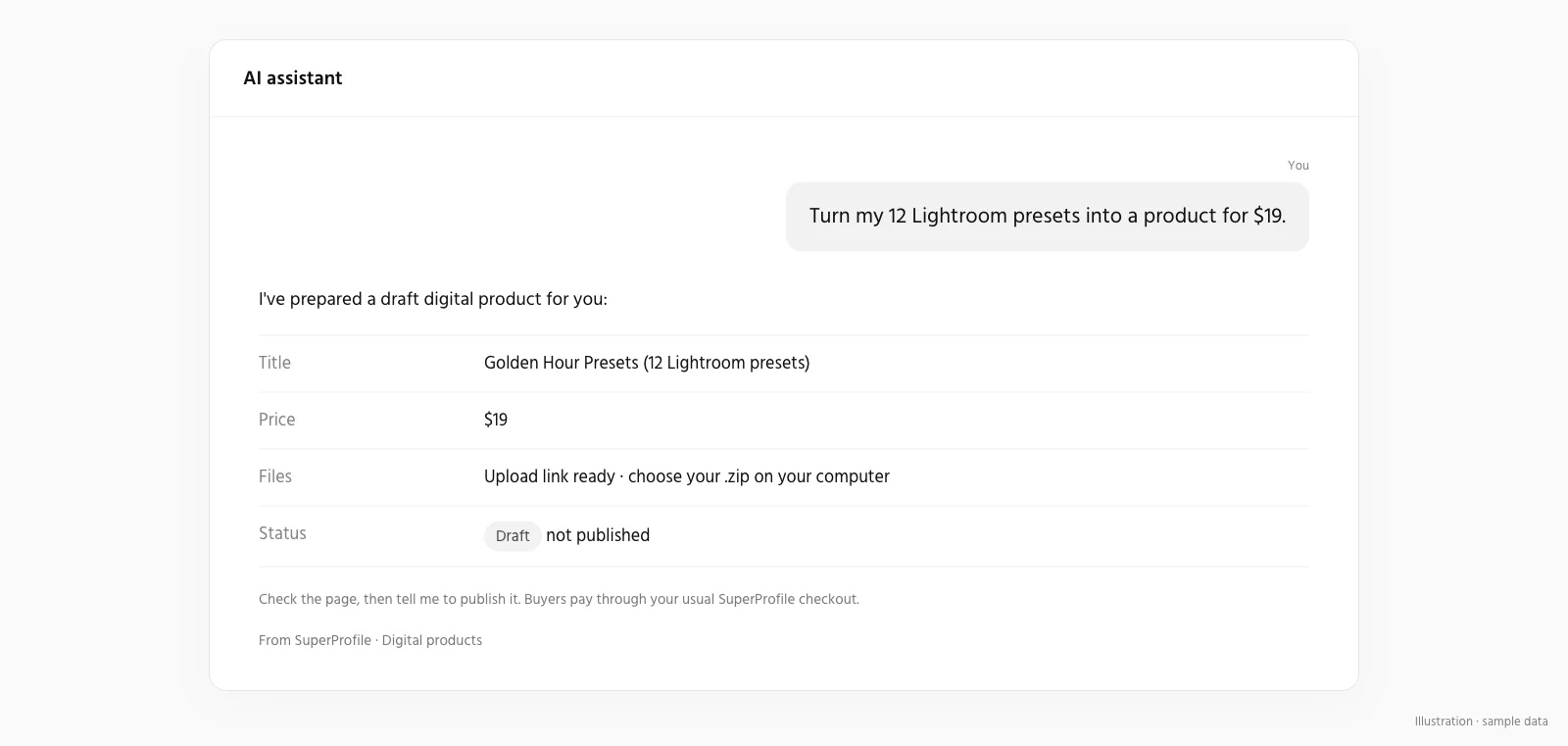
Turning your file into something you can sell
Once the file is ready, setting up checkout is straightforward: upload it to a checkout page, add a cover image and price, and publish — in India you sell through SuperProfile's own checkout (UPI, cards and netbanking) after KYC, without your own payment gateway account. Buyers get the file automatically after paying, and earnings are paid out to your bank account the next day (T+1). Creating a SuperProfile account is free; selling in India needs a paid plan (see the pricing page). Full steps: how to sell digital products online in India.
Digital product kaise banaye?
Pehle ek problem chuniye jo aapki audience already puchti hai, aur uske liye sahi format pick kijiye — ebook, template, preset ya printable. Google Docs, Canva ya Notion jaise free tools mein usse banaiye, apne khud ke examples aur steps add kijiye, aur ek clean file (PDF ya shareable link) ke roop mein export kijiye. Jab file ready ho jaaye, SuperProfile par upload kijiye, price set kijiye aur publish kar dijiye. Account banana free hai, lekin India mein sell karne ke liye paid plan chahiye (pricing page dekhiye).
Frequently asked questions
How do I create my own digital product?
Pick a problem your audience already asks you about, choose a format that fits it (an ebook, a template, a preset pack, a printable), build it in a free or low-cost tool, export it as a file, and set a price. The building step is the slow part; once the file exists, setting up checkout is straightforward.
Can ChatGPT or another AI tool create a digital product for me?
AI tools like ChatGPT or Claude can draft an outline, first-pass text or a product description quickly, but a good digital product still needs your own expertise, examples and editing: check every fact it gives you and add the original parts only you can. Separately, SuperProfile's own AI assistant (via MCP) can draft the product LISTING for a file you already made — price, description and an upload link — not the creative file itself.
Do I need design skills to create a digital product?
No. Free tools cover most formats: Google Docs or Canva for an ebook or PDF guide, Canva or Notion for templates, Google Sheets or Excel for trackers and planners. Canva's library is a good place to learn layouts, but anything you sell should be your own original design, not a lightly edited library template.
What is the easiest digital product to create as a beginner?
A PDF guide, checklist or set of notes on something you already know well. It needs no design software beyond a word processor, no code, and you can have a sellable first version the same day.
How do I turn my file into something I can sell online?
Upload it to a checkout page, add a cover and price, and publish — no payment gateway account needed, only KYC. Creating an account is free, but selling in India needs a paid plan; see the pricing page. See the full steps in how to sell digital products online in India.
More guides
Last updated .