
How to write an Instagram bio as a creator
Your bio has one job: tell a new visitor who you help, what you offer and what to tap next, in 150 characters. This guide gives a simple structure, worked examples for Indian creators, Hindi and Hinglish options, and the steps to edit it.
How long can an Instagram bio be?
Instagram's Help Center says an Instagram bio can be up to 150 characters, and anyone can see it. Your name, username, category label and links sit around it, so the bio itself should not repeat them.
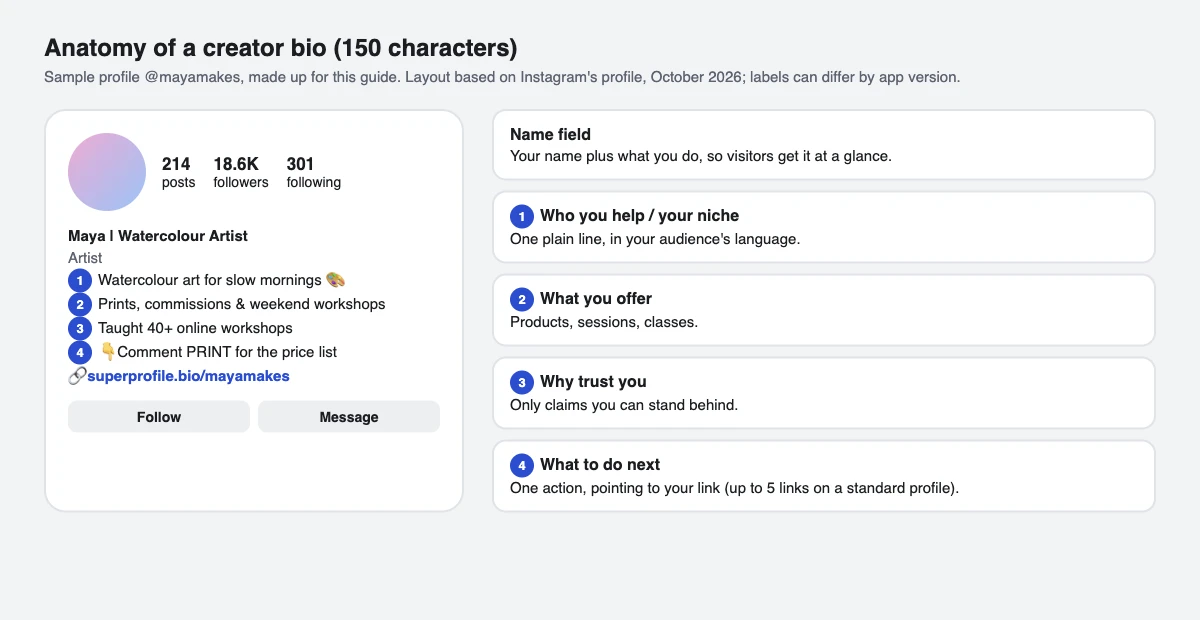
What should a creator put in an Instagram bio?
Most good creator bios answer four things, one per line:
- Who you help: "for busy women", "for first jobbers", "for UPSC aspirants".
- What you offer: workouts, consultations, a course, prints.
- Why trust you: experience, a result, a language you teach in. Only claims you can stand behind.
- What to do next: "Book a 1:1", "Free 7-day plan", or a comment keyword, pointing to the link below.
Put your main keyword in your name field too, for example "Maya | Watercolour Artist", so people searching for what you do can understand your profile at a glance.
Instagram bio examples for creators
Sample bios, written for this guide (not real accounts). The number is the character count; emoji can count as more than one character in the app, so check the counter while you type.
| Creator | Bio | Characters |
|---|---|---|
| Fitness coach | Online fitness coach for busy women 🏋️♀️ | 119 |
| Astrologer | Vedic astrologer | 12 yrs | 114 |
| Course creator | I teach Excel for jobs, in Hinglish 📊 | 119 |
| Artist | Watercolour artist from Jaipur 🎨 | 86 |
| Personal finance | Personal finance for first jobbers 💸 | 116 |
Bio ideas in Hindi and Hinglish
If your audience follows you in Hindi, write the bio the way you talk in your videos. Two samples:
Ghar baithe fitness 💪
Desi diet + 20-min workouts
👇 Free 7-day plan
ज्योतिष सलाह | 12 साल का अनुभव
करियर, शादी, कुंडली
👇 1:1 सलाह बुक करेंHow to edit your Instagram bio
- Go to your profile
- Tap Edit profile (click it on a computer)
- Write your text in Bio
- Tap Done (Submit on a computer)
Your bio is public: anyone who opens your profile can read it, even if your account is private.
Common Instagram bio mistakes
- Repeating your name or username: they already show above the bio.
- No next step: a visitor who likes you should know exactly what to tap.
- A link that leads nowhere useful: Instagram lets you add up to five links on a standard profile; if you sell several things, one page that lists them works better. See what a link in bio is and how to add one.
- Claims you can't back up: follower counts, earnings or certifications that aren't true can mislead people and can break platform rules.
- Fancy "fonts": bios take plain text and emoji. Pasted fonts from font generators are Unicode lookalike characters that screen readers read badly.
Turn bio visitors into buyers with SuperProfile
Point your link to a SuperProfile page that lists what you offer: courses, 1:1 sessions, webinars, digital products and paid communities, with checkout built in. If your bio says "Comment EXCEL on any Reel", Instagram Auto-DM can reply with the details in a DM when people comment that word. Selling in India needs a paid plan.
Frequently asked questions
How many characters is an Instagram bio?
Up to 150 characters. Your name, username and links are separate fields, so you don't need to spend bio characters on them.
What is a good bio for Instagram?
One that tells a new visitor who you help, what you offer, why to trust you and what to tap next, in plain words. Use the examples above as a structure, not to copy.
Can I write my Instagram bio in Hindi?
Yes. Instagram bios accept Hindi, Hinglish and emoji. Write in the language your audience follows you in.
Should I put my link in my bio text?
Add it in the Links field under Edit profile instead: that is the place Instagram shows tappable links, up to five on a standard profile. Use the bio text to say what the link is for.
How do I add a line break in my Instagram bio?
Type your bio with line breaks in Edit profile; most app versions keep them. If yours removes them, write it in a notes app and paste it in.
More guides
Last updated .