
Instagram Highlights: how to add, name and cover them
A Highlight keeps a Story visible on your profile after the Story itself disappears in 24 hours. Below: the exact steps to add one, how covers and names work, and how creators point a Highlight at their link in bio so it keeps selling after the Story is gone.
Does a Highlight expire like a Story?
No. Per Instagram's own Help Center, stories you add as highlights remain visible as highlights until you remove them, even after the original story has disappeared; anyone who could see your story can also see your highlights.
So a Highlight is permanent until you remove it yourself — there is no 24-hour countdown once a Story is inside one.
How to add a new Highlight
- Open a Story you've posted — a live one, or one sitting in your Archive — and tap Highlight near the bottom.
- Tap New to start a fresh Highlight (or tap an existing Highlight instead, to add this Story to it).
- If you're starting a new Highlight, choose a cover photo for it.
- Type a name and tap Add to save it. A short name (one or two words) is less likely to get cut off on a small screen.
You can only add a story you posted yourself — a current one (within its first 24 hours) or one already sitting in your Archive, not a story someone else posted.
How to add a story to an existing Highlight
- Go to your profile and tap the Highlight you want to add to.
- Tap the three-dot More icon in the top right, then tap Edit highlight.
- Tap Stories next to Selected and pick the story or stories to add.
- Tap Next, then Done.
The same Edit highlight screen also lets you rename it, remove a story from it, or change its cover, any time.
Highlight covers: why consistency beats a cute photo
Instagram's own Help Center confirms the cover photo is cropped into a circle. You can choose any photo as the cover — from the story or your own library — and change it any time from the highlight's Edit menu. A photo that is sharp and legible at full size can look like a smear once it's cropped into a circle and sitting next to four others.
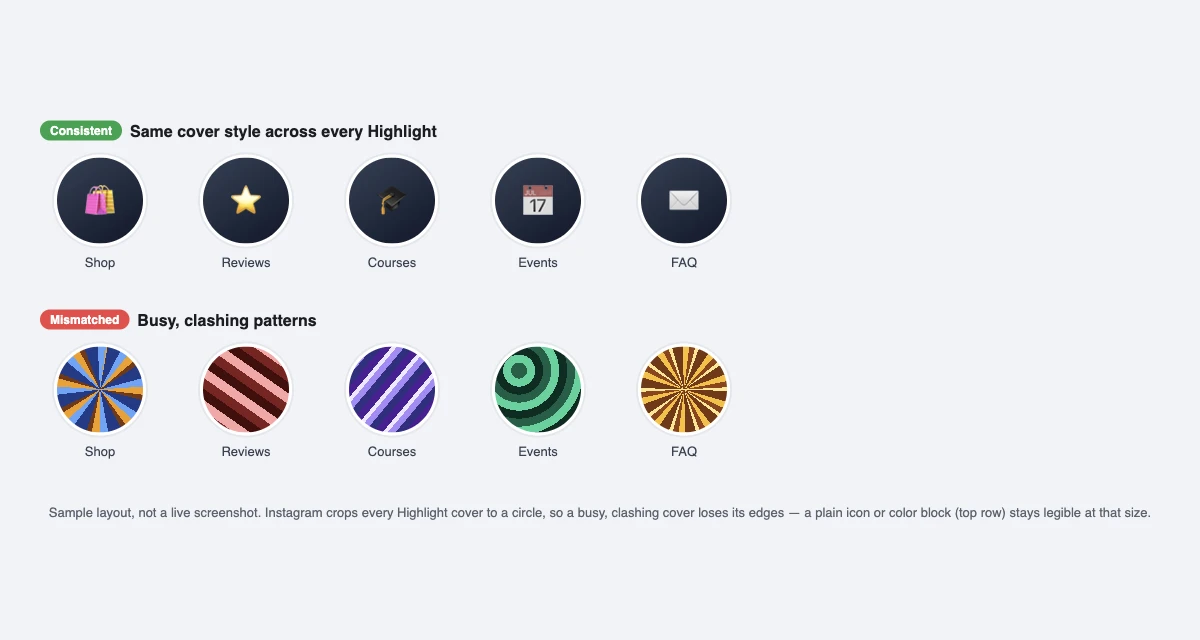
What tends to survive the crop:
- A single icon, emoji or short word on a plain background — a simple shop bag, star or calendar icon.
- One brand colour (or 2-3 colours total) reused across every cover, so the row reads as one set.
- A tight close-up (a face, a logo) rather than a wide photo with the subject small in the frame.
You can design covers with any photo-editing app, or screenshot a Story frame and crop it yourself — the cited Help Center article doesn't specify a required size, it just says Instagram crops whatever you choose into a circle.
What to name your Highlights
Keep names to one or two words so they don't get cut off. Common categories creators use:
- Shop or Products — what you sell and how to buy.
- Reviews or Results — proof from past buyers or students.
- FAQ — the questions you get asked in DMs most often.
- Behind the scenes — how you make or run what you sell.
- Events or Launches — upcoming dates, webinars or drops.
Instagram's Help Center doesn't document a reorder control. Creators widely report (not an official Instagram rule) that editing a Highlight moves it to the front of the row, so the one you add to or edit most recently tends to show first.
Using a Highlight to point at your link in bio
A Highlight built from a Story that used the link sticker — named something like Shop or Start here — keeps reminding profile visitors that your SuperProfile link is where to go, long after the original Story is gone.
SuperProfile gives you that one link: a page listing your digital products, courses, bookings or paid community, built from your link in bio. Record a Story walking through what's behind the link, add it as a Highlight named Shop or Start here, and eligible profile visitors can see it without you reposting.
Instagram Highlights kaise lagaye?
Highlight ek Story ko profile par 24 ghante se zyada time tak dikhata hai — jab tak aap use khud na hatao. Naya Highlight banane ke liye apni Story open karo, Highlight par tap karo, phir New (ya koi existing Highlight) choose karo, cover photo chuno aur naam do.
Cover har bar circle mein crop hota hai, isliye ek simple icon ya ek hi colour sabhi Highlights mein use karna photo se zyada clean dikhta hai. Apne link in bio ko highlight karne ke liye ek Highlight ka naam "Shop" ya "Start here" rakho.
Frequently asked questions
Does an Instagram Highlight expire?
No. A Highlight stays on your profile until you delete it yourself, even after the original Story (which disappears after 24 hours) is gone.
What size should a Highlight cover be?
The cited Instagram Help Center article doesn't specify required dimensions — it crops whatever photo you pick into a circle. A simple icon or one reused colour per Highlight usually reads better at that size than a busy photo.
Can I add an old story to a Highlight later?
Yes, from your Archive (stories older than 24 hours that you haven't deleted) or from the current Highlight's Edit screen, which lets you add more stories at any time.
How many Highlights can I have?
Instagram's Help Center doesn't publish a maximum. Keep the row to a handful of clear categories (Shop, FAQ, Reviews) so a visitor can scan it at a glance.
Can I reorder my Highlights?
Instagram's Help Center doesn't document a drag-to-reorder control or a stated sort rule. The widely observed (not officially documented) behaviour is that editing a Highlight — adding or removing a story — moves it to the front of the row, so editing them in the reverse of the order you want is the common workaround.
More guides
Last updated .