
Instagram Story reply automation: send a DM when someone replies
A Story reply is a private message someone sends from your Story, not a public comment -- so automating it means sending a DM back, not a public reply. On SuperProfile, Comments on Reels and Posts, Story replies, Live comments and direct messages can all start an Auto-DM automation; this guide covers the Story-reply kind: how it is different from a Story comment or a Story mention, how to set it up, and what it costs.
Story reply, Story comment or Story mention -- which one is this?
Instagram Stories have two ways to respond: a reply, which is a private message to the creator, and a Story comment of up to 60 characters that anyone who can see the Story can read. This guide is about automating the first kind -- a reply someone sends you from your Story. A Story COMMENT is public, so SuperProfile's Story Auto-DM never answers it there (see the full setup rules below).
A Story MENTION is a different feature again: that is when someone else tags your account in THEIR OWN Story, not a reply to yours. SuperProfile answers that with the separate Story mention auto-reply inside Must-haves, covered below.
How does Story reply automation work on SuperProfile?
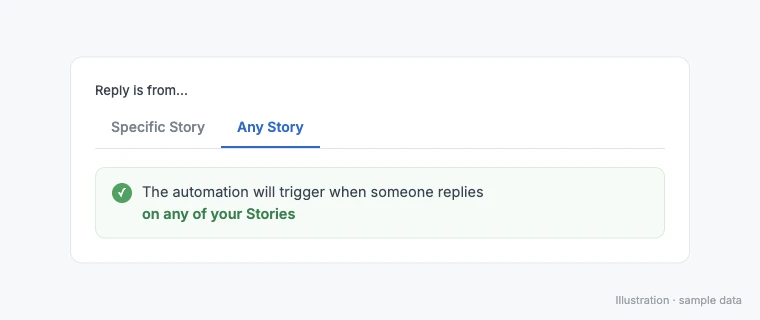
Auto-DM sends replies and DMs through Meta's official Instagram Graph API and Facebook Graph API (Messenger), with the account connected by Meta login; no password sharing or browser automation. For a Story, first choose Specific Story (only that one Story's replies match) or Any Story (every Story you post matches, from when you turn it on).
Then pick the trigger: a specific keyword (only replies containing that word get the DM) or any reply (every reply gets it, where your plan allows it). Auto-DM on Stories and Lives, ask-to-follow, email collection and follow-ups need a paid plan.
Unlike a comment or Live trigger that uses follow-ups, a Story reply never needs the extra opening-message tap: on comment and Live triggers, follow-ups need the person to respond first, so the automation opens with a message and a button (the default button reads "Send me the link"), and the tap is that response. A Story reply is already a direct message from that person, so it opens Meta's standard messaging window right away, and your automated DM can go out immediately: for most actions that window lasts 24 hours after the person's message (longer in some ad and human-agent cases -- see Instagram DM limits).
How do you set it up?
- Open Auto-DM and create a new automation.
- Pick Story as the content type, then choose Specific Story (just the one you pick) or Any Story (every Story you post, once the automation is on).
- Choose the trigger: a specific keyword, or any reply.
- Write the DM and add a button if you want one (a link, or one of your published products).
- Publish the automation.
Scheduling a Story ahead of time instead?
- On a scheduled Instagram Story, the Auto-DM answers private Story replies, not Story comments: people whose reply matches your keyword get your DM, or anyone who replies if you choose any reply
- It answers replies to that one Story only, from the moment it publishes; replies to your other Stories are not matched
- Public comment replies aren't available for a Story Auto-DM
- Add the keyword ask, such as "Reply GUIDE", to your image or video before uploading: SuperProfile can't add text or stickers to a scheduled Story
- To change a scheduled post to or from a Story, remove its Auto-DM first
- Facebook Page Stories can't take an Auto-DM
See Instagram Schedule.
Story mention auto-reply (a different, related feature)
Must-haves adds a separate automated reply for when a fan mentions your account in their OWN Story -- not a reply to yours. It is included in every paid SuperProfile plan (a free plan sees an upgrade prompt); a fan gets at most one automated reply in a rolling 24 hours, and it goes out through the same queue as your other Auto-DM replies, which can run a few minutes behind at busy times.
What are the rules and limits?
- Auto-DM works with Instagram Creator and Business (professional) accounts; if an account is switched back to personal, Instagram stops letting tools send its DMs and SuperProfile shows the fix: switch back to Creator or Business in Settings and activity, Account type and tools, then reconnect.
- A Specific Story automation answers only the one Story it is attached to; an Any Story automation answers replies to every Story you post, from when you turn it on (see the setup steps above).
Meta's Send API rate limits and messaging windows apply the same way they do to any other Auto-DM: see Instagram DM limits for the published hour-by-hour and window numbers.
What mistakes should you avoid?
- Expecting it to catch a public Story comment. A Story comment is public and up to 60 characters; the Story Auto-DM answers private replies only, never comments.
- Writing the keyword into the Story image itself and forgetting to add it to the automation too. SuperProfile matches what you set as the trigger keyword, not what the image shows; keep them the same word.
- Picking Specific Story and expecting it to also catch replies on your other Stories. Only Any Story does that; Specific Story answers just the one Story you attached it to.
Frequently asked questions
How do I automate Instagram Story replies?
Create an automation in Auto-DM, pick Story as the content type and the Story it should answer, choose a specific keyword or any reply as the trigger, write the DM (with an optional button), and publish. Story automations need a paid plan.
Is a Story reply the same as a Story comment?
No. A Story reply is a private message only the creator sees; a Story comment is public, up to 60 characters, visible to anyone who can see the Story. SuperProfile's Story Auto-DM answers replies, not comments.
Is a Story reply automation the same as Story mention auto-reply?
No. A Story reply answers someone messaging you from YOUR Story. Story mention auto-reply (in Must-haves, on paid plans) answers when someone mentions your account in THEIR OWN Story -- a different trigger, with its own delay setting and a 24-hour once-per-fan limit.
Does a Story reply need an extra tap before the DM goes out?
No, unlike a comment or Live trigger that uses follow-ups. A Story reply is already a direct message, so it opens Meta's messaging window immediately and the automated DM can send right away.
Can I automate replies to a Story I already posted?
Yes: pick that Story as the content type's target when you create the automation in Auto-DM. To set one up before the Story goes live, attach it while scheduling the Story through Instagram Schedule instead.
More guides
Last updated .